
SessionCast
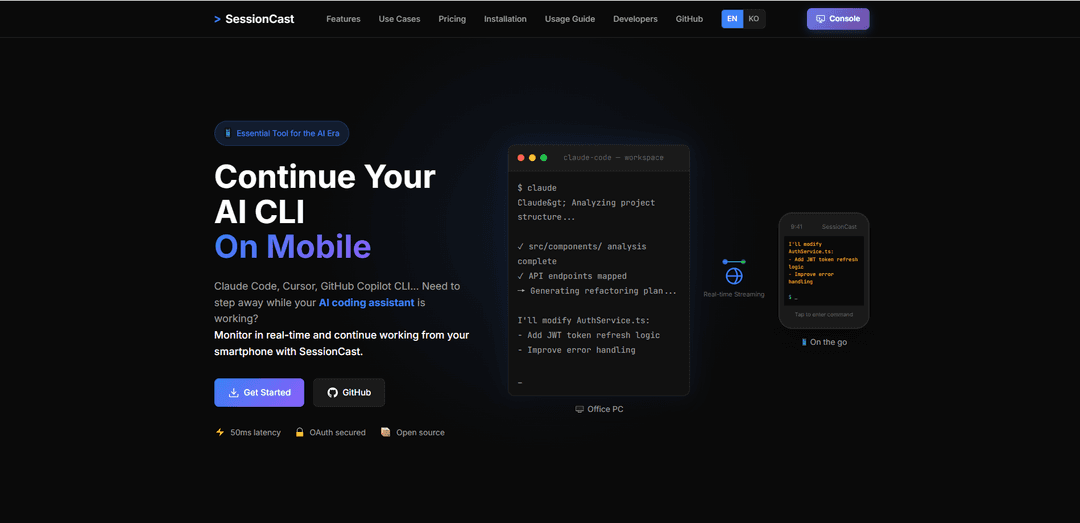
SessionCast is a real-time terminal monitoring tool that allows developers to watch and control their AI CLI sessions and other terminal processes from their mobile devices with secure, low-latency streaming.
https://sessioncast.io/?ref=producthunt
Product Information
Updated:Feb 8, 2026
What is SessionCast
SessionCast is an essential tool designed for the AI coding era that bridges the gap between desktop and mobile terminal access. It enables developers to maintain continuous monitoring of their AI coding assistants (like Claude Code, Cursor, and GitHub Copilot CLI), build processes, and terminal sessions even when away from their desk. With OAuth secured authentication and open-source architecture, SessionCast provides a seamless solution for remote terminal access and management.
Key Features of SessionCast
SessionCast is a real-time terminal streaming solution that allows users to monitor and interact with their AI coding assistants and terminal sessions from mobile devices. It features WebSocket-based streaming with low latency, secure OAuth authentication, and mobile-optimized terminal UI, enabling users to continue their CLI work remotely while maintaining full terminal functionality.
Real-time Terminal Streaming: WebSocket-based streaming with under 50ms latency for instant terminal output and AI CLI monitoring
Secure Authentication: Google OAuth2 authentication system ensuring private and secure access to terminal sessions
Mobile-Optimized Interface: Responsive terminal UI specifically designed for smartphone browsers with bidirectional input support
Multi-session Management: Ability to manage and switch between multiple terminal sessions simultaneously
Use Cases of SessionCast
AI CLI Monitoring: Watch and interact with AI coding assistants like Claude Code, Cursor, and GitHub Copilot CLI while away from desk
Build Process Management: Monitor CI/CD pipelines, Docker builds, and large compilations remotely
Remote Deployment Monitoring: Check deployment logs and respond to issues immediately from mobile device
Remote Pair Programming: Share terminal sessions with colleagues for collaborative debugging and code reviews
Pros
Ultra-low latency (50ms) for real-time streaming
Secure authentication system
Mobile-optimized interface with full terminal functionality
Cons
Currently in Beta phase
Requires agent installation on PC
How to Use SessionCast
Sign Up: Create an account at account.sessioncast.io using Google OAuth2 authentication
Generate API Token: Go to Account → API Tokens section and create a new agent token for your PC/device
Install Agent: Install the SessionCast agent software on your computer that will capture and stream terminal sessions
Connect Agent: Run the agent and connect it using your generated API token to enable session streaming
Access Sessions: Visit app.sessioncast.io from your mobile device or any browser to view and interact with your terminal sessions
Monitor Terminal: Watch your AI CLI tools, builds, or other terminal processes in real-time with <50ms latency streaming
Input Commands: Use the mobile-optimized terminal UI to enter commands and interact with your sessions remotely when needed
Switch Sessions: Easily switch between multiple terminal sessions if you're monitoring different processes simultaneously
SessionCast FAQs
SessionCast is a tool that allows you to monitor and continue your AI CLI (Command Line Interface) sessions on mobile devices. It enables real-time streaming of terminal sessions from your PC to your smartphone.
Popular Articles

Atoms: A Multi-Agent AI Platform That Transforms Ideas into Launch-Ready Products
May 22, 2026

Nano Banana SBTI: What It Is, How It Works, and How to Use It in 2026
Apr 15, 2026

Atoms Review — The AI Product Builder Redefining Digital Creation in 2026
Apr 10, 2026

Kilo Claw: How to Deploy and Use a True "Do‑It‑For‑You" AI Agent(2026 Update)
Apr 3, 2026
Latest AI Tools Similar to SessionCast

Gait
Gait is a collaboration tool that integrates AI-assisted code generation with version control, enabling teams to track, understand, and share AI-generated code context efficiently.

invoices.dev
invoices.dev is an automated invoicing platform that generates invoices directly from developers' Git commits, with integration capabilities for GitHub, Slack, Linear, and Google services.

EasyRFP
EasyRFP is an AI-powered edge computing toolkit that streamlines RFP (Request for Proposal) responses and enables real-time field phenotyping through deep learning technology.

Cart.ai
Cart.ai is an AI-powered service platform that provides comprehensive business automation solutions including coding, customer relations management, video editing, e-commerce setup, and custom AI development with 24/7 support.
Popular AI Tools Like SessionCast

GitHub Copilot Chat
GitHub Copilot Chat is an AI-powered coding assistant that provides natural language interactions, real-time code suggestions, and contextual support directly within supported IDEs and GitHub.com.

CopilotForXcode
CopilotForXcode is an Xcode Source Editor Extension that integrates GitHub Copilot, Codeium, and ChatGPT to provide AI-powered code suggestions, chat assistance, and prompt-to-code functionality within Xcode.

BrowserAI
BrowserAI is an open-source library that enables running local Large Language Models (LLMs) directly in web browsers with WebGPU acceleration, offering privacy-focused AI capabilities without requiring server infrastructure.

OpenAI Codex CLI
OpenAI Codex CLI is a lightweight, open-source coding agent that runs in your terminal, enabling developers to translate natural language into code execution while providing ChatGPT-level reasoning with the ability to run code, manipulate files, and iterate under version control.