Remove BG Video
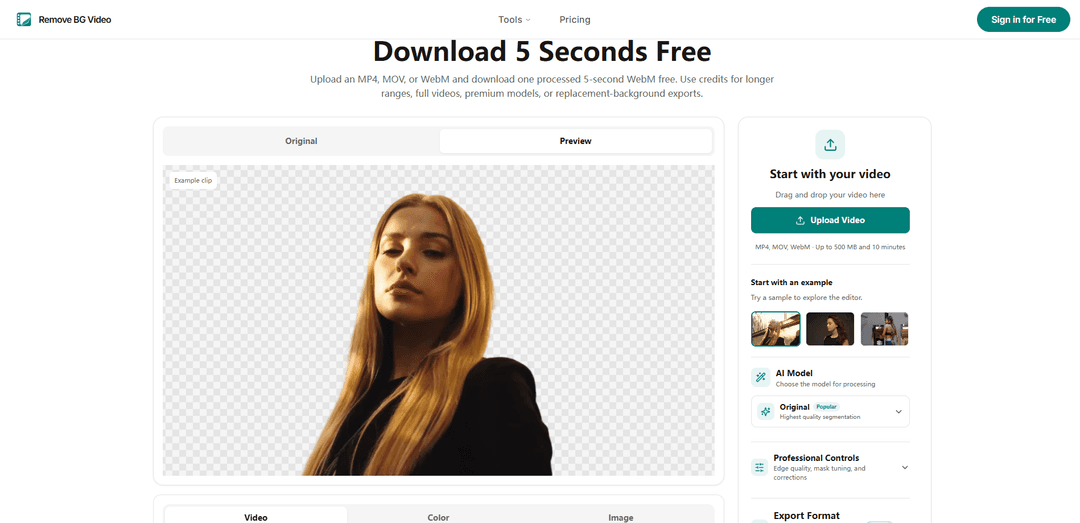
Remove BG Video is an AI-powered online video background remover that isolates subjects without a green screen, offers free five-second WebM tests, supports transparent or replacement-background exports, and includes advanced mask-refinement tools.
https://removebgvideo.org/?utm_source=aipure
Product Information
Updated:Nov 10, 2026
What is Remove BG Video
Remove BG Video is a browser-based tool for removing or replacing video backgrounds using AI. It accepts MP4, MOV, and WebM files up to 500 MB and 10 minutes long, making it suitable for talking-head videos, product demonstrations, lessons, advertisements, pet clips, and short-form social content. Users can test a five-second section for free without an account, while credits unlock longer ranges, full-video processing, premium AI modes, and background-replacement exports. The platform supports transparent results as well as composited videos with solid-color, image, or looping-video backgrounds.
Key Features of Remove BG Video
Remove BG Video is an online AI video background-removal tool that isolates a main subject from MP4, MOV, and WebM footage without requiring a green screen. It supports five-second free test exports, selectable AI modes for general footage, portraits, simple scenes, and prompt-based subject selection, plus mask refinements such as edge feathering, despill, temporal smoothing, and keep/remove correction points. Users can export transparent cutouts or composite subjects over solid colors, images, or looping video backgrounds.
AI background removal: Automatically tracks and separates the main person, pet, product, or object from the original background across video frames.
Four AI processing modes: Offers Original for general footage, Light for simpler scenes, Human for portraits, and Pro for prompt-based subject selection.
Free five-second test: Lets users process and download one five-second WebM clip without creating an account, helping them evaluate edge quality before buying credits.
Mask and edge refinements: Provides Fast, Balanced, and Fine Edges settings, along with edge shift, feathering, despill, temporal smoothing, and frame-specific keep/remove points.
Flexible background replacement: Users can keep transparency or place the isolated subject over a solid color, uploaded image, or looping video background.
Range-based processing and exports: Supports custom ranges or full videos up to 500 MB and 10 minutes, with WebM, MOV, MP4, or GIF exports where supported.
Use Cases of Remove BG Video
Creator talking-head videos: YouTubers, educators, and reviewers can turn recorded presenters into clean overlays for branded tutorials, commentary videos, and social content.
Product advertising and e-commerce: Marketing teams can isolate products or presenters and place them over campaign visuals, seasonal scenes, or branded backgrounds.
Online lessons and presentations: Teachers and corporate presenters can position themselves alongside slides, screen recordings, or instructional graphics without a physical studio.
Social media short-form editing: Creators can cut out people, pets, dance clips, and other subjects for TikTok, Instagram Reels, Shorts, and meme-style edits.
Pet and object videos: Users can isolate animals or selected objects from ordinary footage and composite them into creative scenes or promotional assets.
Pros
No green screen is required, making background removal accessible for ordinary recorded footage.
A free downloadable five-second test allows users to inspect results before paying for longer processing.
Advanced subject and edge controls provide more flexibility than a basic one-click remover.
Supports custom ranges, full-video processing, transparent output, and replacement backgrounds.
Cons
Full videos, custom ranges, premium AI models, and replacement-background exports require an account and paid credits.
Results may vary with lighting, motion blur, low subject-background contrast, hair, fur, and overlapping objects.
Source uploads are limited to 500 MB and 10 minutes.
Some export formats and browser-composited MP4 options are only available where supported.
How to Use Remove BG Video
Open Remove BG Video: Go to removebgvideo.org and open the video background remover generator.
Upload your video: Upload an MP4, MOV, or WebM file. Videos can be up to 500 MB and 10 minutes long. For large paid jobs, the site uses multipart uploading with retries.
Choose a test section: Move the fixed five-second timeline window to a section that best shows difficult details such as hair, hands, fur, clothing, or fast movement.
Select an AI mode: Choose Original for general footage, Light for simple scenes, Human for portrait footage, or Pro to select a specific person, animal, or object using a text description.
Process and review the preview: Run the background-removal preview and inspect the cutout, especially around moving edges. One processed five-second WebM can be downloaded free without creating an account.
Refine the mask if needed: Adjust edge quality with Fast, Balanced, or Fine Edges. Use edge shift, feathering, despill, and temporal smoothing as needed. In Pro mode, pause on a problem frame and add Keep or Remove points, then rerun tracking.
Choose an output background: Keep the background transparent, or add a solid color, image, or looping video background. Check that the replacement background matches the framing and lighting of the subject.
Select the processing range: For a paid export, drag the timeline handles to process a custom range or select the entire video. Sign in and add credits for full videos, premium models, extra jobs, or replacement-background exports.
Confirm export settings and cost: Review the estimated credit cost before processing. Choose a supported output format such as WebM, MOV, MP4, or GIF, depending on the result you need.
Generate and download: Start processing and monitor preparation, upload, processing, and finalization progress. Download the completed video when ready; completed jobs are also saved in My Creations. Reserved credits are returned if a paid processing job fails.
Remove BG Video FAQs
You can upload a video, preview the result, and process and download one 5-second WebM clip for free without creating an account. Credits and an account are required for additional processing, premium models, custom ranges, full videos, and replacement-background exports.
Popular Articles

Proferex: A Cloud-Based Ad Tracking and Campaign Optimization Platform
Nov 4, 2026

How to Create Viral Talking Baby Podcast Videos with AI: Step-by-Step Guide
Nov 2, 2026

Vosko AI: Localize and Dub Videos for Global Audiences
Oct 15, 2026

Atoms: A Multi-Agent AI Platform That Transforms Ideas into Launch-Ready Products
Oct 13, 2026
Latest AI Tools Similar to Remove BG Video
Erase BG
Erase BG is a free, AI-powered online tool that automatically removes backgrounds from images with support for up to 4K resolution, requiring no account or special skills.
ImageKit.io
ImageKit.io is a comprehensive media management and delivery platform that provides real-time image and video optimization, processing APIs, and Digital Asset Management (DAM) solutions for delivering high-quality visual experiences on websites and apps.

Pixmaker
Pixmaker is an AI-powered image generation and editing platform that helps businesses create high-quality product photos, model displays, and marketing visuals through advanced AI algorithms.

RetouchAI
RetouchAI is an iOS app that leverages AI technology to create, enhance, and edit high-quality images through features like image generation, outpainting, inpainting, and object removal.
Popular AI Tools Like Remove BG Video
Canva AI
Canva AI is an advanced suite of AI-powered design tools integrated into Canva's platform, offering features like text-to-image generation, background removal, and content creation assistance to streamline the design process.
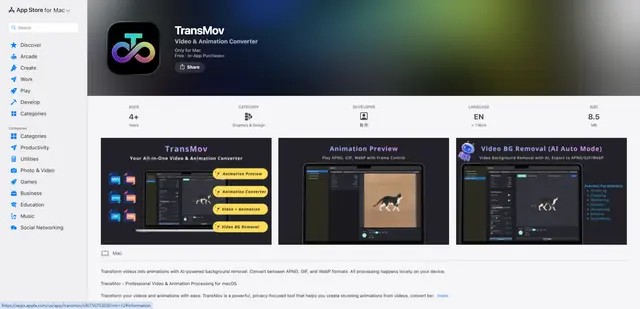
TransMov
TransMov is a powerful, privacy-focused macOS app that helps users create stunning animations from videos, remove backgrounds using AI, and convert between popular animation formats like APNG, GIF, and WebP - all processed locally on your device.

Remove Image Background
Remove.bg is an AI-powered online tool that automatically removes image backgrounds in seconds with just one click.

Vecteezy Background Remover
Vecteezy Background Remover is a free AI-powered tool that automatically removes backgrounds from images with just a few clicks, producing high-quality transparent PNG files.