
Qlane
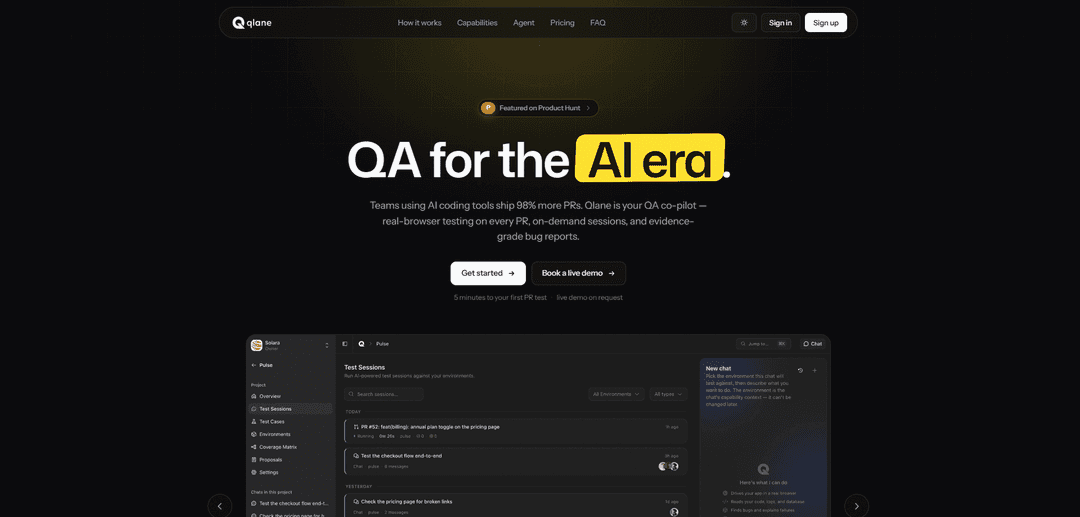
Qlane is an AI-powered QA agent that runs real-browser tests on every pull request, generates evidence-backed bug reports, drafts test cases from code diffs, and tracks coverage with a live map and GitHub reviews.
https://qlane.ai/?ref=producthunt
Product Information
Updated:Jul 15, 2026
What is Qlane
Qlane is an AI-native quality assurance tool built for teams shipping faster with AI coding tools, designed to close the growing gap between rising PR volume and limited QA capacity. It acts as a QA co-pilot that can clone, build, and run your application, then validate real user flows in a real browser (via Playwright) and return structured, reproducible findings. Qlane focuses on runtime and interaction issues—UI regressions, broken flows, and integration bugs—delivering clear artifacts like screenshots, click paths, and severity grounded in user impact so teams can act quickly.
Key Features of Qlane
Qlane is an AI-powered QA agent that automatically tests your application in a real browser on every pull request (or on-demand), then returns evidence-backed, reproducible bug reports (screenshots, DOM snapshots, exact click paths) and structured GitHub reviews. It can run isolated per-PR sandboxes, support whole-stack testing via Docker Compose for multi-service apps, and continuously improves your test suite by generating PR-diff-based test cases and maintaining a coverage map across smoke/sanity/regression levels with human approval gates. Qlane integrates into common workflows (GitHub, Linear, Jira, Slack, CI, and Claude Code) so teams can trigger and review QA where they already work.
Real-browser PR testing: Runs every pull request in an isolated sandbox and drives the app with Playwright to catch runtime and UI regressions, not just code-level issues.
Evidence-grade bug reports: Produces reproducible reports with screenshots, DOM snapshots, exact click paths, and severity grounded in user impact—designed for fast developer handoff.
Auto-generated test cases from PR diffs: Reads the PR diff and drafts the test cases that should exist; drafts only become active tests after a human merges/approves.
Coverage map & test suite governance: Maps tested vs untested areas to test cases with pass/fail history, and manages smoke/sanity/regression levels with AI-suggested promotions/demotions and archival (with human sign-off).
Whole-app, multi-service sandboxing: Supports end-to-end testing across multi-service stacks using Docker Compose, realistic seeded data, and encrypted secret injection in ephemeral environments.
Workflow-native integrations & triggers: Invokable from GitHub, Linear, Jira, Slack, Claude Code, and CI/API with multi-trigger support (webhooks, schedules, manual runs, deployment status) and “silent on pass” reporting.
Use Cases of Qlane
SaaS teams shipping many AI-assisted PRs: Automatically validates critical user flows on every PR to prevent UI and interaction regressions when code volume increases and manual QA can’t keep up.
Multi-service product platforms (Docker Compose stacks): Runs full-stack integration testing across services to catch cross-service breakages that unit tests or single-component checks miss.
QA teams doing on-demand investigations: Spins up targeted sessions to reproduce a reported issue on staging/production-like environments and returns a clean, shareable report with steps and evidence.
Engineering orgs optimizing smoke/regression suites: Keeps a lean, high-signal smoke suite by proposing which tests should be promoted/demoted/archived based on real failure history and coverage gaps.
PM/Release sign-off and quality visibility: Uses the coverage map and PR-by-PR results to understand what’s protected before release, reducing last-minute surprises and improving confidence in ship decisions.
Pros
Catches real runtime/UI issues via real-browser execution, complementing code review bots that only analyze code.
High-signal outputs: structured reviews with screenshots/DOM/click paths and “silent on pass” reduces notification noise.
Fits existing workflows (GitHub/Linear/Jira/Slack/CI) and supports both automated PR checks and on-demand QA sessions.
Cons
Requires access to runnable environments (buildable repo, reachable staging URL, or Docker Compose setup) which may add initial setup effort.
Human approval gates mean some automation (e.g., activating generated tests or promoting to smoke) still depends on team process.
Real-browser sandbox runs can add CI time/compute costs compared with lightweight static checks.
How to Use Qlane
1) Create an account and sign in: Go to https://qlane.ai/ and click “Get started” to sign in and create your workspace.
2) Create (or select) a project: From the Qlane dashboard, create a new project for the app you want Qlane to test, or open an existing one.
3) Choose how Qlane will run your app (pick one runtime): Decide whether you want Qlane to test: (a) every Pull Request in an isolated sandbox, (b) your whole stack via Docker Compose, or (c) an on-demand session against a reachable environment (like staging/production).
4) Quick start: test a public URL (fastest way to try Qlane): In your project, open Environments → New environment → “Test a URL”. Set Target URL to any publicly reachable page (staging or production works). Optionally add Test credentials (username/password) so the agent can sign in.
5) Run an on-demand QA session: Start a session from the Qlane dashboard (or from an integration like Slack/Jira/Linear) to have the agent open the target environment in a real browser and explore user flows to find issues.
6) Review evidence-backed bug reports: For each bug Qlane finds, review the structured report: screenshot(s), DOM snapshot, exact click path/reproduction steps, and severity grounded in user impact.
7) Connect Qlane to GitHub for PR testing: Install/enable the Qlane GitHub integration so Qlane can automatically test pull requests. Qlane will clone/build/run the PR in an isolated sandbox and post findings back as a GitHub review.
8) Configure triggers for when tests run: Choose how runs start: on PR open, via webhook, GitHub Actions, schedule, manual runs, push-to-main, or deployment-status. You can mix multiple triggers depending on your CI workflow.
9) Use GitHub review behavior to reduce noise: Rely on Qlane’s “silent on pass” behavior: when nothing is broken, it posts nothing; when it finds bugs, it posts a structured review with per-bug comments and screenshots.
10) (Optional) Run your whole stack with Docker Compose: If your app is multi-service, use the Docker Compose runtime so Qlane can run the full stack (not stubs) and drive cross-service flows to catch integration issues.
11) Keep your test suite sharp with Smoke/Sanity/Regression levels: Use Qlane’s suite management to organize tests into smoke, sanity, and regression. Qlane can propose promotions/demotions/archives based on what actually breaks, with a human approval gate before anything enters smoke.
12) Use Qlane where your team already works (Slack/Jira/Linear): Invoke Qlane from integrations by mentioning it on issues/tickets or using commands (e.g., “/qlane test staging” in Slack, or “@qlane verify ENG-247” in Linear/Jira). Findings return inline as comments/threads with links to the full run.
13) Use Qlane from Claude Code (editor workflow): If you use Claude Code, run Qlane commands like “/qlane:test” to QA against localhost before pushing, or “/qlane:fix PR 247” to load bug repro details and screenshots into your editor workflow.
14) Automate via CI/API when needed: For CI automation, use the GitHub Action (qlane/qa-action@v1) or the REST API to script runs. Prefer short-lived tokens/OAuth flows rather than long-lived secrets in repos.
Qlane FAQs
Qlane is an AI-powered QA agent that runs your app in a real browser, tests every pull request (PR) in an isolated sandbox, and posts evidence-backed bug reports and structured GitHub reviews.
Popular Articles

Vosko AI: Localize and Dub Videos for Global Audiences
Oct 15, 2026

Atoms: A Multi-Agent AI Platform That Transforms Ideas into Launch-Ready Products
Oct 13, 2026

Nano Banana SBTI: What It Is, How It Works, and How to Use It in 2026
Apr 15, 2026

Atoms Review — The AI Product Builder Redefining Digital Creation in 2026
Apr 10, 2026
Latest AI Tools Similar to Qlane

Gait
Gait is a collaboration tool that integrates AI-assisted code generation with version control, enabling teams to track, understand, and share AI-generated code context efficiently.

invoices.dev
invoices.dev is an automated invoicing platform that generates invoices directly from developers' Git commits, with integration capabilities for GitHub, Slack, Linear, and Google services.

EasyRFP
EasyRFP is an AI-powered edge computing toolkit that streamlines RFP (Request for Proposal) responses and enables real-time field phenotyping through deep learning technology.

Cart.ai
Cart.ai is an AI-powered service platform that provides comprehensive business automation solutions including coding, customer relations management, video editing, e-commerce setup, and custom AI development with 24/7 support.
Popular AI Tools Like Qlane

GitHub Copilot Chat
GitHub Copilot Chat is an AI-powered coding assistant that provides natural language interactions, real-time code suggestions, and contextual support directly within supported IDEs and GitHub.com.

CopilotForXcode
CopilotForXcode is an Xcode Source Editor Extension that integrates GitHub Copilot, Codeium, and ChatGPT to provide AI-powered code suggestions, chat assistance, and prompt-to-code functionality within Xcode.

BrowserAI
BrowserAI is an open-source library that enables running local Large Language Models (LLMs) directly in web browsers with WebGPU acceleration, offering privacy-focused AI capabilities without requiring server infrastructure.

OpenAI Codex CLI
OpenAI Codex CLI is a lightweight, open-source coding agent that runs in your terminal, enabling developers to translate natural language into code execution while providing ChatGPT-level reasoning with the ability to run code, manipulate files, and iterate under version control.