
Parallel Code
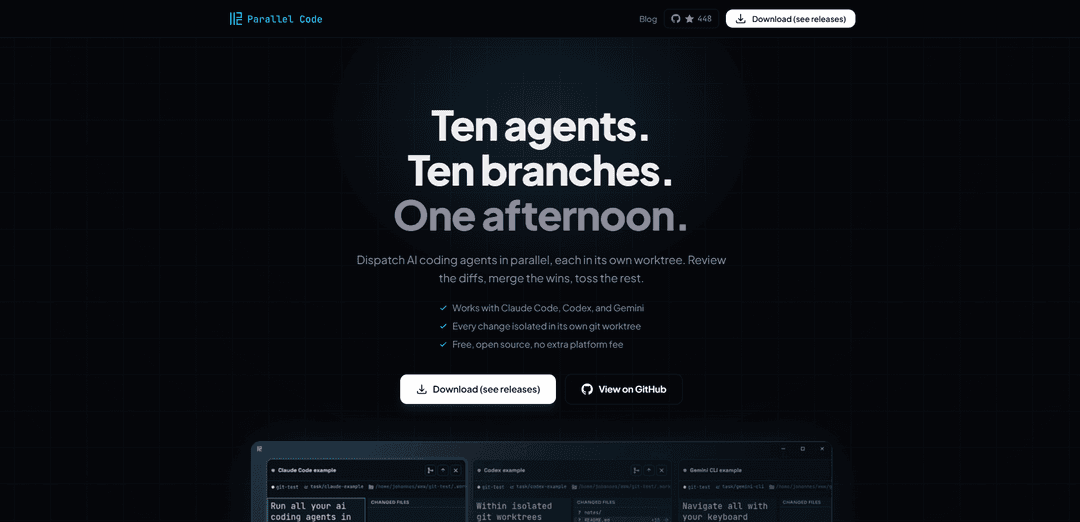
ParallelCode is a desktop application that enables multiple AI coding agents (Claude Code, Codex CLI, Gemini CLI) to work simultaneously in isolated git worktrees, allowing developers to dispatch coding tasks in parallel and merge successful results.
https://parallelcode.app/?ref=producthunt
Product Information
Updated:Apr 8, 2026
What is Parallel Code
ParallelCode is a free, open-source desktop application designed to revolutionize how developers work with AI coding assistants. Instead of using AI agents sequentially and waiting for each task to complete, ParallelCode allows multiple AI agents to work simultaneously on different tasks within the same repository. The application integrates seamlessly with popular AI coding assistants like Claude Code, Codex CLI, and Gemini CLI, while maintaining compatibility with any preferred code editor such as VS Code, JetBrains IDEs, or Sublime Text.
Key Features of Parallel Code
Parallel Code is a desktop application that enables developers to run multiple AI coding agents simultaneously in isolated environments. It creates separate git branches and worktrees for each agent, allowing them to work on different tasks without conflicts. The app supports various AI agents like Claude Code, Codex CLI, and Gemini CLI, and integrates seamlessly with existing development workflows while providing an easy-to-use interface for managing, reviewing, and merging code changes.
Isolated Workspaces: Automatically creates separate git branches and worktrees for each AI agent, ensuring no conflicts between parallel tasks
Multi-Agent Support: Compatible with multiple AI coding tools including Claude Code, Codex CLI, and Gemini CLI, all manageable from a single interface
Streamlined Review Process: Provides easy-to-use tools for reviewing diffs, inspecting changed files, and merging code changes back to the main branch
Cross-Platform Accessibility: Offers keyboard shortcuts and mobile monitoring capabilities through QR code scanning over Wi-Fi or Tailscale
Use Cases of Parallel Code
Rapid Prototyping: Test multiple implementation approaches simultaneously using different AI agents to quickly identify the best solution
Large-Scale Refactoring: Parallelize code refactoring tasks across multiple AI agents to handle different parts of the codebase simultaneously
Feature Development: Work on multiple features concurrently by assigning different AI agents to separate development tasks
Pros
Free and open-source with MIT license
No learning curve - works alongside existing IDEs
Efficient parallel processing with multiple AI agents
Cons
Limited to CLI-based AI coding agents
Currently only available for macOS and Linux
How to Use Parallel Code
Download and Install: Download Parallel Code from GitHub releases page and install it on your system (supports macOS and Linux)
Launch Application: Open the Parallel Code desktop application while keeping your preferred code editor (VS Code, JetBrains, etc.) ready
Create a Task: Describe what you want built and select which AI agent to use from the available options - Claude Code, Codex CLI, or Gemini CLI
Let Agent Work: The app automatically creates a git branch and worktree for the task. The AI agent works in its own isolated directory to avoid conflicts
Create Multiple Tasks: You can create multiple tasks with different AI agents simultaneously - they will work in parallel in their own isolated environments
Monitor Progress: Watch the progress of all agents from the main dashboard. You can also scan a QR code to monitor from your phone over Wi-Fi
Review Changes: Inspect the diffs and check changed files for each task to verify the AI-generated code
Merge Code: When satisfied with the results, merge the branch back to main directly from the sidebar with one click
Repeat Process: Continue creating new tasks and dispatching them to different AI agents in parallel as needed
Parallel Code FAQs
Parallel Code is a desktop application that allows multiple AI coding agents to work simultaneously on different tasks, each in its own git branch and worktree. It works with Claude Code, Codex CLI, and Gemini CLI.
Parallel Code Video
Popular Articles

Vosko AI: Localize and Dub Videos for Global Audiences
Oct 15, 2026

Atoms: A Multi-Agent AI Platform That Transforms Ideas into Launch-Ready Products
Oct 13, 2026

Nano Banana SBTI: What It Is, How It Works, and How to Use It in 2026
Apr 15, 2026

Atoms Review — The AI Product Builder Redefining Digital Creation in 2026
Apr 10, 2026
Latest AI Tools Similar to Parallel Code

Gait
Gait is a collaboration tool that integrates AI-assisted code generation with version control, enabling teams to track, understand, and share AI-generated code context efficiently.

invoices.dev
invoices.dev is an automated invoicing platform that generates invoices directly from developers' Git commits, with integration capabilities for GitHub, Slack, Linear, and Google services.

EasyRFP
EasyRFP is an AI-powered edge computing toolkit that streamlines RFP (Request for Proposal) responses and enables real-time field phenotyping through deep learning technology.

Cart.ai
Cart.ai is an AI-powered service platform that provides comprehensive business automation solutions including coding, customer relations management, video editing, e-commerce setup, and custom AI development with 24/7 support.
Popular AI Tools Like Parallel Code

GitHub Copilot Chat
GitHub Copilot Chat is an AI-powered coding assistant that provides natural language interactions, real-time code suggestions, and contextual support directly within supported IDEs and GitHub.com.

CopilotForXcode
CopilotForXcode is an Xcode Source Editor Extension that integrates GitHub Copilot, Codeium, and ChatGPT to provide AI-powered code suggestions, chat assistance, and prompt-to-code functionality within Xcode.

BrowserAI
BrowserAI is an open-source library that enables running local Large Language Models (LLMs) directly in web browsers with WebGPU acceleration, offering privacy-focused AI capabilities without requiring server infrastructure.

OpenAI Codex CLI
OpenAI Codex CLI is a lightweight, open-source coding agent that runs in your terminal, enabling developers to translate natural language into code execution while providing ChatGPT-level reasoning with the ability to run code, manipulate files, and iterate under version control.