
OpenAI WebSocket Mode for Responses API
OpenAI WebSocket Mode for Responses API is a persistent connection-based solution that enables low-latency, long-running agentic workflows with incremental inputs and efficient tool-call handling.
https://developers.openai.com/api/docs/guides/websocket-mode?ref=producthunt
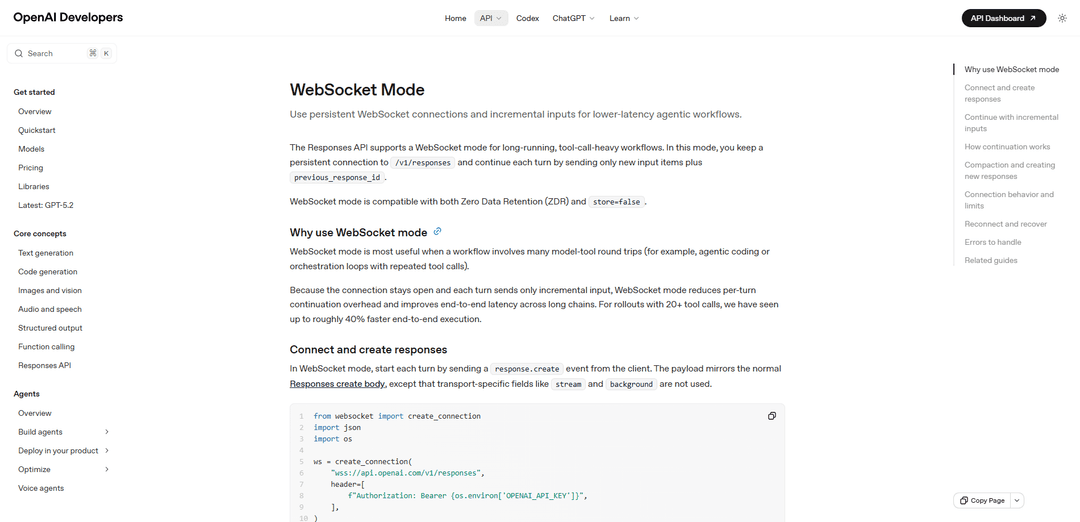
Product Information
Updated:Mar 8, 2026
What is OpenAI WebSocket Mode for Responses API
OpenAI WebSocket Mode is a specialized transport mode within the Responses API designed for complex AI workflows that require frequent model-tool interactions. It establishes a persistent WebSocket connection to /v1/responses endpoint, allowing developers to maintain continuous communication between their applications and OpenAI's models. This mode is fully compatible with Zero Data Retention (ZDR) and store=false options, making it suitable for both stateful and stateless implementations while maintaining data privacy requirements.
Key Features of OpenAI WebSocket Mode for Responses API
OpenAI WebSocket Mode for Responses API is a specialized communication protocol that enables persistent connections for long-running, tool-call-heavy workflows. It maintains a connection-local in-memory cache for the most recent response, allowing clients to send only incremental inputs with previous_response_id instead of resending the full context each time. This mode can improve end-to-end execution speed by up to 40% for workflows with 20+ tool calls while remaining compatible with Zero Data Retention (ZDR) and store=false options.
Persistent Connection: Maintains a single WebSocket connection for up to 60 minutes, eliminating the need to establish new HTTP connections for each interaction
Incremental Input Processing: Allows sending only new input items plus previous_response_id instead of resending the entire conversation context
Connection-Local Caching: Maintains the most recent response state in memory for faster access while remaining compatible with Zero Data Retention requirements
Optional Warm-up Requests: Supports generate:false requests to prepare server-side state in advance, reducing latency for subsequent turns
Use Cases of OpenAI WebSocket Mode for Responses API
AI-Powered Code Development: Enables efficient coding assistance workflows where AI agents make multiple sequential tool calls for reading files, writing code, and testing
Complex Automation Pipelines: Supports long-running automation tasks requiring multiple tool interactions and orchestration steps with reduced latency
Multi-Step Reasoning Systems: Facilitates complex problem-solving scenarios where AI needs to make multiple sequential decisions and tool calls
Real-time Agent Workflows: Powers interactive AI agents that need to maintain context while performing multiple actions in response to user inputs
Pros
Significantly reduces latency for tool-heavy workflows (up to 40% faster)
Reduces bandwidth usage by only sending incremental updates
Compatible with existing security features like ZDR and store=false
Cons
Limited to 60-minute connection duration requiring reconnection
No support for parallel response processing within single connection
Requires additional error handling for connection management and recovery
How to Use OpenAI WebSocket Mode for Responses API
Install Required Dependencies: Install the websocket-client library for Python using: pip install websocket-client
Import Libraries: Import required libraries: websocket, json, and os for environment variables
Create WebSocket Connection: Establish WebSocket connection to OpenAI endpoint 'wss://api.openai.com/v1/responses' with API key in header
Send Initial Response Create Event: Send first response.create event with model, store flag, initial input message, and tools array. Do not include stream or background fields
Optional: Warm Up Request State: Optionally send response.create with generate:false to prepare server state for upcoming requests without generating output
Continue Conversation: Send subsequent response.create events with previous_response_id and only new input items (tool outputs, new messages)
Handle Connection Limits: Monitor 60-minute connection limit and reconnect when needed. Only one response can be in-flight at a time
Handle Reconnection: When reconnecting: either continue with previous_response_id (if store=true), start new response, or use compacted context from /responses/compact
Handle Errors: Handle previous_response_not_found and websocket_connection_limit_reached errors appropriately
Close Connection: Close WebSocket connection when finished using ws.close()
OpenAI WebSocket Mode for Responses API FAQs
WebSocket Mode is a feature of OpenAI's Responses API that enables persistent connections for long-running, tool-call-heavy workflows. Its main benefits include reduced per-turn continuation overhead and improved end-to-end latency across long chains. For workflows with 20+ tool calls, it can achieve up to 40% faster end-to-end execution.
OpenAI WebSocket Mode for Responses API Video
Popular Articles

Atoms: A Multi-Agent AI Platform That Transforms Ideas into Launch-Ready Products
May 22, 2026

Nano Banana SBTI: What It Is, How It Works, and How to Use It in 2026
Apr 15, 2026

Atoms Review — The AI Product Builder Redefining Digital Creation in 2026
Apr 10, 2026

Kilo Claw: How to Deploy and Use a True "Do‑It‑For‑You" AI Agent(2026 Update)
Apr 3, 2026
Latest AI Tools Similar to OpenAI WebSocket Mode for Responses API

Hapticlabs
Hapticlabs is a no-code toolkit that enables designers, developers and researchers to easily design, prototype and deploy immersive haptic interactions across devices without coding.

Deployo.ai
Deployo.ai is a comprehensive AI deployment platform that enables seamless model deployment, monitoring, and scaling with built-in ethical AI frameworks and cross-cloud compatibility.

CloudSoul
CloudSoul is an AI-powered SaaS platform that enables users to instantly deploy and manage cloud infrastructure through natural language conversations, making AWS resource management more accessible and efficient.

Devozy.ai
Devozy.ai is an AI-powered developer self-service platform that combines Agile project management, DevSecOps, multi-cloud infrastructure management, and IT service management into a unified solution for accelerating software delivery.
Popular AI Tools Like OpenAI WebSocket Mode for Responses API

A2A Protocol
A2A (Agent2Agent) Protocol is an open interoperability protocol developed by Google that enables seamless communication and collaboration between AI agents across different frameworks and vendors, regardless of their underlying architecture.

VoltOps
VoltOps is a framework-agnostic LLM observability platform that provides real-time visual monitoring, debugging, and optimization tools for AI agents across any technology stack.

Chaterm
Chaterm is an open-source AI-native terminal and SRE copilot that enables engineers to manage complex infrastructure through natural language, automating deployment, troubleshooting, and operations without memorizing commands.

Open Browser Use
Open Browser Use is an open-source, agent-runtime-neutral browser automation layer that pairs a Chrome extension with a CLI/SDK/MCP to enable DOM-aware, CDP-powered tab control, navigation, and actions across different AI agent tools.