Nixmac
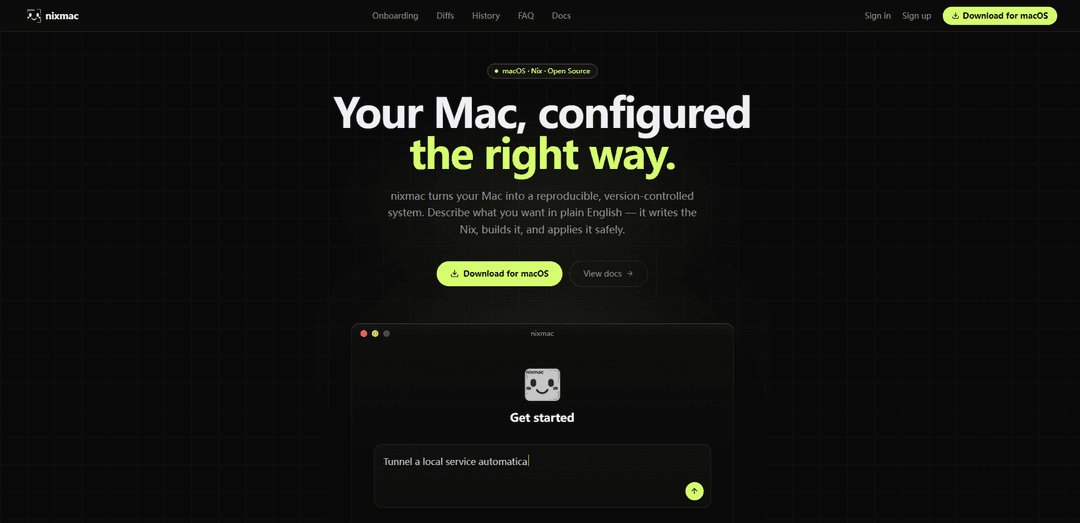
nixmac is an AI-powered macOS configuration manager built on nix-darwin that turns your Mac into a reproducible, version-controlled system by generating Nix from plain-English requests, showing diffs, and applying changes safely with atomic rebuilds and rollbacks.
https://nixmac.com/?ref=producthunt
Product Information
Updated:Jul 8, 2026
What is Nixmac
nixmac is a macOS app designed to make managing a Mac with Nix approachable and reliable. Built on top of nix-darwin and the Nix ecosystem (including Nixpkgs and home-manager, with optional Homebrew integration), it helps you set up and evolve a declarative configuration without having to hand-write everything from scratch. You can start from a sensible template that scaffolds a working flake, or import an existing flake (including from GitHub) and continue where you left off—keeping your system configuration reproducible and easy to share across machines.
Key Features of Nixmac
nixmac is an AI-powered macOS configuration manager built on nix-darwin that helps you turn a Mac into a reproducible, version-controlled system. You describe desired changes in plain English, and it generates/updates Nix code (typically a flake), builds the configuration, and applies it safely via an atomic darwin-rebuild switch with live build output. It can scaffold a sensible starter template, import an existing flake (including from GitHub), detect prior manual/custom settings via read-only checks, show line-level diffs before applying, detect drift from manual edits, and commit every applied change to Git for easy history and rollback.
Natural-language to Nix changes: Describe what you want in plain English; nixmac reads your existing configuration, writes/updates the Nix code, and iterates until it builds.
Flake scaffolding and clean project layout: Pick a starting template (e.g., nix-darwin + Determinate, nixos-unified, or flake-parts) and nixmac scaffolds a working flake with sensible modules that builds on the first try.
Import existing configurations (no rewrite required): Point nixmac at an existing flake (local folder, flake reference, or GitHub) and it continues from your current setup, including auto-detecting flake.nix files.
Safe, observable rebuilds: Streams each rebuild phase in real time (evaluate, build, fetch/compile, activate) and applies changes atomically; failed builds don’t alter the running system.
Reviewable diffs + drift detection: Shows per-file, line-level diffs before changes land; detects manual edits (“drift”) and lets you adopt them into the config or undo them.
Git-native history and restore: Every apply becomes a Git commit with an AI-written semantic message, creating a changelog-like history and enabling one-click restore to prior states.
Use Cases of Nixmac
Reproducible developer workstations: Standardize tools, shells, and services across engineers’ Macs using nix-darwin/home-manager, with changes tracked and reviewable via Git commits and diffs.
Onboarding and device setup at scale: Quickly bootstrap new Macs from a known-good template or an existing team flake, reducing setup time and ensuring consistent configurations.
Personal “infrastructure as code” for macOS: Maintain a version-controlled Mac configuration where system changes are requested in natural language, reviewed as diffs, and applied atomically with rollback safety.
Migration from ad-hoc/manual tweaks to declarative config: Use read-only detection to discover what was customized already, convert it into Nix code, and continuously catch future drift from manual edits.
Multi-machine consistency and recovery: Use Git history to replicate the same setup across multiple Macs and restore a known working state after a bad change or failed rebuild.
Pros
Reproducible, version-controlled macOS configuration built on nix-darwin with atomic apply/rollback behavior.
Strong transparency: live rebuild output plus line-level diffs and drift detection reduce “black box” risk.
Flexible onboarding: scaffold a working flake or import an existing one (including from GitHub) without rewriting.
Cons
Requires adopting/understanding Nix concepts (flakes, nix-darwin) for deeper troubleshooting despite the AI assistance.
AI features may depend on hosted models or external API keys; offline mode requires local tooling (e.g., Ollama).
macOS-specific operational constraints (e.g., Full Disk Access and App Translocation considerations) can add setup friction if installed/run incorrectly.
How to Use Nixmac
1) Download and install nixmac: Go to https://nixmac.com/download and install the macOS app.
2) Launch nixmac and start onboarding: Open nixmac and begin the guided onboarding flow (it will walk you through setting up a reproducible, version-controlled Mac configuration).
3) Choose a configuration template (scaffold a working flake): In the onboarding step “Config directory”, pick a starting template so nixmac scaffolds a Nix flake that builds on the first try. Options shown include: “nix-darwin + Determinate (recommended)”, “nixos-unified for cross-platform”, and “flake-parts for minimalists”.
4) Or import an existing flake instead of scaffolding: If you already manage your Mac with Nix, point nixmac at your existing flake (e.g., connect a GitHub account and let nixmac detect flake.nix automatically, or use a local folder/flake reference).
5) Let nixmac detect existing manual customizations (drift/import): During onboarding, nixmac can run read-only detection to find settings, packages, and services you already changed manually, then convert them into Nix code you can keep in your config.
6) Watch the live build and rebuild phases: When applying the initial setup or later changes, nixmac streams each phase in real time (evaluating the flake, building packages, fetching from cache/compiling, and activating configuration).
7) Apply changes safely with atomic activation (darwin-rebuild switch): nixmac applies changes atomically using a real darwin-rebuild switch. If the build fails, your running system remains unchanged (automatic rollback on failure; nothing is activated until it passes).
8) Configure AI inference (hosted, BYO key, or local): In the “AI inference” step, choose how nixmac will generate/iterate on Nix changes: use nixmac hosted models (metered billing), bring your own API key (e.g., Anthropic/OpenAI), or run fully local/offline with Ollama.
9) Make changes by describing what you want in plain English: After onboarding, use natural-language prompts to request changes (e.g., install packages, enable a setting). nixmac reads your config, plans edits, writes the Nix, and iterates until it builds.
10) Review line-level diffs before applying: Before changes land, inspect per-file, line-by-line diffs showing exactly what will be added/removed so you can verify it is not a black box.
11) Handle drift: adopt or undo manual changes: If you change something outside of Nix, nixmac detects drift and offers to either adopt those changes into your declarative config or undo them to return to the declared state.
12) Save every apply as a Git commit and roll back when needed: Each apply is saved as a Git commit (with an AI-written semantic commit message). You can restore any previous state via the Git-backed history/one-click restore workflow.
13) (Optional) Use the CLI for evolution prompts and limits: You can run changes from the terminal using nixmac evolve "<request>". For self-hosted OpenAI-compatible servers or smaller context windows, set limits like --max-output-tokens (also configurable in Settings → AI Models → Evolution Limits). Example: nixmac evolve "install ripgrep and fd"; or nixmac evolve "enable Touch ID for sudo" --max-output-tokens 32768.
Nixmac FAQs
nixmac is an AI-powered macOS configuration manager built on nix-darwin. It turns your Mac into a reproducible, version-controlled system by letting you describe desired changes in plain English; it then writes the Nix, builds it, and applies it safely.
Popular Articles

Proferex: A Cloud-Based Ad Tracking and Campaign Optimization Platform
Nov 4, 2026

How to Create Viral Talking Baby Podcast Videos with AI: Step-by-Step Guide
Nov 2, 2026

Vosko AI: Localize and Dub Videos for Global Audiences
Oct 15, 2026

Atoms: A Multi-Agent AI Platform That Transforms Ideas into Launch-Ready Products
Oct 13, 2026
Latest AI Tools Similar to Nixmac

Gait
Gait is a collaboration tool that integrates AI-assisted code generation with version control, enabling teams to track, understand, and share AI-generated code context efficiently.

invoices.dev
invoices.dev is an automated invoicing platform that generates invoices directly from developers' Git commits, with integration capabilities for GitHub, Slack, Linear, and Google services.

EasyRFP
EasyRFP is an AI-powered edge computing toolkit that streamlines RFP (Request for Proposal) responses and enables real-time field phenotyping through deep learning technology.

Cart.ai
Cart.ai is an AI-powered service platform that provides comprehensive business automation solutions including coding, customer relations management, video editing, e-commerce setup, and custom AI development with 24/7 support.
Popular AI Tools Like Nixmac

GitHub Copilot Chat
GitHub Copilot Chat is an AI-powered coding assistant that provides natural language interactions, real-time code suggestions, and contextual support directly within supported IDEs and GitHub.com.

CopilotForXcode
CopilotForXcode is an Xcode Source Editor Extension that integrates GitHub Copilot, Codeium, and ChatGPT to provide AI-powered code suggestions, chat assistance, and prompt-to-code functionality within Xcode.

BrowserAI
BrowserAI is an open-source library that enables running local Large Language Models (LLMs) directly in web browsers with WebGPU acceleration, offering privacy-focused AI capabilities without requiring server infrastructure.

OpenAI Codex CLI
OpenAI Codex CLI is a lightweight, open-source coding agent that runs in your terminal, enabling developers to translate natural language into code execution while providing ChatGPT-level reasoning with the ability to run code, manipulate files, and iterate under version control.