
Nimbalyst Beta
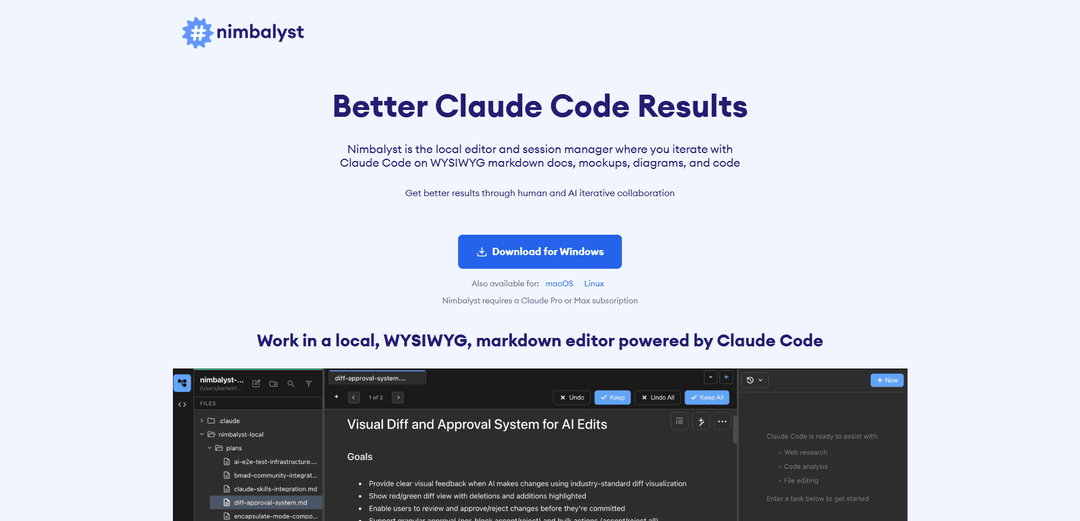
Nimbalyst is a local WYSIWYG markdown editor and session manager that empowers PMs and developers to collaborate with Claude Code on documentation, diagrams, mockups, and code development.
https://nimbalyst.com/?ref=producthunt
Product Information
Updated:Dec 15, 2025
What is Nimbalyst Beta
Nimbalyst Beta is an innovative software tool designed to enhance feature development through AI collaboration. It serves as a comprehensive local editor that integrates with Claude Code (requiring Claude Pro or Max subscription) to provide a seamless environment for creating and managing documentation, mockups, diagrams, and code. The tool emphasizes local storage and user control, ensuring all created content remains on the user's machine.
Key Features of Nimbalyst Beta
Nimbalyst is a local WYSIWYG markdown editor and session manager that enables collaboration between users and Claude Code AI. It features a powerful markdown editing environment with visual diffs, supports images, diagrams, and mockups, while keeping all data stored locally. The tool integrates with Claude Pro or Max subscription and provides AI collaboration tools for enhancing feature development.
WYSIWYG Markdown Editor: An intuitive visual markdown editor that allows real-time editing and preview of documents, with support for images, Mermaid diagrams, and frontmatter
Parallel Session Management: Ability to manage and coordinate multiple Claude Code sessions simultaneously for efficient workflow management
Local Data Storage: All created content stays on the local machine with optional GitHub synchronization, ensuring data privacy and complete user control
AI-Powered Collaboration: Integration with Claude Code for enhanced document creation, code development, and mockup generation
Use Cases of Nimbalyst Beta
Product Development: PMs and developers can collaborate on feature development, creating documentation, mockups, and code iterations
Technical Documentation: Teams can create and maintain technical documentation with AI assistance, including diagrams and visual elements
UI/UX Design: Designers can create and iterate on HTML mockups with AI assistance, annotate them, and use them for coding implementation
Pros
Local data storage ensures privacy and security
Cross-platform support (Windows, macOS, Linux)
Integrated AI collaboration tools
Cons
Requires Claude Pro or Max subscription
Some early beta glitches reported
How to Use Nimbalyst Beta
Download and Install: Download Nimbalyst for your operating system (macOS, Windows, or Linux). Note that Nimbalyst requires a Claude Pro or Max subscription to use.
Launch the WYSIWYG Editor: Open Nimbalyst to access the local WYSIWYG markdown editor where you can create and edit documents, diagrams, mockups and code.
Create/Edit Content: Use the markdown editor to write documentation, create mockups, add diagrams, and write code. The editor provides real-time WYSIWYG preview of your markdown content.
Collaborate with Claude Code: Use slash commands to interact with Claude Code AI within the editor. Claude Code can help analyze code, answer questions, and provide suggestions.
Review AI Changes: Review AI-suggested changes through red/green visual diffs. You can approve or reject the changes Claude Code proposes.
Manage Multiple Sessions: Switch to the agent manager view to run and manage multiple Claude Code AI sessions in parallel for different tasks.
Version Control Integration: Store content locally in markdown files that can be synced with git repositories. Track changes and collaborate using standard git workflows.
Iterate and Refine: Continue iterating on content through multiple rounds of human edits and AI suggestions to gradually improve the quality of documentation, mockups and code.
Nimbalyst Beta FAQs
Nimbalyst is a local WYSIWYG markdown editor and session manager that allows users to collaborate with Claude Code on documents, diagrams, mockups, and code development.
Nimbalyst Beta Video
Popular Articles

Vosko AI: Localize and Dub Videos for Global Audiences
Oct 15, 2026

Atoms: A Multi-Agent AI Platform That Transforms Ideas into Launch-Ready Products
Oct 13, 2026

Nano Banana SBTI: What It Is, How It Works, and How to Use It in 2026
Apr 15, 2026

Atoms Review — The AI Product Builder Redefining Digital Creation in 2026
Apr 10, 2026
Latest AI Tools Similar to Nimbalyst Beta

Gait
Gait is a collaboration tool that integrates AI-assisted code generation with version control, enabling teams to track, understand, and share AI-generated code context efficiently.

invoices.dev
invoices.dev is an automated invoicing platform that generates invoices directly from developers' Git commits, with integration capabilities for GitHub, Slack, Linear, and Google services.

EasyRFP
EasyRFP is an AI-powered edge computing toolkit that streamlines RFP (Request for Proposal) responses and enables real-time field phenotyping through deep learning technology.

Cart.ai
Cart.ai is an AI-powered service platform that provides comprehensive business automation solutions including coding, customer relations management, video editing, e-commerce setup, and custom AI development with 24/7 support.
Popular AI Tools Like Nimbalyst Beta

GitHub Copilot Chat
GitHub Copilot Chat is an AI-powered coding assistant that provides natural language interactions, real-time code suggestions, and contextual support directly within supported IDEs and GitHub.com.

CopilotForXcode
CopilotForXcode is an Xcode Source Editor Extension that integrates GitHub Copilot, Codeium, and ChatGPT to provide AI-powered code suggestions, chat assistance, and prompt-to-code functionality within Xcode.

BrowserAI
BrowserAI is an open-source library that enables running local Large Language Models (LLMs) directly in web browsers with WebGPU acceleration, offering privacy-focused AI capabilities without requiring server infrastructure.

OpenAI Codex CLI
OpenAI Codex CLI is a lightweight, open-source coding agent that runs in your terminal, enabling developers to translate natural language into code execution while providing ChatGPT-level reasoning with the ability to run code, manipulate files, and iterate under version control.