
Monako Glass
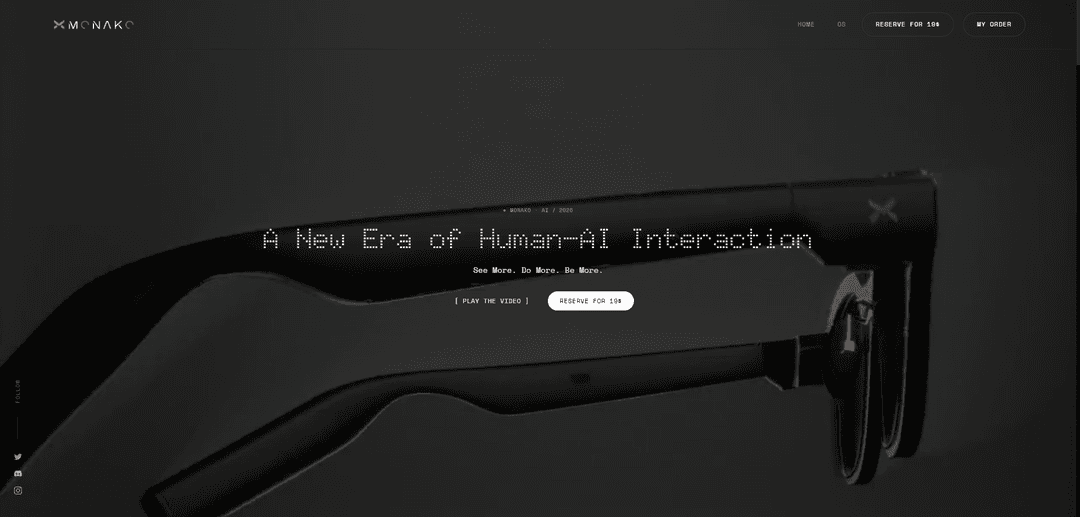
Monako Glass is a 48‑gram developer-focused smart-glasses “wearable Linux computer” with a waveguide HUD, camera, speakers, noise-robust bone-conduction mic, gesture control, and built-in support for AI coding agents like Claude Code and Codex on its Linux-based MonoOS.
https://www.monako.ai/?ref=producthunt
Product Information
Updated:Jun 15, 2026
What is Monako Glass
Monako Glass is a pair of lightweight smart glasses designed less as a consumer camera gadget and more as a hands-free productivity and creation device for developers, researchers, and AI power users. It runs a custom Linux-based operating system called MonoOS and presents a heads-up display (HUD) for interacting with tools, terminals, and AI agents while you move through real-world environments like labs, classrooms, or multi-monitor workspaces. The platform emphasizes an open, developer-oriented approach—positioned as something you can customize, wipe, and rebuild with your own code and workflows—while keeping the hardware compact with a waveguide display, integrated camera, and audio components in a 48 g frame.
Key Features of Monako Glass
Monako Glass is a developer-focused pair of smart glasses positioned as a “wearable Linux computer” designed for AI-native productivity rather than casual capture. In a lightweight 48g frame, it combines a waveguide heads-up display, camera, speakers, and a specialized bone-conduction microphone intended to isolate your voice in noisy environments. It runs a custom Linux-based OS (MonoOS) with a tiny-footprint Lua application layer (apps reportedly as small as 200–500KB RAM), plus an embedded Rive runtime for sharp, state-driven UI animations. The core idea is hands-free, on-the-go workflows where you can invoke AI coding agents (e.g., Claude Code, OpenAI Codex) and quickly generate, run, and keep small personalized tools that can also interoperate with cloud sandboxes and local Mac/PC setups.
48g waveguide HUD computer: A very lightweight smart-glasses form factor with a waveguide display for heads-up interaction, aimed at long-wear productivity rather than bulky MR headsets.
MonoOS (Linux-based) platform: Runs a custom Linux-based operating system positioned as a flexible wearable computing environment, with the ability to deploy custom code and tools.
Lua application layer (tiny apps): Uses a Lua/LuaJIT layer designed for minimal memory footprint (claimed ~200–500KB RAM per app), enabling rapid, no-build-step app generation and execution.
AI-agent-first workflows: Built to run and interact with AI coding agents (e.g., Claude Code, Codex) directly from the glasses, treating agents as the primary interface for creating tools and code.
Noise-robust bone-conduction mic: A microphone system that detects vibrations (via nasal/bone conduction) to better separate the wearer’s voice from ambient noise in loud environments.
Gesture + cinematic UI motion: Supports gesture-based navigation (Vision Engine) and includes an embedded Rive runtime for interactive, state-driven vector animations optimized for wearable hardware.
Use Cases of Monako Glass
On-the-go software development terminal: Developers can run a lightweight terminal/agent workflow for quick edits, code generation, and task execution while away from a laptop—useful for field work, commuting, or lab environments.
Education & STEM note conversion: Students can capture or observe equations/notes and prompt an AI workflow to generate structured outputs (e.g., converting handwritten math into LaTeX) and build small helper apps for classes.
Research assistant in the field: Researchers can perform hands-free querying, summarization, and tool creation during experiments, site visits, or conferences, using voice/gesture input and quick, personalized micro-apps.
Rapid “micro-tool” creation for operations: Teams can generate situational tools (checklists, calculators, status dashboards) as small Lua apps that appear when needed and can persist on the home screen for repeat workflows.
Cross-device agent command layer: Acts as a wearable control surface that can span Monako Glass, cloud sandboxes, and local Mac/PC—useful for triggering builds, running scripts, or orchestrating AI tasks across environments.
Noisy-environment voice computing: In cafés, open offices, or events, the bone-conduction mic approach is intended to keep voice commands usable, enabling reliable agent prompting without needing a quiet room.
Pros
Developer-first positioning: Focuses on AI coding agents, terminal-style workflows, and programmable micro-apps rather than consumer social features.
Lightweight + hands-free interaction: 48g frame with HUD, gestures, and voice input supports quick, in-context usage.
Fast app iteration: Lua layer with no build step and tiny memory footprint supports rapid, agent-generated tools.
Potentially better voice input in noise: Bone-conduction approach is designed to isolate the wearer’s commands from ambient sound.
Cons
Many practical details remain unclear: Battery life, pricing, display readability for long sessions, and real-world latency/UX are not well established from announcements.
Privacy and social acceptability concerns: Always-available camera/mic wearables raise trust and policy questions, especially in workplaces and public spaces.
Early-stage ecosystem risk: Developer adoption, tooling maturity, and long-term support are uncertain for a new wearable OS/platform.
Not a full workstation replacement: Likely best as a command layer/companion device; complex development still depends on external machines and workflows.
How to Use Monako Glass
1) Charge and power on Monako Glass: Fully charge the glasses, then power them on to boot into MonoOS (the Linux-based OS). Wait for the home screen/heads-up display (HUD) to appear.
2) Complete first-time setup in MonoOS: Follow the on-device prompts to set basic preferences (language, time, display comfort). Confirm you can see the waveguide HUD clearly and that audio output (speakers/bone-conduction) is working.
3) Learn the two primary inputs: voice + gestures: Practice issuing short voice commands and using the built-in gesture system (often described as a 'Vision Engine') to navigate the UI (select, back, scroll). The bone-conduction mic is designed to pick up your voice via nasal vibrations to reduce background-noise interference.
4) Test voice capture in a noisy environment (optional): Try a simple command in a louder place (café/office). The intended workflow is that the glasses prioritize your voice input over ambient sound due to the bone-conduction microphone design.
5) Open the Terminal / command layer: From the MonoOS home screen, open the terminal-like interface (the product is pitched as having 'terminal access'). Use it as your primary control surface for developer workflows and agent invocation.
6) Connect to your workflow targets (local + cloud): Set up 'Seamless Interop' by linking the glasses to the environments where work happens: (a) your local Mac/PC, and/or (b) a cloud sandbox. The goal is to use the glasses as a wearable command layer across these systems.
7) Launch a coding agent (Claude Code / Codex): From the HUD, open the connector/app for your preferred coding agent (e.g., Claude Code or Codex). Use voice to describe the task you want done, and review the agent’s output directly in your field of view.
8) Use the glasses for 'vibe coding' loops: Iterate hands-free: describe a change → let the agent generate/modify code → review output on the HUD → confirm/adjust with voice. This is the core demonstrated workflow for developers and researchers.
9) Generate a tiny app using the Lua application layer: Ask the agent to create a small MonoOS app in Lua. MonoOS is described as using a LuaJIT application layer with a tiny memory footprint (about 200–500 KB per app) and 'no build step', meaning the agent can generate Lua code and run it immediately.
10) Run the Lua app immediately (no compilation step): Execute the generated Lua app directly on-device. Validate the UI and behavior in the HUD, then request incremental changes via voice until it matches your needs.
11) Pin the app to your home screen for reuse: After the app works, save/pin it so it remains available as a personalized tool you can launch later from the MonoOS home screen.
12) Add cinematic UI motion with Rive (optional): If you’re building UI, incorporate Rive animations. MonoOS is described as embedding a Rive runtime so interactive vector animations remain sharp and performant on wearable hardware.
13) Use tool connectors for creative/3D workflows (optional): If available in your build, open connectors for tools mentioned in the sources (e.g., Unreal Engine, Blender, After Effects). Use the glasses to issue commands, trigger scripts, or request agent-generated steps while the heavy work runs on your linked machine/cloud.
14) Create and share a 'Mini Tool' (optional): Build a small text-to-text or text-to-image tool (described as a 'Mini Tool') so other users can run it. Package it as a reusable workflow that can be launched from the glasses.
15) Customize the system (advanced / open Linux access): If you want full control, use the device’s Linux access to remove bundled apps and deploy your own code/agents. The sources claim you can wipe preinstalled software and run custom code directly on the onboard Linux system.
16) Choose offline vs cloud execution for agents: When running agents, prefer on-device/offline execution for privacy and low-latency tasks, and use cloud sandboxes for heavier models or larger builds (as described in the sources: cloud is optional for heavy workloads).
17) Practice privacy and environment controls: Use the device’s hardware/software controls (where available) to manage camera/mic usage. For sensitive work, keep workflows local/offline and only enable sensors when needed.
Monako Glass FAQs
Monako Glass is a developer-focused pair of smart glasses positioned as a wearable Linux computer. It’s designed for building projects and running AI/code workflows from a heads-up display rather than as a casual lifestyle camera device.
Monako Glass Video
Popular Articles

Atoms: A Multi-Agent AI Platform That Transforms Ideas into Launch-Ready Products
May 22, 2026

Nano Banana SBTI: What It Is, How It Works, and How to Use It in 2026
Apr 15, 2026

Atoms Review — The AI Product Builder Redefining Digital Creation in 2026
Apr 10, 2026

Kilo Claw: How to Deploy and Use a True "Do‑It‑For‑You" AI Agent(2026 Update)
Apr 3, 2026
Latest AI Tools Similar to Monako Glass

invoices.dev
invoices.dev is an automated invoicing platform that generates invoices directly from developers' Git commits, with integration capabilities for GitHub, Slack, Linear, and Google services.

Monyble
Monyble is a no-code AI platform that enables users to launch AI tools and projects within 60 seconds without requiring technical expertise.

Devozy.ai
Devozy.ai is an AI-powered developer self-service platform that combines Agile project management, DevSecOps, multi-cloud infrastructure management, and IT service management into a unified solution for accelerating software delivery.
Mediatr
MediatR is a popular open-source .NET library that implements the Mediator pattern to provide simple and flexible request/response handling, command processing, and event notifications while promoting loose coupling between application components.
Popular AI Tools Like Monako Glass
Launch
Launch is an AI-powered platform that enables users to build full-stack applications instantly while providing comprehensive tools for product launches, entrepreneurship programs, and customer acquisition.

GitHub Copilot Chat
GitHub Copilot Chat is an AI-powered coding assistant that provides natural language interactions, real-time code suggestions, and contextual support directly within supported IDEs and GitHub.com.

Rememberall
Rememberall is a secure, open-source long-term memory solution that enables AI applications and GPT models to maintain persistent memory across conversations through semantic search and vector storage capabilities.

Upsonic
Upsonic is a reliability-focused AI agent framework with dockerized server-client architecture that enables trusted agent workflows through advanced features like verification layers, triangular architecture, and Model Context Protocol (MCP) integration.