
Memoriq
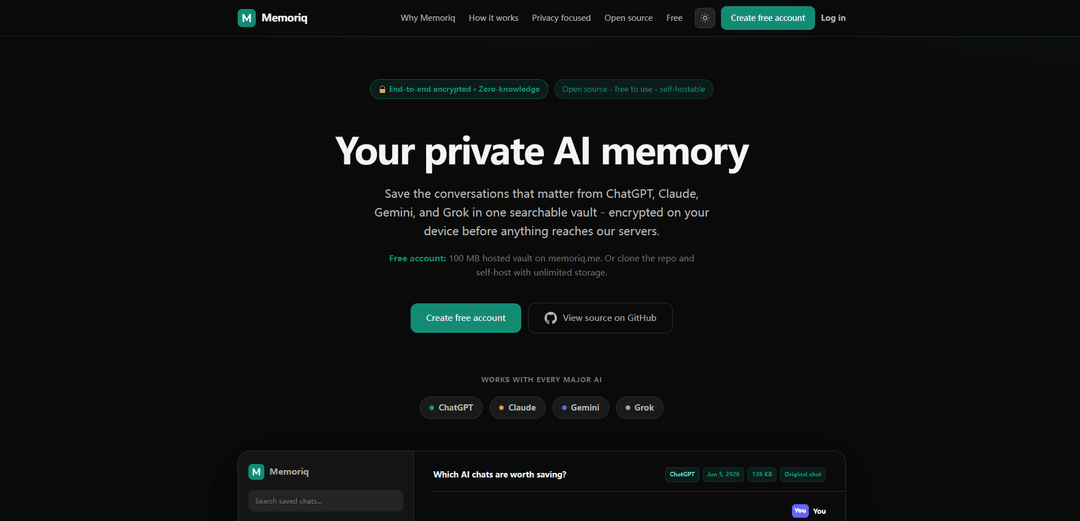
Memoriq is an open-source, end-to-end encrypted, zero-knowledge “AI memory vault” that saves and organizes chats from ChatGPT, Claude, Gemini, and Grok into one searchable archive you control.
https://memoriq.me/?ref=producthunt
Product Information
Updated:Jun 16, 2026
What is Memoriq
Memoriq is a privacy-first tool for preserving the AI conversations that matter. Instead of leaving important threads scattered across different AI providers (and subject to their retention policies), Memoriq lets you capture, store, and search your chats in a single vault. It is built around end-to-end encryption with a zero-knowledge design, meaning conversations are encrypted on your device before upload and the service stores only ciphertext. Memoriq is also AGPL open source, so anyone can inspect the code, verify the encryption path, and either use the hosted version (with a free 100 MB vault) or self-host for unlimited storage.
Key Features of Memoriq
Memoriq is a private AI “memory vault” for saving and organizing important conversations from major AI chat providers (ChatGPT, Claude, Gemini, Grok) in one searchable place, with end-to-end encryption performed on your device before anything is uploaded. It offers a Chrome extension for one-click capture, supports manual imports, and provides tagging/projects plus search and filtering so you can reliably revisit long research threads, decisions, and drafts. Memoriq is open source (AGPL) and can be used via a hosted free tier (100 MB) or self-hosted for full control and unlimited storage.
End-to-end encryption (client-side, zero-knowledge): Encrypts conversations on your device (AES-256) before upload, storing only ciphertext so the service cannot read your archives without your keys.
Cross-provider conversation capture: Save chats from ChatGPT, Claude, Gemini, and Grok into a single vault, reducing fragmentation across different AI platforms.
Chrome extension for one-click saving: Capture conversations as you go directly from supported AI chat pages, without leaving the workflow.
Search, tags, and projects: Organize archives with metadata (source, date, projects, tags) and quickly retrieve key threads via search and filters.
Open source + self-host option: AGPL-licensed codebase that can be audited and deployed on your own infrastructure for maximum control and storage flexibility.
Portability controls (export/delete): Keep archives portable and manageable with the ability to export or delete your stored conversations at any time.
Use Cases of Memoriq
Product & engineering knowledge retention: Persist architectural discussions, debugging threads, and implementation plans from AI chats so teams can search and reuse decisions instead of recreating context.
Research and writing workflows: Archive long research sessions, evolving outlines, and curated summaries with links and citations, making them easy to revisit for articles, reports, or academic work.
Business planning and operations: Store strategy sessions, SOP drafts, meeting prep, and decision logs created with AI so they remain accessible even if provider history changes or disappears.
Personal knowledge management: Keep travel planning, learning notes, and life-admin checklists from AI chats in a private, searchable repository rather than scattered across multiple apps.
Sensitive-domain archiving (health/legal/HR drafts): Maintain a private record of high-sensitivity conversations and drafts with encryption-first storage, reducing exposure compared to leaving them solely on provider servers.
Pros
Strong privacy posture via client-side E2EE and zero-knowledge design
Unifies AI chat archives across multiple providers with search and organization
Open source and self-hostable, enabling auditability and full control
Convenient capture via Chrome extension plus import/export options
Cons
End-to-end encryption implies key management responsibility; losing keys can risk losing access to archives
Self-hosting requires technical setup/maintenance for those who want unlimited storage and full control
Browser-extension-based capture may be limited by provider UI changes or platform compatibility over time
How to Use Memoriq
1) Choose how you want to run Memoriq: Decide between (a) using the hosted service at memoriq.me (includes a free 100 MB hosted vault) or (b) self-hosting by cloning the open-source AGPL repo from GitHub (unlimited storage on your own hardware).
2) Create your Memoriq vault (hosted option): Go to https://memoriq.me/register and create a free account. Your vault will store encrypted archives (ciphertext) that Memoriq cannot read (zero-knowledge).
3) Self-host Memoriq (self-host option): Open https://github.com/memoriqme and clone/deploy the app on your own server. This gives you unlimited storage and full control over backups and infrastructure while using the same features (dashboard, search, projects/tags, export, and extension capture).
4) Install the Chrome extension: Install Memoriq’s Chrome extension (linked from the Memoriq site/GitHub) so you can capture chats from ChatGPT, Claude, Gemini, and Grok in one click while you’re on those sites.
5) Sign in to the extension once: Log into the extension using your memoriq.me account (or point it to your self-hosted instance). After this, you can save conversations without leaving the chat page.
6) Capture a conversation from an AI provider: Open a chat in ChatGPT/Claude/Gemini/Grok and use the Memoriq extension to save it. Memoriq encrypts the conversation in your browser (AES-256 client-side) before anything is uploaded.
7) Import conversation exports (optional alternative to the extension): If you already have exported chat histories from providers, import them into Memoriq so they appear in the same searchable vault alongside extension-captured threads.
8) Organize your archives: In Memoriq, review saved threads and organize them with metadata such as source provider, date, projects, and tags so you can filter and browse like a chat app.
9) Search and revisit saved chats anytime: Use Memoriq’s search and filters to find important conversations across all providers in one place, then open a thread to read it formatted and searchable.
10) Export or delete your archive when needed: Use Memoriq’s export and delete controls to keep your data portable and under your control (useful if you change accounts/providers or want local backups).
11) Verify privacy claims (optional, for technical users): Because Memoriq is open source, you can audit the encryption path (client-side crypto, server storage, and extension behavior) in the GitHub codebase to verify end-to-end encryption and zero-knowledge design.
Memoriq FAQs
Memoriq is a private AI memory vault that lets you save and search conversations from major AI chat providers (including ChatGPT, Claude, Gemini, and Grok) in one place.
Popular Articles

Vosko AI: Localize and Dub Videos for Global Audiences
Oct 15, 2026

Atoms: A Multi-Agent AI Platform That Transforms Ideas into Launch-Ready Products
Oct 13, 2026

Nano Banana SBTI: What It Is, How It Works, and How to Use It in 2026
Apr 15, 2026

Atoms Review — The AI Product Builder Redefining Digital Creation in 2026
Apr 10, 2026
Latest AI Tools Similar to Memoriq

Ticknotes
Ticknotes is an AI-powered meeting assistant that automatically records, transcribes, and generates personalized meeting summaries, action items, and key insights from audio, video, and text content.

Feta
Feta is an AI-powered meeting tool that helps product and engineering teams run efficient meetings by capturing discussions, automating tasks, and providing actionable insights through smart summaries and integrations.

Aimeet
Aimeet is a comprehensive AI-powered communication platform that combines real-time translation, transcription, screen sharing, and unlimited meeting capabilities for effective virtual collaboration.

MinutesLink
MinutesLink is an advanced AI-powered note-taking assistant that automatically records, transcribes, summarizes and organizes virtual meetings while building personalized digital avatars from meeting data.
Popular AI Tools Like Memoriq

Second Brain for AI
Second Brain for AI is a self-hosted, MCP-compatible persistent memory layer on Cloudflare that lets Claude, ChatGPT, Cursor, and other AI clients store and semantically recall shared context across sessions.

Slack
Slack is an AI-powered work platform that brings team communication, channels, files, automation, and app integrations into one conversational workspace.

24me Smart Personal Assistant
24me is an award-winning smart personal assistant app that combines calendar, to-do lists, notes, and personal accounts in one unified platform to help boost productivity and time management.

Granola for iOS
Granola for iOS is an AI-powered notepad app that helps users effortlessly capture, transcribe and summarize meeting conversations through intelligent note-taking and one-tap recording capabilities.