
Makersfuel
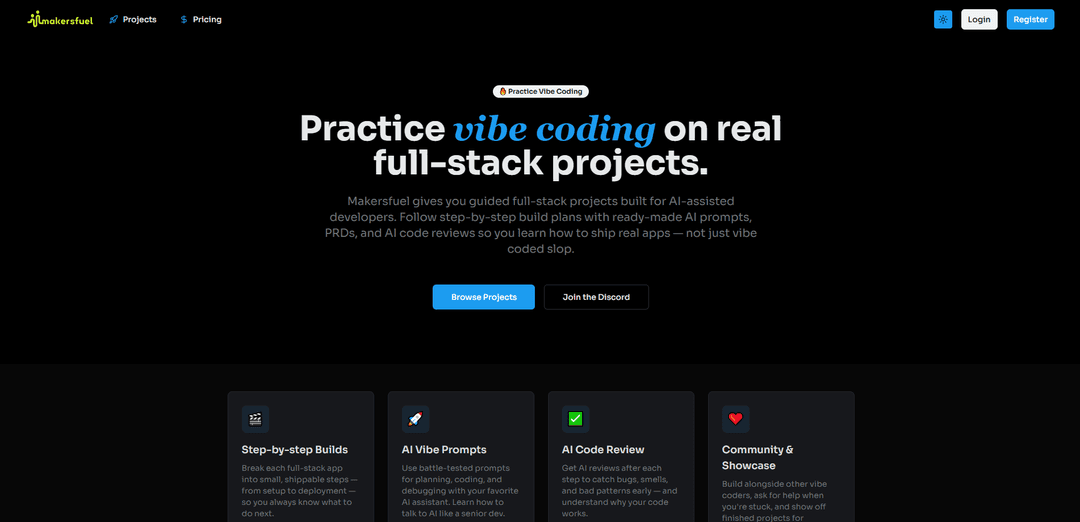
Makersfuel \u00e8 una piattaforma di apprendimento gamificata che combina sviluppo assistito dall'IA, guida strutturata del progetto e supporto della community per aiutare gli sviluppatori e i fondatori di startup a costruire applicazioni pronte per la produzione e a far crescere le loro imprese.
https://www.makersfuel.com/?ref=producthunt&utm_source=aipure
Informazioni sul Prodotto
Aggiornato:Dec 8, 2025
Cos'è Makersfuel
Makersfuel \u00e8 una piattaforma innovativa progettata per supportare sia gli sviluppatori che i fondatori di startup nel loro percorso di creazione di progetti e imprese di successo. Funge sia da piattaforma di apprendimento basata su progetti per gli sviluppatori che praticano il 'vibe coding' (sviluppo assistito dall'IA) sia da piattaforma di arricchimento gamificata per i fondatori. La piattaforma offre progetti full-stack guidati, micro-task strutturati e un ecosistema completo che supporta gli utenti dal concetto iniziale al deployment, promuovendo al contempo un ambiente di community collaborativo.
Caratteristiche principali di Makersfuel
Makersfuel è una piattaforma di apprendimento basata su progetti, progettata per sviluppatori assistiti dall'IA, che fornisce progetti di sviluppo full-stack guidati. Offre piani di costruzione passo dopo passo, suggerimenti basati sull'IA, revisioni del codice e un ambiente di comunità di supporto. La piattaforma aiuta gli sviluppatori a imparare come utilizzare efficacemente gli assistenti di codifica AI durante la creazione di applicazioni reali, dai chatbot alle app mobili, con una guida strutturata e le migliori pratiche.
Roadmap di progetto guidate: Piani di costruzione passo dopo passo che suddividono complesse applicazioni full-stack in attività gestibili, dall'impostazione iniziale alla distribuzione finale
Supporto allo sviluppo basato sull'IA: Suggerimenti AI curati per la pianificazione, la codifica e il debug, insieme a revisioni automatiche del codice per individuare i problemi in anticipo
Modelli di progetto e PRD: Documenti e modelli di requisiti di progetto già pronti per vari tipi di applicazioni, inclusi chatbot, app di social media e client di posta elettronica
Ambiente di apprendimento comunitario: Spazio collaborativo in cui gli sviluppatori possono costruire insieme ai colleghi, condividere conoscenze e ottenere aiuto quando sono bloccati
Casi d'uso di Makersfuel
Sviluppo di applicazioni web: Crea applicazioni web full-stack come chatbot AI e client di posta elettronica utilizzando tecnologie moderne come Next.js e Tailwind CSS
Sviluppo di app mobili: Crea applicazioni mobili utilizzando React Native ed Expo, con l'implementazione di funzionalità come l'autenticazione e le interazioni sociali
Apprendimento dello sviluppo assistito dall'IA: Esercitati nell'uso efficace degli assistenti di codifica AI in progetti reali mentre impari le migliori pratiche e l'implementazione corretta
Vantaggi
Approccio di apprendimento strutturato con una chiara guida passo dopo passo
Integrazione di strumenti di intelligenza artificiale e moderne pratiche di sviluppo
Supporto attivo della comunità e opportunità di apprendimento tra pari
Svantaggi
Varietà di progetti attualmente disponibile limitata
Potrebbe non essere adatto a sviluppatori esperti che necessitano di meno guida
Come usare Makersfuel
Scegli un progetto: Seleziona un progetto full-stack che vuoi costruire tra le opzioni disponibili come chatbot AI, app di social media o client di posta elettronica
Segui il piano di costruzione: Usa la roadmap passo-passo fornita che suddivide il progetto dal repository vuoto al deployment
Usa i prompt dell'IA: Utilizza i prompt dell'IA collaudati forniti da Makersfuel per la pianificazione, la codifica e il debug con il tuo assistente di codifica AI preferito
Ottieni revisioni del codice AI: Dopo aver completato ogni passaggio, esegui le revisioni del codice AI per individuare bug, code smell e pattern errati nelle prime fasi dello sviluppo
Interagisci con la community: Costruisci insieme ad altri sviluppatori, chiedi aiuto quando sei bloccato e condividi i tuoi progressi nella community
Implementa i modelli PRD: Usa i modelli di Documento dei Requisiti del Prodotto (PRD) forniti per pianificare e documentare correttamente il tuo progetto
Affina l'implementazione: In base alle revisioni dell'IA e al feedback della community, migliora l'implementazione del tuo codice
Distribuisci il progetto: Segui le istruzioni di deployment per spedire il tuo progetto completato in produzione
Mostra il lavoro: Mostra i tuoi progetti finiti per ottenere feedback dalla community
FAQ di Makersfuel
Makersfuel è una piattaforma gamificata che fornisce progetti full-stack guidati per sviluppatori assistiti dall'IA. Aiuta gli sviluppatori a creare app reali attraverso piani di costruzione passo-passo con prompt di IA, PRD (Documenti dei Requisiti del Prodotto) e revisioni del codice IA.
Articoli Popolari

Vosko AI: Localizza e doppia video per un pubblico globale
Oct 15, 2026

Atoms: Una Piattaforma AI Multi-Agente Che Trasforma le Idee in Prodotti Pronti al Lancio
May 22, 2026

Nano Banana SBTI: Cos'è, come funziona e come usarlo nel 2026
Apr 15, 2026

Recensione di Atoms — Il builder di prodotti AI che ridefinisce la creazione digitale nel 2026
Apr 10, 2026
Ultimi Strumenti AI Simili a Makersfuel

Gait
Gait è uno strumento di collaborazione che integra la generazione di codice assistita dall'IA con il controllo delle versioni, consentendo ai team di tracciare, comprendere e condividere il contesto del codice generato dall'IA in modo efficiente.

invoices.dev
invoices.dev è una piattaforma di fatturazione automatizzata che genera fatture direttamente dai commit Git dei programmatori, con capacità di integrazione per i servizi GitHub, Slack, Linear e Google.

EasyRFP
EasyRFP è un toolkit di edge computing alimentato da AI che semplifica le risposte alle RFP (Richiesta di Proposta) e consente la fenotipizzazione sul campo in tempo reale attraverso la tecnologia di deep learning.

Cart.ai
Cart.ai è una piattaforma di servizi alimentata dall'IA che fornisce soluzioni complete di automazione aziendale, tra cui codifica, gestione delle relazioni con i clienti, editing video, configurazione e-commerce e sviluppo di AI personalizzata con supporto 24/7.
Strumenti AI Popolari Come Makersfuel

GitHub Copilot Chat
GitHub Copilot Chat è un assistente di codifica alimentato dall'IA che fornisce interazioni in linguaggio naturale, suggerimenti di codice in tempo reale e supporto contestuale direttamente all'interno degli IDE supportati e di GitHub.com.

CopilotForXcode
CopilotForXcode è un'estensione dell'Editor di Codice Xcode che integra GitHub Copilot, Codeium e ChatGPT per fornire suggerimenti di codice alimentati dall'IA, assistenza in chat e funzionalità di prompt-to-code all'interno di Xcode.

BrowserAI
BrowserAI è una libreria open source che consente l'esecuzione di modelli linguistici di grandi dimensioni (LLM) locali direttamente nei browser web con accelerazione WebGPU, offrendo funzionalità di intelligenza artificiale incentrate sulla privacy senza richiedere infrastrutture server.

OpenAI Codex CLI
OpenAI Codex CLI è un agente di codifica open-source leggero che viene eseguito nel tuo terminale, consentendo agli sviluppatori di tradurre il linguaggio naturale in esecuzione di codice fornendo al contempo un ragionamento a livello di ChatGPT con la capacità di eseguire codice, manipolare file e iterare sotto controllo di versione.