localskills.sh
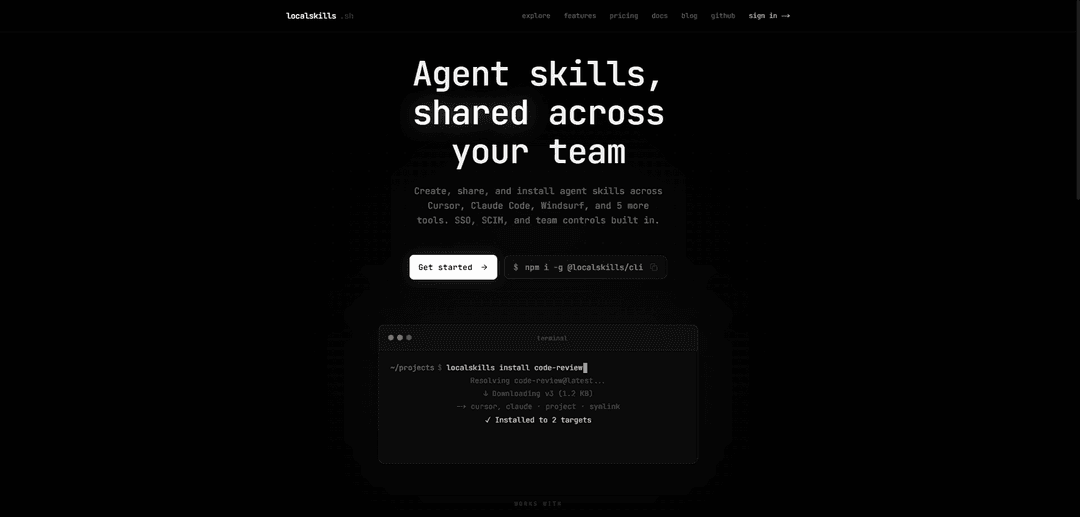
localskills.sh is a registry and CLI that lets you create, version, and install reusable agent skills and rules across 8 coding tools (e.g., Cursor, Claude Code, Windsurf) with team controls like SSO/SCIM, analytics, and audit logging.
https://localskills.sh/?ref=producthunt
Product Information
Updated:Aug 8, 2026
What is localskills.sh
localskills.sh is a platform for publishing and sharing “agent skills” and rules—reusable instruction bundles that would otherwise live in scattered dotfiles or per-repo configs. It provides a hosted registry plus a command-line interface so individuals and teams can create skills once and install them consistently into multiple agent environments (including Cursor, Claude Code, Windsurf, Cline, Copilot, Codex, OpenCode, and Aider). Beyond sharing, it’s designed for collaboration and governance, offering team features such as role-based access control, SAML 2.0 SSO, SCIM provisioning, API tokens, and activity/audit visibility.
Key Features of localskills.sh
localskills.sh is a registry plus CLI for creating, publishing, discovering, and installing reusable “agent skills” (rules/instructions packaged as files) across multiple AI coding tools (e.g., Cursor, Claude Code, Windsurf, Cline, Copilot, Codex, OpenCode, Aider). It standardizes installs across differing tool formats, supports versioning and update detection, and adds team/enterprise controls like roles, SAML SSO, SCIM provisioning, audit logs, API tokens, and download analytics—so individuals and organizations can keep AI coding standards consistent across repos and developer environments.
Cross-tool skill distribution: Publish once and install the same skill into any combination of 8 supported tools (Cursor, Claude Code, Windsurf, Cline, Copilot, Codex, OpenCode, Aider), with the CLI handling format and location differences automatically.
CLI-driven install, update, and uninstall: Use a single command workflow (install/pull/uninstall/list) to manage skills in local environments; updates are detected via SHA-256 content hashing so only changed content is refreshed.
Versioning and rollback: Every publish creates an auto-incrementing version with full history; teams can revert to previous versions to quickly undo problematic rule changes without manual file edits.
Flexible sharing & visibility controls: Publish publicly, keep skills private to your team, or share via an unlisted direct link; also supports anonymous sharing with an Ed25519 identity (with limits for anonymous users).
Team governance and enterprise identity: Built-in roles/permissions plus SAML 2.0 SSO and SCIM 2.0 directory sync for centralized access control and provisioning in larger organizations.
Audit logs, analytics, and tokens: Provides download tracking/analytics, user and team audit logs (e.g., publishes, logins, provisioning events), and API token support for operational visibility and governance.
Use Cases of localskills.sh
Standardize AI coding rules across multiple repos: Engineering teams can maintain one shared set of AI coding conventions (linting, testing patterns, framework usage) and install it into every developer’s preferred tool without duplicating files per repo.
Multi-tool development environments: Organizations using Cursor for daily coding, Claude Code for refactors, and Windsurf for prototyping can keep consistent agent behavior across tools, reducing “rule drift” and onboarding friction.
Enterprise compliance and governance: Regulated teams can use SSO/SCIM, role-based access, and audit logs to control who can publish or modify skills and to maintain traceability of instruction changes that influence generated code.
Internal platform/DevEx enablement: Platform engineering can publish internal best-practice skills (API conventions, deployment runbooks, incident response steps) and push updates org-wide with versioned rollbacks.
Community sharing of specialized workflows: Individuals can publish reusable skills (e.g., framework-specific rules, CLI workflows, testing scaffolds) to the public registry for others to discover and install quickly.
Fast iteration on agent instruction quality: Teams can treat rule updates like dependency updates—propose changes, publish a new version, measure impact via downloads/feedback, and roll back if the new behavior causes issues.
Pros
Reduces fragmentation by installing the same skill across multiple agent tools with one workflow.
Strong operational controls for teams (version history, rollback, audit logs) compared to ad-hoc dotfile copying.
Enterprise-ready identity and provisioning (SAML SSO, SCIM) for centralized access management.
Update detection via hashing and structured install methods (copy/section) helps keep rules consistent over time.
Cons
Relies on a hosted registry/service for discovery and distribution, which may be a concern for strict offline or self-hosting requirements.
Anonymous sharing is limited (e.g., capped number of shared skills), pushing heavier usage toward account-based publishing.
Tool-specific rule features may not translate perfectly everywhere, even if the platform automates format differences.
How to Use localskills.sh
1) Create an account and (optionally) a team: Go to https://localskills.sh and sign up (e.g., “Sign in with Google”). Create a team from the dashboard if you want to publish/manage skills with role-based access control (teams own skills; the creator becomes the owner).
2) Install the localskills CLI: Install globally with npm: `npm i -g @localskills/cli` then verify: `localskills --version`.
3) Log in (interactive CLI auth): Run `localskills login` to authenticate the CLI to your localskills.sh account so you can publish private/team skills and manage them.
4) Understand what you can publish (skills vs rules): A “skill” provides reusable agent instructions/workflows installed into your tool’s skill/rules location. A “rule” is governance/coding standards (some tools store these in a separate rules directory). Content is Markdown (max 512 KB). Each publish creates an auto-incrementing version; content is SHA-256 hashed so updates can be detected.
5) Create your skill content locally: Write your instructions as Markdown (and optionally organize as a folder package if you’re using the platform’s bundled packaging). Keep the description tight and specific (2–4 sentences) so the right situations trigger the skill.
6) Publish a skill to localskills.sh: From your skill directory (or pointing at a file), publish with the CLI: `localskills publish` (and include a name like `your-team/skill-name` if prompted/required by your workflow). Each publish produces a new immutable version visible in the dashboard’s version history.
7) Share a skill anonymously (no account required): Use `localskills share ./my-skill.md` to share a specific file, or run `localskills share` for an interactive scan-and-select flow. On first use, the CLI generates an Ed25519 keypair stored in `~/.localskills/config.json` as your anonymous identity. Anonymous users are limited to 10 shared skills.
8) Install a published skill into one or more tools: Install by slug/name into supported tools (Cursor, Claude Code, Windsurf, Cline, GitHub Copilot, Codex CLI, OpenCode, Aider) with one command, for example: `localskills install your-team/api-conventions --target cursor claude windsurf`. The CLI writes each tool’s native format/locations (e.g., `.claude/skills/` for Claude Code, `.cursor/rules/` for Cursor, `.windsurf/rules/` for Windsurf).
9) Choose an install mode (symlink, copy, or section): Symlink: creates a symlink from the tool’s target location to the cached file in `~/.localskills/cache/` so updates automatically reflect via the cache. Copy: writes an independent copy into the target location; `localskills pull` re-writes it on update. Section: embeds skill content into a shared file using markers like `<!-- localskills:start:{slug} --> ... <!-- localskills:end:{slug} -->` (useful for tools that rely on a single shared file).
10) Pull updates when a new version is published: Run `localskills pull` in a repository to update installed skills to the latest compatible versions. With symlink installs, pulling updates the cache and all symlinks point to the latest content automatically.
11) Test that your tool is actually applying the skill: Start a fresh session in your AI tool (some tools scan skills at startup, so a running session may not see newly installed skills). Test with a realistic request without explicitly naming the skill to confirm triggering and behavior.
12) Manage skills (list/view/delete/update) from CLI and dashboard: Use the CLI to manage registry content (list skills, view details, delete/remove skills, and manage versions). Use the dashboard to inspect version history and revert to previous versions if needed.
13) Use CI/CD publishing with OIDC (no long-lived secrets): For automated publishing, configure an OIDC trust policy on localskills.sh and publish from CI using short-lived identity tokens. Example GitHub Actions flow: set `permissions: id-token: write`, install the CLI, then run `localskills publish --oidc` with `LOCALSKILLS_TEAM` set to your team slug. Ensure the OIDC `aud` claim matches `https://localskills.sh`.
14) Enterprise rollout (optional): SSO, SCIM, and audit logs: For organizations, enable SAML 2.0 SSO (Okta, Microsoft Entra ID/Azure AD, etc.) and optionally SCIM 2.0 for user/group provisioning. Use roles/permissions for team access control and rely on audit logs (90-day retention) to track platform actions.
15) Troubleshoot auth and local configuration: If you need to reset CLI authentication, clear the stored auth token from your local configuration (the CLI provides a command for this). Anonymous identity keys live in `~/.localskills/config.json`.
localskills.sh FAQs
localskills.sh is a platform to create, share, and install reusable agent skills and rules across a team, with a single CLI-based install flow that works across multiple AI coding tools.
localskills.sh Video
Popular Articles

Proferex: A Cloud-Based Ad Tracking and Campaign Optimization Platform
Nov 4, 2026

How to Create Viral Talking Baby Podcast Videos with AI: Step-by-Step Guide
Nov 2, 2026

Vosko AI: Localize and Dub Videos for Global Audiences
Oct 15, 2026

Atoms: A Multi-Agent AI Platform That Transforms Ideas into Launch-Ready Products
Oct 13, 2026
Latest AI Tools Similar to localskills.sh

Gait
Gait is a collaboration tool that integrates AI-assisted code generation with version control, enabling teams to track, understand, and share AI-generated code context efficiently.

invoices.dev
invoices.dev is an automated invoicing platform that generates invoices directly from developers' Git commits, with integration capabilities for GitHub, Slack, Linear, and Google services.

EasyRFP
EasyRFP is an AI-powered edge computing toolkit that streamlines RFP (Request for Proposal) responses and enables real-time field phenotyping through deep learning technology.

Cart.ai
Cart.ai is an AI-powered service platform that provides comprehensive business automation solutions including coding, customer relations management, video editing, e-commerce setup, and custom AI development with 24/7 support.
Popular AI Tools Like localskills.sh

GitHub Copilot Chat
GitHub Copilot Chat is an AI-powered coding assistant that provides natural language interactions, real-time code suggestions, and contextual support directly within supported IDEs and GitHub.com.

CopilotForXcode
CopilotForXcode is an Xcode Source Editor Extension that integrates GitHub Copilot, Codeium, and ChatGPT to provide AI-powered code suggestions, chat assistance, and prompt-to-code functionality within Xcode.

BrowserAI
BrowserAI is an open-source library that enables running local Large Language Models (LLMs) directly in web browsers with WebGPU acceleration, offering privacy-focused AI capabilities without requiring server infrastructure.

OpenAI Codex CLI
OpenAI Codex CLI is a lightweight, open-source coding agent that runs in your terminal, enabling developers to translate natural language into code execution while providing ChatGPT-level reasoning with the ability to run code, manipulate files, and iterate under version control.