Kiro
Kiro is an AI-powered, agentic development environment from AWS that turns prompts into executable specs, uses parallel agents and hooks to implement and automate work across large codebases, and validates correctness with techniques like property-based testing.
https://kiro.dev/?ref=producthunt
Product Information
Updated:Aug 8, 2026
What is Kiro
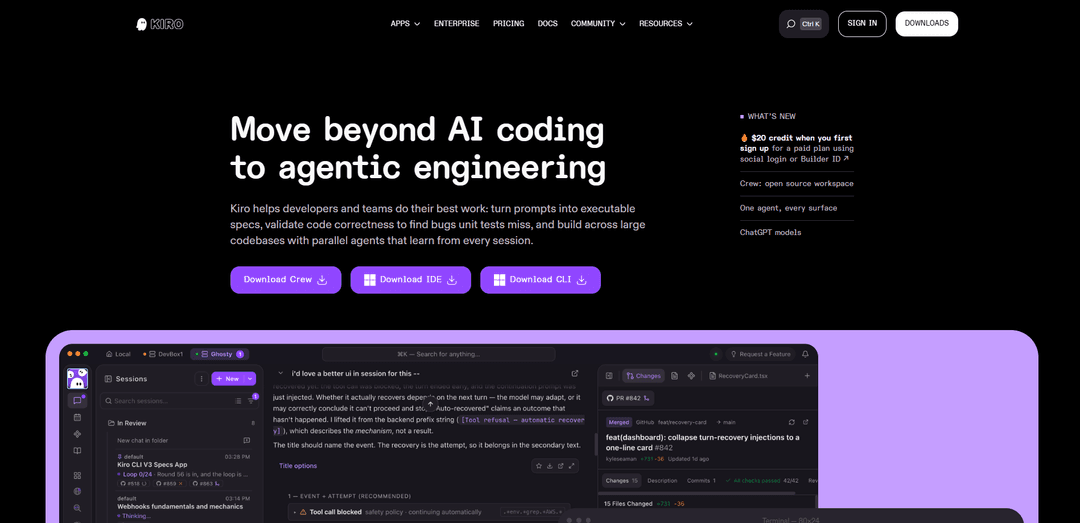
Kiro (kiro.dev) is an agentic, AI-powered development environment built by a small team within AWS to help developers go from prototype to production with more structure and confidence than typical “prompt-and-pray” coding. Instead of only generating snippets, Kiro emphasizes spec-driven development: it converts a single prompt into structured requirements (including user stories and EARS-style acceptance criteria), architectural/design artifacts, and a sequenced task plan that can be executed by AI agents. Kiro is available across multiple surfaces—Kiro IDE for local editor-based work, Kiro CLI for terminal and automation workflows, and Kiro Web for browser-based, multi-repo sessions that can open pull requests—sharing context through a .kiro/ directory and steering files.
Key Features of Kiro
Kiro is an agentic IDE, CLI, and Web experience designed to take software from idea to production using spec-driven development. It turns natural-language prompts into structured, reviewable specs (requirements, architecture/design, and sequenced tasks), then executes those tasks with parallel agents across large codebases while keeping context through shared project artifacts (e.g., .kiro/ steering/learnings). Kiro also automates repetitive workflows via hooks, supports codebase-aware chat and delegation, can integrate into terminal/headless workflows via the CLI, and emphasizes correctness with validation approaches like property-based testing to catch edge cases that unit tests can miss.
Spec-driven development: Converts prompts into structured specifications—requirements, technical/architectural design, and an ordered task plan—with approval gates or a Quick Spec option for well-understood work.
Parallel agents for large codebases: Runs independent tasks concurrently by analyzing dependencies, enabling faster multi-file feature work, refactors, and cross-repo changes.
Automations with Hooks: Lets you set intelligent triggers that respond to file changes or development events to automatically run tasks like tests, documentation updates, or checks in the background.
Multi-surface workflow (IDE + CLI + Web): Provides editor-integrated local development, terminal-native/headless automation, and browser-based sessions; steering files, permissions, hooks, MCP servers, and custom agents stay in sync via .kiro/.
Codebase-aware agentic chat & delegation: Supports natural-language conversations grounded in project context, with the ability to delegate work to agents and maintain learnings across sessions.
Correctness-focused validation: Includes validation approaches (e.g., property-based testing) aimed at catching bugs and edge cases that can slip past conventional unit tests.
Use Cases of Kiro
Startup product development: Turn evolving requirements into executable specs and ship production-ready features faster, with automated tests/docs to reduce process overhead.
Enterprise modernization & refactoring: Coordinate multi-file and large-scale refactors across legacy repositories using parallel agents, structured plans, and persistent steering rules.
DevOps / IaC automation: Use the CLI and hooks to generate and maintain Terraform/Python infrastructure changes, enforce standards, and run recurring checks in pipelines.
Open-source maintenance: Automate repetitive tasks like documentation updates, test generation, and issue-driven fixes while keeping changes aligned to a clear spec.
Scheduled engineering operations (Web automations): Connect GitHub/GitLab repos and have Kiro open pull requests for recurring work on a schedule, coordinating changes across repositories.
Pros
Strong structure for moving from prototype to production via specs (requirements/design/tasks) and reviewable artifacts
Parallel agent execution can speed up multi-step, multi-file work across large codebases
Automations via hooks reduce forgotten tasks (tests, docs) and improve consistency
Multiple interfaces (IDE/CLI/Web) support both interactive and headless workflows with shared context
Cons
Preview/free usage may have limits and access may require joining a waitlist depending on availability
Agentic automation can require trust and governance (permissions/steering) to avoid unwanted changes in sensitive codebases
Some advanced capabilities are experimental and may require toggling features or may be less stable
How to Use Kiro
1) Choose how you want to use Kiro (IDE, CLI, or Web): Kiro works across three surfaces—IDE (desktop app), CLI (terminal), and Web (app.kiro.dev). They share the same agent harness, so steering files, hooks, MCP servers, and learnings carry across interfaces.
2) Install Kiro IDE (desktop) if you want editor-first workflows: Download the installer from kiro.dev, run it (Windows/macOS/Linux), open Kiro IDE, and sign in (social or AWS login options). Optionally migrate your VS Code settings/extensions during initial setup.
3) Install Kiro CLI if you want terminal-native or headless automation: Run: curl -fsSL https://cli.kiro.dev/install | bash. Use the CLI to ask questions, modify code, run agent workflows, and automate tasks (including CI/CD-style headless runs).
4) Use Kiro Web for zero-setup sandboxed sessions: Go to app.kiro.dev and sign in. Kiro Web supports GitHub and GitLab repo connections and provides sandboxed sessions in the browser.
5) Connect your repositories (Web) or open a project folder (IDE/CLI): Web: connect a repository provider (GitHub or GitLab) so the agent can read/write code, create branches, and open PRs (you need write permissions). IDE: open a local project folder. CLI: run from within your repo directory so Kiro can understand the codebase context.
6) Add steering files to define project rules and context: Create steering documents in .kiro/steering/ (project-specific) to encode coding standards, architecture preferences, naming conventions, workflows, and constraints. Kiro automatically reads these and applies them during agent work across IDE/CLI/Web.
7) Decide between ‘Vibe’ (quick interactive) vs ‘Specs’ (structured planning): Use an interactive session for quick fixes and exploration. Use Specs when you want structured planning before code: Kiro turns a prompt into requirements, design, and sequenced implementation tasks.
8) Create a Spec for a feature (recommended for complex work): Describe the feature at a high level (e.g., “Add a review system for products”). Kiro generates spec artifacts (commonly requirements/design/tasks). Review and edit them to match your intent, then tell Kiro to reload/review if you made manual changes.
9) Execute the plan: ask Kiro to implement tasks step-by-step: Once the spec is approved, have Kiro implement tasks in order (or in parallel where appropriate), write code across the repo(s), generate docs/tests, and validate correctness (e.g., via unit/property-based tests where applicable).
10) Use agent hooks to automate routine actions: Set up hooks (automated triggers) so Kiro runs predefined actions on events like saving files, creating files, or deleting files. Example uses: auto-generate commit messages, update docs, run tests, or enforce formatting.
11) Extend Kiro with MCP servers for specialized tools and integrations: Enable and configure Model Context Protocol (MCP) servers to give Kiro access to external tools/APIs/knowledge bases. In IDE, open the Kiro panel and enable MCPs (edit via the pencil icon).
12) Run Kiro in autonomous mode when you want end-to-end ownership: For tasks where you want the agent to complete the outcome independently, use autonomous agent workflows (agentic development): Kiro can plan, implement, run tests, and prepare PRs with minimal guidance.
13) Use Kiro CLI for scripted workflows and PR automation: Example flow: create a branch, run Kiro with a prompt to fix an issue, commit, push, and open a PR. This is useful for troubleshooting CI failures, generating changes, and publishing PRs from the terminal.
14) Open pull requests and iterate collaboratively: Ask Kiro to prepare changes as a PR (especially in Web where repo write access is configured). Review diffs, request adjustments, and iterate until ready to merge.
15) Reuse learnings across sessions to build persistent project knowledge: Kiro can store and reuse learnings (editable on Kiro.dev) so future sessions benefit from prior decisions, code review feedback, and established patterns.
16) (Optional) Follow a guided practice project to learn faster: Use the official hands-on guide built around the sample game “Spirit of Kiro” to practice: setting up steering files, building features with specs, automating with hooks, and extending with MCP servers.
Kiro FAQs
Kiro is an agentic AI with an IDE, CLI, and web interface that helps you go from prototype to production. It turns prompts into detailed specs (requirements, technical design, and sequenced tasks) and then produces working code, documentation, and tests. Kiro’s agents can also automate tasks like generating documentation and unit tests.
Kiro Video
Popular Articles

Vosko AI: Localize and Dub Videos for Global Audiences
Oct 15, 2026

Atoms: A Multi-Agent AI Platform That Transforms Ideas into Launch-Ready Products
Oct 13, 2026

Nano Banana SBTI: What It Is, How It Works, and How to Use It in 2026
Apr 15, 2026

Atoms Review — The AI Product Builder Redefining Digital Creation in 2026
Apr 10, 2026
Latest AI Tools Similar to Kiro

Gait
Gait is a collaboration tool that integrates AI-assisted code generation with version control, enabling teams to track, understand, and share AI-generated code context efficiently.

invoices.dev
invoices.dev is an automated invoicing platform that generates invoices directly from developers' Git commits, with integration capabilities for GitHub, Slack, Linear, and Google services.

EasyRFP
EasyRFP is an AI-powered edge computing toolkit that streamlines RFP (Request for Proposal) responses and enables real-time field phenotyping through deep learning technology.

Cart.ai
Cart.ai is an AI-powered service platform that provides comprehensive business automation solutions including coding, customer relations management, video editing, e-commerce setup, and custom AI development with 24/7 support.
Popular AI Tools Like Kiro

GitHub Copilot Chat
GitHub Copilot Chat is an AI-powered coding assistant that provides natural language interactions, real-time code suggestions, and contextual support directly within supported IDEs and GitHub.com.

CopilotForXcode
CopilotForXcode is an Xcode Source Editor Extension that integrates GitHub Copilot, Codeium, and ChatGPT to provide AI-powered code suggestions, chat assistance, and prompt-to-code functionality within Xcode.

BrowserAI
BrowserAI is an open-source library that enables running local Large Language Models (LLMs) directly in web browsers with WebGPU acceleration, offering privacy-focused AI capabilities without requiring server infrastructure.

OpenAI Codex CLI
OpenAI Codex CLI is a lightweight, open-source coding agent that runs in your terminal, enabling developers to translate natural language into code execution while providing ChatGPT-level reasoning with the ability to run code, manipulate files, and iterate under version control.