
KatClaw™
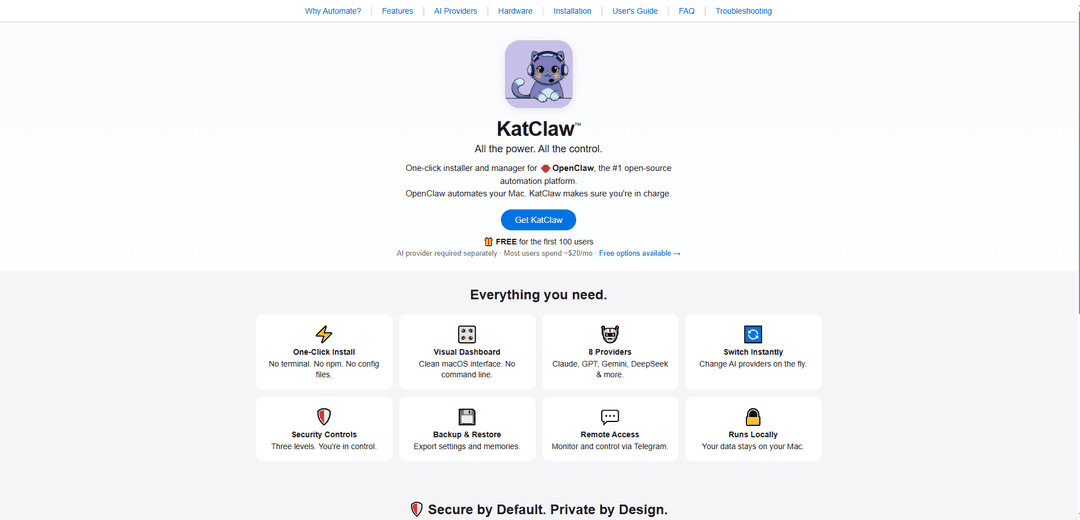
KatClaw™ is a one-click Mac app that simplifies the installation and management of OpenClaw AI assistant, allowing users to easily connect with multiple AI providers while maintaining security and control over their automation.
https://katclaw.ai/?ref=producthunt
Product Information
Updated:Mar 8, 2026
What is KatClaw™
KatClaw™ is a Mac application that serves as a user-friendly interface and manager for OpenClaw, the popular open-source AI automation platform. Developed by Albert, a veteran Mac app developer with 15 years of experience, KatClaw transforms the complex terminal-based setup of OpenClaw into an intuitive point-and-click experience. It enables users to run their personal AI assistant locally on their Mac while integrating with various AI providers like Claude, GPT, Gemini, and DeepSeek, with remote access through Telegram messaging.
Key Features of KatClaw™
KatClaw is a Mac application that provides a user-friendly interface for installing and managing OpenClaw, an open-source AI automation platform. It offers one-click installation, visual dashboard management, support for multiple AI providers (including Claude, GPT, Gemini, and DeepSeek), built-in security controls, local data storage, and remote access via Telegram, all while maintaining user privacy and control.
One-Click Installation and Management: Simplifies OpenClaw setup with no terminal commands or configuration files needed, making AI automation accessible to non-technical users
Multi-Provider AI Support: Seamlessly integrates with 8 different AI providers and allows instant switching between them, giving users flexibility in choosing their preferred AI service
Comprehensive Security Controls: Offers three security levels (Conservative, Moderate, and Full Access) with built-in security auditing and one-click fixes for potential vulnerabilities
Local Data Processing and Backup: Runs entirely on the user's Mac with automatic backup features and no cloud dependency, ensuring data privacy and control
Use Cases of KatClaw™
Personal AI Assistant Management: Individuals can easily set up and manage their AI assistant for daily tasks and automation without technical expertise
Professional Development Environment: Developers can utilize multiple AI models for code review, testing, and development tasks while maintaining security and privacy
Business Process Automation: Companies can implement AI automation for tasks like email management, content pipelines, and project management with controlled access and security
Remote Team Collaboration: Teams can coordinate AI-assisted work through Telegram integration while maintaining centralized control over automation capabilities
Pros
User-friendly interface requiring no technical knowledge
Strong security features and local data control
Flexible AI provider integration with easy switching
Built-in backup and restore capabilities
Cons
Additional cost for AI provider services (approximately $20/month)
Limited to Mac operating system only
Potential high API costs with continuous AI usage
How to Use KatClaw™
Download KatClaw: Visit katclaw.ai and download the KatClaw installer for Mac. The first 100 users get it free, after that it costs $49 one-time payment.
Install KatClaw: Run the one-click installer on your Mac. No terminal or complex configuration required.
Choose AI Provider: Select your preferred AI provider from the 8 available options (Claude, GPT, Gemini, DeepSeek, etc.) and enter your API key in the visual dashboard.
Set Security Level: Choose from three security levels: Conservative (no shell access), Moderate (allowlisted commands only), or Full Access (unrestricted). Configure according to your comfort level.
Connect Telegram: Set up Telegram integration to communicate with your AI assistant remotely through messaging.
Configure Backup Settings: Enable auto-backup feature through the Dashboard to protect your agent configuration, settings, and memories.
Start Using Assistant: Begin interacting with your AI assistant through Telegram or other configured messaging platforms. The assistant can now help with tasks based on your security settings and permissions.
Monitor & Manage: Use the visual dashboard to monitor activity, switch between AI providers, perform security audits, and manage backups as needed.
KatClaw™ FAQs
KatClaw is a one-click Mac app that provides a visual interface for installing and managing OpenClaw, an open-source AI automation platform. It allows users to connect with various AI providers and control their personal AI assistant through a clean macOS interface without using command lines.
KatClaw™ Video
Popular Articles

Atoms: A Multi-Agent AI Platform That Transforms Ideas into Launch-Ready Products
May 22, 2026

Nano Banana SBTI: What It Is, How It Works, and How to Use It in 2026
Apr 15, 2026

Atoms Review — The AI Product Builder Redefining Digital Creation in 2026
Apr 10, 2026

Kilo Claw: How to Deploy and Use a True "Do‑It‑For‑You" AI Agent(2026 Update)
Apr 3, 2026
Latest AI Tools Similar to KatClaw™

Inbox AI
Inbox AI is a privacy-focused MacOS productivity app that combines voice-driven AI automation with email management capabilities, allowing users to create custom workflows and commands while offering both cloud-based and on-device AI options.

Cart.ai
Cart.ai is an AI-powered service platform that provides comprehensive business automation solutions including coding, customer relations management, video editing, e-commerce setup, and custom AI development with 24/7 support.

Hiyllo Work
Hiyllo Work is an all-in-one team workspace platform that combines chat, project management, calendar, email, file storage and video meetings in a single integrated environment.

MailSense
MailSense is an AI-powered email assistant that filters, summarizes, and generates replies to emails through a Telegram bot interface to help users manage their inbox more efficiently.
Popular AI Tools Like KatClaw™

Magentic-UI
Magentic-UI is an open-source, human-centered web agent prototype by Microsoft Research that enables collaborative planning and execution of complex web-based tasks through transparent interaction between humans and AI agents.

Microsoft Copilot Cowork
Microsoft Copilot Cowork is an AI-powered assistant that turns user intent into actionable plans and autonomously executes multi-step tasks across Microsoft 365 apps while keeping users in control through checkpoints and approvals.

Upsonic
Upsonic is a reliability-focused AI agent framework with dockerized server-client architecture that enables trusted agent workflows through advanced features like verification layers, triangular architecture, and Model Context Protocol (MCP) integration.

CampEd Hire
CampEd Hire is a powerful Chrome extension that streamlines recruitment by automatically collecting and organizing job applicant data from LinkedIn job posts, with features like automated data collection, CSV export, and batch resume downloads.