
Jina Debug
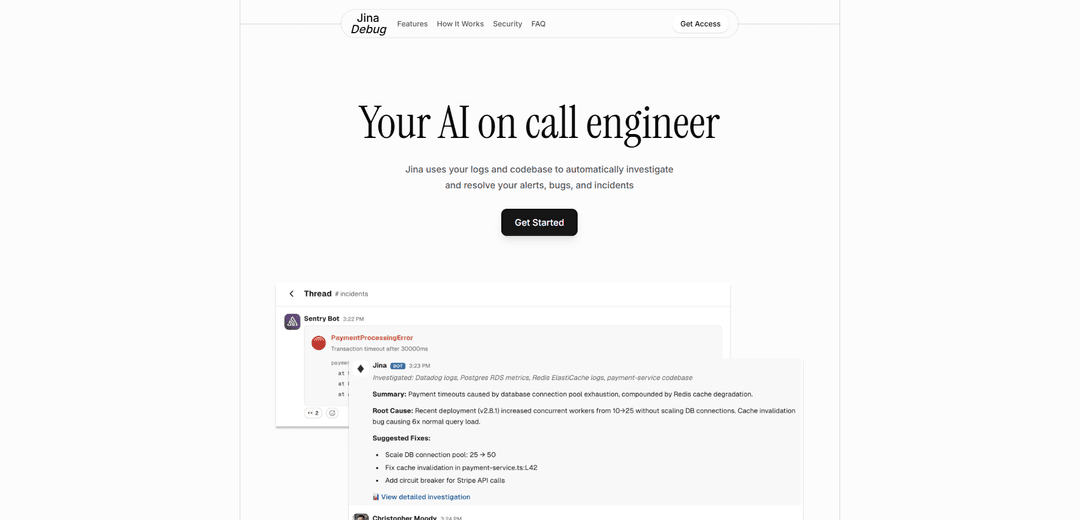
Jina Debug is an AI-powered on-call engineer that automatically investigates and resolves alerts, bugs, and incidents by learning from your logs and codebase.
https://jinadebug.com/?ref=producthunt
Product Information
Updated:Nov 13, 2025
What is Jina Debug
Jina Debug is an advanced AI solution designed to function as a virtual on-call engineer for software development teams. It serves as an intelligent system that integrates with various development tools, monitoring platforms, and communication channels to provide automated incident response and resolution. Built with enterprise-grade security and trusted by major organizations including Uber, Microsoft, and Stanford University, Jina Debug aims to streamline the incident management process and reduce the burden on engineering teams.
Key Features of Jina Debug
Jina Debug is an AI-powered on-call engineer solution that automatically investigates and resolves alerts, bugs, and incidents. It learns from your codebase, logs, commit history, and Slack discussions to build historical intelligence, providing automatic investigation, root cause analysis, and fix suggestions while integrating with various development and monitoring tools.
Automatic Investigation: Automatically investigates alerts and incidents, providing summaries of events, impact assessment, root causes, and potential fixes
Historical Intelligence: Learns from past incidents, codebase, and team discussions to build contextual knowledge for better problem-solving
Tool Integration: Seamlessly integrates with popular tools like Datadog, Sentry, Slack, GitHub, and major cloud platforms
Security-First Approach: Implements enterprise-grade security with end-to-end encryption, secure credential storage, and role-based access control
Use Cases of Jina Debug
Alert Management: Automatically tracks and investigates alerts in Slack channels, resolving issues before they escalate
Incident Response: Acts as a copilot during major incidents, helping teams find relevant resources and solutions faster
Customer Support Enhancement: Pre-researches production issues to provide context and solutions for customer-facing problems
Knowledge Management: Automatically documents resolutions and creates a searchable knowledge base for future reference
Pros
Comprehensive integration with popular development and monitoring tools
Strong security features and compliance measures
Automated investigation and resolution capabilities
Continuous learning and improvement from historical data
Cons
Requires initial setup and integration with existing tools
May need human oversight for production changes
Effectiveness depends on quality of historical data and documentation
How to Use Jina Debug
Request Access: Visit jinadebug.com and fill out the access request form to get started with Jina Debug
Integration Setup: Integrate Jina with your existing tools including monitoring platforms (Datadog, Sentry), communication tools (Slack), code repositories (GitHub), and cloud platforms (AWS, GCP, Azure, etc.)
Configure Alert Monitoring: Set up Jina to monitor your alerts channel in Slack where it will automatically investigate issues as they arise
Enable Learning Mode: Allow Jina to learn from your codebase, commit history, logs and past incident resolutions to build contextual intelligence
Automated Investigation: When alerts occur, Jina automatically investigates and provides summaries of the issue, impact, root causes and potential fixes
Review & Apply Fixes: Review Jina's proposed fixes and apply them with one click - Jina will create a pull request with the changes for your review
Interactive Troubleshooting: Use the chat interface to ask Jina questions about incidents and get AI-powered assistance during investigation
Monitor Results: Track Jina's performance through audit logs and incident history to ensure it's effectively reducing alert fatigue and resolution times
Jina Debug FAQs
Jina Debug is an AI on-call engineer that automatically investigates and resolves alerts, bugs, and incidents by using your logs and codebase. It learns your architecture and builds historical intelligence on how issues were resolved in the past.
Jina Debug Video
Popular Articles

Atoms: A Multi-Agent AI Platform That Transforms Ideas into Launch-Ready Products
May 22, 2026

Nano Banana SBTI: What It Is, How It Works, and How to Use It in 2026
Apr 15, 2026

Atoms Review — The AI Product Builder Redefining Digital Creation in 2026
Apr 10, 2026

Kilo Claw: How to Deploy and Use a True "Do‑It‑For‑You" AI Agent(2026 Update)
Apr 3, 2026
Latest AI Tools Similar to Jina Debug

Hapticlabs
Hapticlabs is a no-code toolkit that enables designers, developers and researchers to easily design, prototype and deploy immersive haptic interactions across devices without coding.

Deployo.ai
Deployo.ai is a comprehensive AI deployment platform that enables seamless model deployment, monitoring, and scaling with built-in ethical AI frameworks and cross-cloud compatibility.

CloudSoul
CloudSoul is an AI-powered SaaS platform that enables users to instantly deploy and manage cloud infrastructure through natural language conversations, making AWS resource management more accessible and efficient.

Devozy.ai
Devozy.ai is an AI-powered developer self-service platform that combines Agile project management, DevSecOps, multi-cloud infrastructure management, and IT service management into a unified solution for accelerating software delivery.
Popular AI Tools Like Jina Debug

A2A Protocol
A2A (Agent2Agent) Protocol is an open interoperability protocol developed by Google that enables seamless communication and collaboration between AI agents across different frameworks and vendors, regardless of their underlying architecture.

VoltOps
VoltOps is a framework-agnostic LLM observability platform that provides real-time visual monitoring, debugging, and optimization tools for AI agents across any technology stack.

Chaterm
Chaterm is an open-source AI-native terminal and SRE copilot that enables engineers to manage complex infrastructure through natural language, automating deployment, troubleshooting, and operations without memorizing commands.

Open Browser Use
Open Browser Use is an open-source, agent-runtime-neutral browser automation layer that pairs a Chrome extension with a CLI/SDK/MCP to enable DOM-aware, CDP-powered tab control, navigation, and actions across different AI agent tools.