
Grok Build
Grok Build is xAI’s terminal-native, agentic coding CLI that can plan and execute multi-step engineering work with plan mode, parallel subagents (including Git worktree isolation), and extensibility via skills/plugins/hooks and ACP for automation.
https://x.ai/cli?ref=producthunt
Product Information
Updated:Oct 9, 2026
Grok Build Monthly Traffic Trends
Driven by the launch of Grok 4 with native tool use and the Grok Imagine 0.9 media generation update, Grok Build achieved a moderate growth of 47.0%, adding 7.1M visits to reach 22.4M monthly users. Furthermore, the deep integration of the AI into X's core recommendation algorithm and the rollout of Grok-powered AI image editing features significantly expanded its user engagement and platform visibility.
What is Grok Build
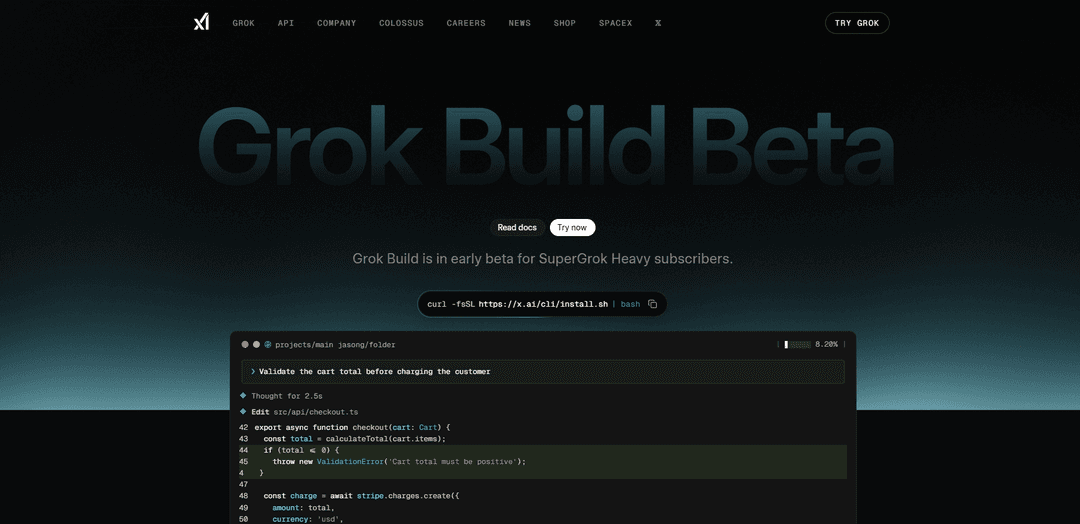
Grok Build is a new command-line coding agent from xAI designed for professional software engineering, application development, and workflow automation. Instead of living in a chat window, it runs directly in your terminal and can take natural-language instructions to produce implementation plans, edit files, run shell commands, and orchestrate larger tasks end to end. It is currently in early beta and is available first to SuperGrok Heavy subscribers, with installation provided via a one-line script and documentation hosted on xAI’s developer site.
Key Features of Grok Build
Grok Build is xAI’s terminal-native, agentic coding CLI (early beta) that helps developers plan and execute multi-step software work from natural-language prompts. It combines a fast fullscreen TUI with an explicit Plan Mode review gate, supports parallel subagents to research/build/review simultaneously, and adapts to existing repo conventions (e.g., AGENTS.md) while remaining extensible via skills, plugins, hooks, and MCP servers. It can edit files, run shell commands, and operate interactively or in headless mode for automation, with feedback capture built into the CLI.
Plan Mode review gate: Generates a step-by-step implementation plan you can review, edit, and approve before changes are executed, helping prevent large unintended rewrites.
Parallel subagents: Runs multiple subagents in parallel to research, build, and review at once, accelerating complex, multi-file tasks and enabling division of labor.
Fullscreen interactive terminal UI: A mouse-capable, fast, flicker-free TUI for coordinating plans, edits, Q&A, plugins, and subagents directly from the terminal.
Repository-aware adaptation: Picks up project conventions automatically (e.g., AGENTS.md) and works with existing plugins, hooks, skills, and MCP servers “out of the box.”
Extensibility via skills/plugins/MCP: Supports skills for workflow preferences, plugin/marketplace-style capability sharing, and MCP server integrations to extend what the agent can do.
Headless + orchestration support (ACP): Can run non-interactively in scripts/automations and supports ACP (Agent Coordination Protocol) for building bots and multi-agent orchestration apps.
Use Cases of Grok Build
Software engineering in large codebases: Use Plan Mode plus parallel subagents to implement features, refactors, and bug fixes across many files while keeping a human approval checkpoint.
DevOps and CI automation: Run Grok Build headlessly in scripts to automate repetitive engineering workflows (e.g., patch generation, dependency updates, or maintenance tasks).
Team enablement and internal tooling: Share skills/plugins across a team to standardize workflows (linting patterns, scaffolding, release steps) and speed up onboarding.
Product prototyping for startups: Rapidly turn natural-language requirements into working application code, with subagents handling research and implementation in parallel.
Enterprise integration and agent platforms: Leverage ACP and MCP support to embed Grok Build-like agents into internal developer platforms, chatops, or custom orchestration systems.
Pros
Plan-first workflow (review/edit/approve) reduces risk compared to agents that start executing immediately.
Parallel subagents enable faster progress on complex tasks through built-in multi-agent coordination.
Extensible and repo-aware: works with existing conventions and integrates via skills, plugins, hooks, and MCP servers.
Cons
Early beta with limited availability (restricted to SuperGrok Heavy subscribers).
Terminal-first UX may be less approachable for developers who prefer IDE-native workflows.
How to Use Grok Build
1) Confirm access prerequisites: Grok Build is in early beta and requires a SuperGrok Heavy subscription. You’ll also need a macOS, Linux, or Windows machine with a terminal emulator.
2) Install Grok Build: Run: curl -fsSL https://x.ai/cli/install.sh | bash
3) Open a terminal in your project folder: Navigate to the repository/directory you want Grok Build to work in (so it can pick up your repo context and conventions).
4) Start an interactive Grok Build session (TUI): Launch Grok Build from that folder to enter the fullscreen terminal UI where you can chat, plan, and edit code in-context.
5) Sign in / authenticate: When prompted, sign in with the account tied to your SuperGrok Heavy subscription so the CLI can access Grok Build.
6) Give Grok Build a concrete task prompt: Describe the change you want in natural language (e.g., “Validate the cart total before charging the customer”). Grok Build will propose edits and apply changes to files in your repo.
7) Review file edits inside the UI: Use the built-in editor/viewer to inspect the exact changes Grok Build makes (e.g., edits to src/api/checkout.ts). Iterate by asking for adjustments until it matches your intent.
8) Use Plan Mode for multi-step projects: Switch to the plan viewer to architect larger work. Use it to break down tasks, track progress, and keep implementation aligned with the plan.
9) Ask side questions without interrupting your main flow: Use the CLI’s side-question workflow (shown as “Ask a side question without interrupting”) to clarify requirements or explore alternatives while keeping your primary task intact.
10) Use Skills for workflow-specific behavior: Enable or select skills to adapt Grok Build to your preferences and tasks (e.g., UI polish/design engineering guidance for hover states, shadows, typography, micro-interactions, and animations).
11) Add or use Plugins / Marketplaces: Open the plugins/marketplace area to install or share capabilities across your team, extending what Grok Build can do in your environment.
12) Let Grok Build ask clarifying questions (Q&A mode): Use the Q&A interface when Grok Build needs missing details. Answering these prompts helps it “nail the details” before it edits code.
13) Run Subagents in parallel for research/build/review: Spawn subagents to work concurrently on different threads (e.g., one researches, one implements, one reviews). This is useful for complex tasks and faster iteration.
14) Use headless mode for scripts and automation: Run Grok Build non-interactively (headless) when you want to integrate it into scripts, CI tasks, or automations.
15) Integrate with other apps via ACP (Agent Client Protocol): If you’re building your own orchestrators or tools, connect through ACP to control Grok Build programmatically from third-party applications.
16) Inspect what Grok Build discovered in your repo: After configuration changes, run the inspect command (e.g., grok inspect) to see what Grok Build detected in the current directory (config sources, instructions, skills, plugins, hooks, MCP servers).
17) Submit feedback from inside the CLI: Use the built-in /feedback command to report bugs, request features, or share reactions—beta feedback is explicitly solicited to improve the product.
18) Refer to official documentation for deeper workflows: Open the official docs for updated guidance and advanced usage: https://docs.x.ai/build/overview
Grok Build FAQs
Grok Build is a terminal-based AI coding agent and CLI from xAI designed for professional software engineering and complex coding work. It provides a fullscreen, mouse-interactive TUI and can also run headlessly for scripts and automations.
Popular Articles

Atoms: A Multi-Agent AI Platform That Transforms Ideas into Launch-Ready Products
May 22, 2026

Nano Banana SBTI: What It Is, How It Works, and How to Use It in 2026
Apr 15, 2026

Atoms Review — The AI Product Builder Redefining Digital Creation in 2026
Apr 10, 2026

Kilo Claw: How to Deploy and Use a True "Do‑It‑For‑You" AI Agent(2026 Update)
Apr 3, 2026
Analytics of Grok Build Website
Grok Build Traffic & Rankings
22.4M
Monthly Visits
#2580
Global Rank
#13
Category Rank
Traffic Trends: Nov 2024-Oct 2025
Grok Build User Insights
00:02:55
Avg. Visit Duration
2.97
Pages Per Visit
27.98%
User Bounce Rate
Top Regions of Grok Build
US: 26.62%
KR: 9.73%
IN: 4.62%
JP: 3.15%
HK: 2.99%
Others: 52.89%
Latest AI Tools Similar to Grok Build

Gait
Gait is a collaboration tool that integrates AI-assisted code generation with version control, enabling teams to track, understand, and share AI-generated code context efficiently.

invoices.dev
invoices.dev is an automated invoicing platform that generates invoices directly from developers' Git commits, with integration capabilities for GitHub, Slack, Linear, and Google services.

EasyRFP
EasyRFP is an AI-powered edge computing toolkit that streamlines RFP (Request for Proposal) responses and enables real-time field phenotyping through deep learning technology.

Cart.ai
Cart.ai is an AI-powered service platform that provides comprehensive business automation solutions including coding, customer relations management, video editing, e-commerce setup, and custom AI development with 24/7 support.
Popular AI Tools Like Grok Build

GitHub Copilot Chat
GitHub Copilot Chat is an AI-powered coding assistant that provides natural language interactions, real-time code suggestions, and contextual support directly within supported IDEs and GitHub.com.

CopilotForXcode
CopilotForXcode is an Xcode Source Editor Extension that integrates GitHub Copilot, Codeium, and ChatGPT to provide AI-powered code suggestions, chat assistance, and prompt-to-code functionality within Xcode.

BrowserAI
BrowserAI is an open-source library that enables running local Large Language Models (LLMs) directly in web browsers with WebGPU acceleration, offering privacy-focused AI capabilities without requiring server infrastructure.

OpenAI Codex CLI
OpenAI Codex CLI is a lightweight, open-source coding agent that runs in your terminal, enabling developers to translate natural language into code execution while providing ChatGPT-level reasoning with the ability to run code, manipulate files, and iterate under version control.