
Genpire
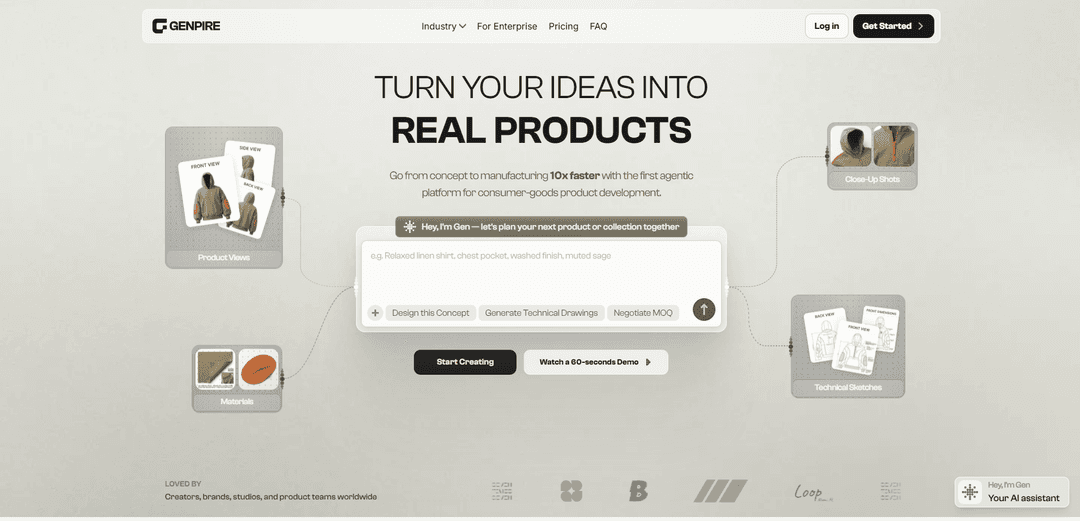
Genpire is an agentic, AI-native product development platform that turns prompts, sketches, or reference images into multi-view visuals and factory-ready tech packs and manufacturing specs in minutes.
https://genpire.com/?ref=producthunt
Product Information
Updated:May 18, 2026
What is Genpire
Genpire is a consumer-goods product design and manufacturing-prep platform built to help creators, brands, studios, and enterprise teams move from an initial idea to production-ready outputs far faster than traditional workflows. Instead of relying on fragmented tools (design, documentation, sourcing) and manual specification work, Genpire provides a single AI-driven workspace where users can generate product concepts, refine details, and export technical documentation such as tech packs and related manufacturing files. It supports multiple consumer product categories—including fashion, accessories, footwear, jewelry, furniture, home goods, toys, and gadgets—and includes options for brand consistency through features like Brand DNA.
Key Features of Genpire
Genpire is an AI-powered, agentic product development platform that turns prompts, sketches, or reference images into factory-ready outputs—multi-view product visuals, technical drawings, measurement/spec documentation, and production files—so teams can move from concept to manufacturing much faster. It supports brand consistency through “Brand DNA” inputs, provides an AI product editor for iterative refinement, and can connect users to manufacturers/suppliers for quoting, sampling, and bulk production across many consumer-goods categories (e.g., fashion, accessories, footwear, jewelry, furniture, home goods, toys, and gadgets).
Prompt/sketch-to-product generation: Create product concepts from text prompts or by uploading sketches/references, producing multi-view visuals and concepts quickly.
Factory-ready tech packs (“Gen-Packs”): Automatically generates manufacturing documentation packages with technical drawings, measurement charts, material specifications, and related production details for manufacturer handoff.
Multi-view visualization & close-ups: Generates product views (front/back/side) plus detail shots to help creators and stakeholders evaluate design intent before sampling.
Brand consistency via Brand DNA: Sync brand identity/assets (and optionally catalogs) so generated concepts align with an established visual style and product language.
AI-powered product editor & iterative refinement: Edit and refine designs (e.g., shapes, colors, materials) in-platform, combining AI generation with manual adjustments for production readiness.
Manufacturing workflow + supplier connections: Supports collaboration with manufacturers and can facilitate quoting, sampling, MOQ negotiation, and production preparation in a single workflow.
Use Cases of Genpire
Fashion/apparel collection development: Rapidly iterate garments from prompt/sketch to tech pack, reducing manual spec work and accelerating seasonal collection timelines.
Footwear design to manufacturer handoff: Translate outsole/upper concepts into technical drawings and specs suitable for factory communication and sampling.
Accessories & bags product specification: Develop backpacks, handbags, and accessories with compartment/assembly details, materials, and production-ready documentation.
Furniture & home goods prototyping: Generate renders plus construction-style documentation and material specs for items like lamps, seating, and fixtures.
Toys and consumer product ideation: Turn early concepts into clearer manufacturable definitions (visuals + specs) to align teams and suppliers before tooling/sampling.
Agency/enterprise design ops acceleration: Help studios and product teams produce more concepts and cleaner technical inputs with fewer resources, improving collaboration with stakeholders and factories.
Pros
End-to-end workflow from idea → visuals → tech pack → manufacturer-ready files, reducing back-and-forth and manual documentation.
Fast iteration: prompt/sketch-based creation plus an editor for refinement supports rapid exploration of many variants.
Cross-category coverage (apparel, footwear, accessories, jewelry, furniture, home goods, toys, gadgets) and brand-style alignment via Brand DNA.
Manufacturing-oriented outputs and workflows (e.g., specs/tech drawings, quoting/sampling/production prep) rather than concept-only generation.
Cons
Free tiers/credit-based plans may limit how many products/exports you can generate without paying (usage constraints).
Real-world manufacturability and accuracy of auto-generated specs may still require expert review before production.
Best results likely depend on providing strong inputs (clear prompts, good sketches, accurate brand assets), which can be a learning curve.
Category breadth is ambitious; more complex products with “moving parts” may require deeper specification capabilities than soft goods.
How to Use Genpire
1) Create an account and open the workspace: Go to https://genpire.com, click “Get Started” (or “Log in”), and enter the main creation workspace where you can generate product visuals, specs, and exports in one place.
2) Start from your preferred input (prompt, sketch, or reference image): Begin a new product by either (a) typing a text prompt describing the product, (b) uploading a sketch/napkin drawing, or (c) uploading reference images to guide the design direction.
3) Define the product category and intent: Choose the relevant consumer-goods category (e.g., fashion/apparel, accessories, footwear, jewelry, furniture, home goods, toys, gadgets) so Genpire can generate more appropriate visuals and manufacturing-oriented outputs.
4) Generate an initial front view concept: Run the first generation to get a clear front view. This is the “approval” anchor that Genpire uses before expanding into consistent multi-view outputs.
5) Iterate on the concept with directed edits: Refine the design by instructing the AI what to change (e.g., proportions, features, materials, components). Repeat generate → review → adjust until the front view matches your intent.
6) Approve the front view: Once satisfied, approve/lock the front view so Genpire can keep the design consistent when producing additional angles and technical assets.
7) Generate multi-view product visuals: Instantly expand from the approved front view into multi-view generation (e.g., front/back/side) to create a coherent set of product visuals suitable for review and downstream documentation.
8) Generate close-up shots for key details: Request close-ups of important areas (e.g., seams, closures, compartments, joints, textures) to clarify construction and design intent for stakeholders and manufacturers.
9) Generate technical sketches and drawings: Produce technical sketches/drawings (e.g., dimensioned views, technical line sketches) to translate the concept into manufacturer-friendly documentation.
10) Specify materials and finishes: Use the materials workflow to define fabrics/materials, colors, finishes, and other surface/trim choices. Update and regenerate visuals/close-ups as needed to reflect the chosen materials.
11) Build factory-ready specifications (tech pack content): Compile manufacturing details such as construction notes, components, and other production requirements. Genpire is designed to generate production-ready tech packs and technical documentation in minutes.
12) Generate a complete tech pack / manufacturing files: Export the factory-ready outputs (tech pack and related manufacturing documentation/files) once the visuals, materials, and technical details are finalized.
13) Create brand assets (optional): If you’re building a brand around the product, generate supporting assets like logos, prints, and social creatives in the same workspace to keep the product and brand identity aligned.
14) Use Brand DNA for consistency (optional, plan-dependent): If available on your plan, set up Brand DNA so Genpire can guide style and outputs to match your brand’s identity across product visuals and related creative assets.
15) Manage credits and plan usage: Track credit usage for generations/edits/renders. Genpire uses a credit system where actions consume credits (some advanced models may cost more per action). Choose one-time credits or a subscription plan based on your volume.
16) Share or publish outputs for feedback (optional): Share your product outputs with collaborators/stakeholders for review. If you want community visibility, publish via the platform’s public/discover sharing options (where available).
Genpire FAQs
Genpire is an AI-driven product development platform that helps creators, brands, and teams go from an initial idea to factory-ready manufacturing outputs, including production-ready tech packs and technical documentation.
Genpire Video
Popular Articles

Atoms: A Multi-Agent AI Platform That Transforms Ideas into Launch-Ready Products
May 22, 2026

Nano Banana SBTI: What It Is, How It Works, and How to Use It in 2026
Apr 15, 2026

Atoms Review — The AI Product Builder Redefining Digital Creation in 2026
Apr 10, 2026

Kilo Claw: How to Deploy and Use a True "Do‑It‑For‑You" AI Agent(2026 Update)
Apr 3, 2026
Latest AI Tools Similar to Genpire

MultipleWords
MultipleWords is a comprehensive AI platform offering 16 powerful tools for content creation and manipulation across audio, video, and image editing with cross-platform accessibility.

Athena AI
Athena AI is a versatile AI-powered platform offering personalized study assistance, business solutions, and life coaching through features like document analysis, quiz generation, flashcards, and interactive chat capabilities.

Taidai.io
Taidai.io is an AI-powered tool that automatically converts notes, emails, and text content into actionable todo lists.

Repliio
Repliio is an AI-powered email assistant Chrome extension that helps users generate professional, context-aware email responses quickly with customizable tones and multi-language support.
Popular AI Tools Like Genpire

Microsoft Excel: Spreadsheets
Microsoft Excel is the industry-leading spreadsheet software that allows users to organize, analyze, and visualize data through powerful features like formulas, charts, and AI-powered insights.

Standboy
Standboy is a VS Code/Cursor extension that auto-expands a Game Boy (GB/GBC/GBA) emulator in the sidebar during AI agent activity, then auto-hides and pauses—resuming mid-frame next time—while keeping a persistent ROM library, saves, and cover art.
Omniaxe
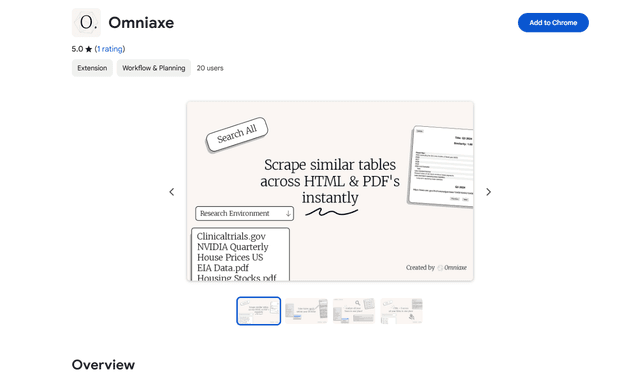
Omniaxe is an all-in-one Chrome extension research tool that combines seamless data extraction, AI-powered analysis, and centralized note-taking capabilities designed specifically for analysts, researchers and students.

Finesse by Skippr AI
Finesse by Skippr AI is a browser extension that provides instant, expert-level product feedback and critiques across design, content strategy, accessibility, and product direction through specialized AI reviewers.