
Friendware
Friendware is a native macOS AI-powered productivity tool that offers universal tab-to-complete functionality and context-aware autocomplete across various applications and platforms.
https://friendware.ai/?ref=producthunt

Product Information
Updated:Jan 8, 2026
What is Friendware
Friendware is an innovative AI productivity tool designed specifically for macOS that aims to streamline digital communication and content creation. It integrates seamlessly with popular applications including email clients (Gmail, Apple Mail), messaging platforms (Slack, WhatsApp, Discord), social media (X/Twitter), and AI tools (ChatGPT, Claude). The software is built as a lightweight, battery-efficient solution that understands user context and predicts intent in real-time.
Key Features of Friendware
Friendware is a Mac-native AI productivity tool that provides universal tab-to-complete functionality across various applications. It offers real-time assistance, context-aware suggestions, and instant replies in email, messaging, and social media apps. The tool is designed to understand user context, predict intent, and execute tasks in real-time while maintaining efficiency and privacy.
Universal Autocomplete: Works seamlessly across multiple platforms including email, Slack, iMessage, AI apps, social media, and more
Context-Aware Intelligence: Understands what users see on screen and provides relevant suggestions without requiring explicit explanations
Native Mac Integration: Built specifically for MacOS with native code, ensuring blazing fast performance and battery efficiency
Real-time Response Generation: Reduces response time from 45 seconds to 4.2 seconds by providing instant AI-powered replies
Use Cases of Friendware
Professional Communication: Helps users craft quick and appropriate responses in business emails and professional messaging platforms
Social Media Management: Assists in generating engaging responses and maintaining active presence across social platforms
Personal Productivity: Streamlines daily communication tasks by providing quick, contextual suggestions and responses
Pros
Native Mac integration for optimal performance
Works across multiple applications and platforms
Battery efficient and lightweight
Cons
Only available for MacOS
Requires subscription or one-time payment
May raise privacy concerns due to screen monitoring
How to Use Friendware
Install Friendware: Download and install Friendware from friendware.ai for macOS (Windows version not currently available)
Purchase Access: Join the Founding Member program for $149 one-time payment which includes lifetime access and 1:1 onboarding support
Enable Permissions: Allow Friendware to access necessary permissions on your Mac to work with different apps and monitor context
Configure Settings: Set up personalization settings and tune prompt settings to match your voice/workflow (can be done during 1:1 onboarding if desired)
Use Tab-to-Complete: Start using the tab-to-complete feature across supported apps like Gmail, Slack, Discord, WhatsApp, X, and other messaging/email platforms
Access Real-time Help: Get AI assistance and suggestions before you ask by letting Friendware observe your context and work
Generate Instant Replies: Use Friendware to quickly generate contextually-aware responses in your communications apps by pressing tab
Improve Prompts: Click to get help writing better AI prompts based on your context and intent
Friendware FAQs
Friendware is an AI-powered productivity tool for macOS that provides tab-to-complete functionality and instant replies across various applications including email, messaging, and social media apps.
Friendware Video
Popular Articles

Vosko AI: Localize and Dub Videos for Global Audiences
Oct 15, 2026

Atoms: A Multi-Agent AI Platform That Transforms Ideas into Launch-Ready Products
Oct 13, 2026

Nano Banana SBTI: What It Is, How It Works, and How to Use It in 2026
Apr 15, 2026

Atoms Review — The AI Product Builder Redefining Digital Creation in 2026
Apr 10, 2026
Latest AI Tools Similar to Friendware

MultipleWords
MultipleWords is a comprehensive AI platform offering 16 powerful tools for content creation and manipulation across audio, video, and image editing with cross-platform accessibility.

Athena AI
Athena AI is a versatile AI-powered platform offering personalized study assistance, business solutions, and life coaching through features like document analysis, quiz generation, flashcards, and interactive chat capabilities.

Taidai.io
Taidai.io is an AI-powered tool that automatically converts notes, emails, and text content into actionable todo lists.

Repliio
Repliio is an AI-powered email assistant Chrome extension that helps users generate professional, context-aware email responses quickly with customizable tones and multi-language support.
Popular AI Tools Like Friendware

Microsoft Excel: Spreadsheets
Microsoft Excel is the industry-leading spreadsheet software that allows users to organize, analyze, and visualize data through powerful features like formulas, charts, and AI-powered insights.

Standboy
Standboy is a VS Code/Cursor extension that auto-expands a Game Boy (GB/GBC/GBA) emulator in the sidebar during AI agent activity, then auto-hides and pauses—resuming mid-frame next time—while keeping a persistent ROM library, saves, and cover art.
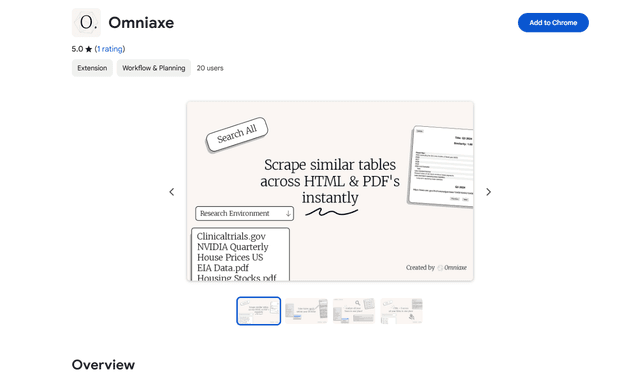
Omniaxe
Omniaxe is an all-in-one Chrome extension research tool that combines seamless data extraction, AI-powered analysis, and centralized note-taking capabilities designed specifically for analysts, researchers and students.

Finesse by Skippr AI
Finesse by Skippr AI is a browser extension that provides instant, expert-level product feedback and critiques across design, content strategy, accessibility, and product direction through specialized AI reviewers.