
Evernote
Evernote is a versatile note-taking and task-management application that helps users capture, organize, find and share notes, documents and information across all devices.
https://evernote.com/?ref=producthunt

Product Information
Updated:Feb 8, 2026
What is Evernote
Evernote is a powerful productivity tool developed by Evernote Corporation (acquired by Bending Spoons in 2022) that serves as your 'second brain' for remembering everything and organizing your digital life. It's designed to be a central hub where users can store and manage various types of content including text notes, documents, images, audio recordings, web clippings, and tasks. The platform works across multiple devices and operating systems, making it accessible whether you're on desktop, mobile, or web browser.
Key Features of Evernote
Evernote is a comprehensive note-taking and organization platform that combines traditional note-taking capabilities with modern AI features and collaboration tools. It allows users to capture, store, organize, and share various types of content including text notes, images, audio recordings, and documents across multiple devices. The platform offers features like AI-powered search, task management, calendar integration, document scanning, and web clipping, while ensuring seamless synchronization across devices and providing tools for team collaboration.
AI-Powered Features: Includes AI Assistant, Semantic Search, and AI Meeting Notes for smart transcription, translation, and content organization, helping users process and understand information faster
Cross-Platform Sync: Seamlessly synchronizes notes, tasks and schedules across all devices (desktop, mobile, tablet) with automatic updates and offline access capabilities
Advanced Organization Tools: Offers notebooks, spaces, tags, and customizable templates to help users structure their content, plus powerful search functionality to quickly find specific information
Integrated Task Management: Combines note-taking with task management, allowing users to create to-do lists, set reminders, and assign tasks while keeping relevant information in context
Use Cases of Evernote
Personal Knowledge Management: Individuals can create a digital brain for storing important information, from recipes and warranties to meeting notes and project plans
Business Team Collaboration: Teams can share notes, assign tasks, and collaborate in real-time on projects while maintaining all relevant documentation in one place
Academic Research & Study: Students and researchers can organize research materials, scan handwritten notes, and create structured study materials with easy reference and search capabilities
Content Creation & Planning: Writers and content creators can collect ideas, organize research, and plan content with web clipping and AI-powered tools for better productivity
Pros
Powerful organization and search capabilities
Rich feature set including AI tools
Excellent cross-platform compatibility and sync
Cons
Some advanced features require paid subscription
Recent updates have faced user criticism for performance issues
Can be overwhelming for basic note-taking needs
How to Use Evernote
Sign up for an Evernote account: Go to Evernote's homepage and click 'Sign up' in the top-right corner. Create a free account or choose a paid plan. Download the desktop/mobile apps if desired for syncing across devices.
Create your first note: Click the 'New Note' button at the top of your screen. Give your note a title and start adding content. You can format text, add checklists, insert images/files, and more.
Organize with notebooks: Create notebooks to organize related notes together. Keep the number of notebooks minimal and use tags for more specific organization. New notes are saved to your default notebook unless specified otherwise.
Use tags effectively: Add relevant tags to notes for easier searching and organization. Tags can be more specific than notebooks and a note can have multiple tags. Create a simple tagging system (e.g. project names, status, priority).
Install Web Clipper extension: Add the Evernote Web Clipper browser extension to easily save web pages, articles, and online content directly to your Evernote account with one click.
Set up saved searches: Create and save frequently used search terms/phrases to quickly find specific notes. Access saved searches by clicking the search bar.
Use templates: Access Evernote's template gallery for pre-made note structures. Create new notes from templates for consistent formatting of meeting notes, project plans, etc.
Review and maintain: Set aside regular time (e.g. weekly) to review recent notes, organize content, and clean up tags/notebooks to keep your Evernote system working effectively.
Evernote FAQs
To make a note available offline, swipe left on a note in the note list then tap the green download button. To see all your offline content in one place, tap the 'Offline' tab in the sidebar.
Evernote Video
Popular Articles

Vosko AI: Localize and Dub Videos for Global Audiences
Oct 15, 2026

Atoms: A Multi-Agent AI Platform That Transforms Ideas into Launch-Ready Products
Oct 13, 2026

Nano Banana SBTI: What It Is, How It Works, and How to Use It in 2026
Apr 15, 2026

Atoms Review — The AI Product Builder Redefining Digital Creation in 2026
Apr 10, 2026
Latest AI Tools Similar to Evernote

MultipleWords
MultipleWords is a comprehensive AI platform offering 16 powerful tools for content creation and manipulation across audio, video, and image editing with cross-platform accessibility.

Athena AI
Athena AI is a versatile AI-powered platform offering personalized study assistance, business solutions, and life coaching through features like document analysis, quiz generation, flashcards, and interactive chat capabilities.
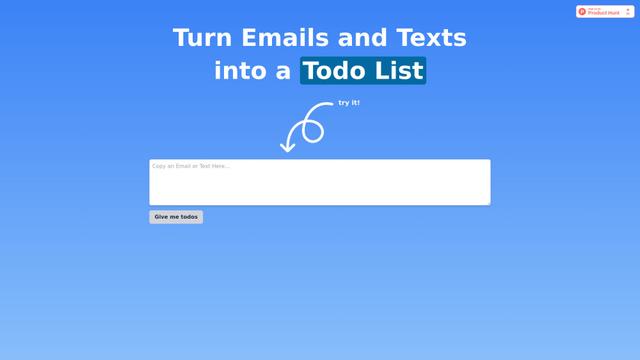
Taidai.io
Taidai.io is an AI-powered tool that automatically converts notes, emails, and text content into actionable todo lists.

Repliio
Repliio is an AI-powered email assistant Chrome extension that helps users generate professional, context-aware email responses quickly with customizable tones and multi-language support.
Popular AI Tools Like Evernote

Microsoft Excel: Spreadsheets
Microsoft Excel is the industry-leading spreadsheet software that allows users to organize, analyze, and visualize data through powerful features like formulas, charts, and AI-powered insights.

Standboy
Standboy is a VS Code/Cursor extension that auto-expands a Game Boy (GB/GBC/GBA) emulator in the sidebar during AI agent activity, then auto-hides and pauses—resuming mid-frame next time—while keeping a persistent ROM library, saves, and cover art.
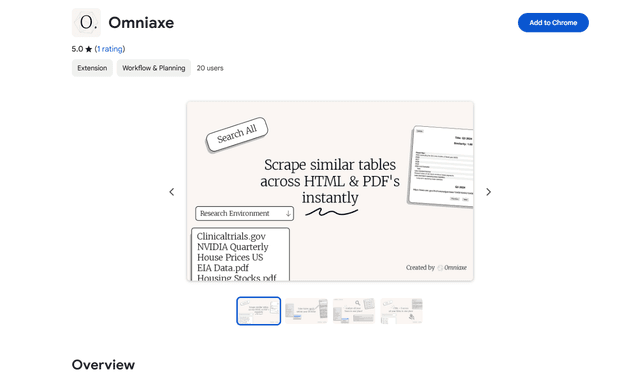
Omniaxe
Omniaxe is an all-in-one Chrome extension research tool that combines seamless data extraction, AI-powered analysis, and centralized note-taking capabilities designed specifically for analysts, researchers and students.

Finesse by Skippr AI
Finesse by Skippr AI is a browser extension that provides instant, expert-level product feedback and critiques across design, content strategy, accessibility, and product direction through specialized AI reviewers.