
EasyCircuit
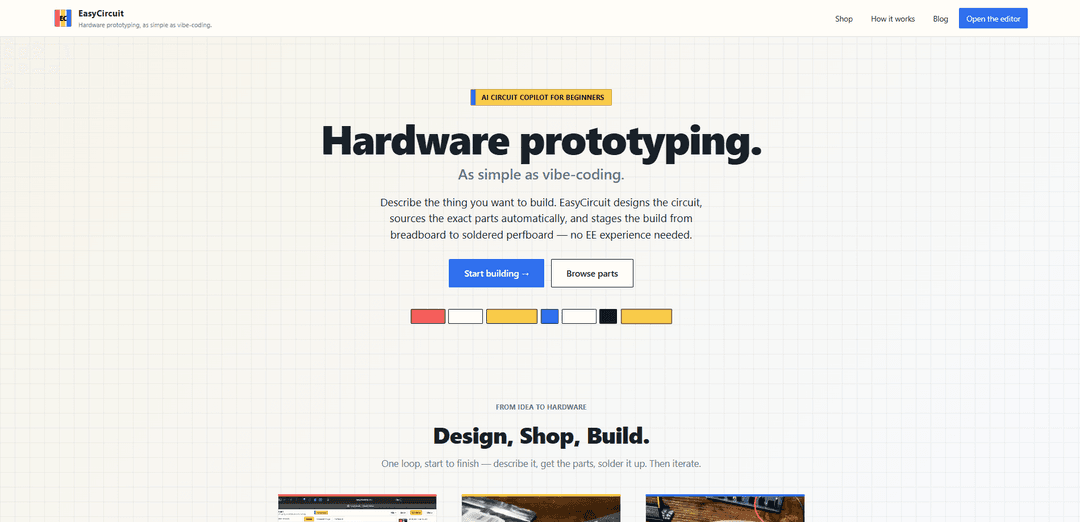
EasyCircuit is an AI hardware prototyping copilot that turns a plain‑language idea into an editable schematic, automatically sources a verified parts kit, and guides you from breadboard proof to a solder-ready perfboard layout with real footprints.
https://easycircuit.app/?ref=producthunt
Product Information
Updated:Aug 8, 2026
What is EasyCircuit
EasyCircuit is a browser-based “design, shop, build” platform for electronics prototyping that aims to make building custom circuits accessible even without an electrical engineering background. Instead of starting with datasheets and supplier searches, you describe what you want to build in chat and the copilot generates a complete schematic you can review and edit. It then bundles the exact components into a made-to-order kit and provides a build path that mirrors real-world prototyping: validate on a breadboard first, then move to a soldered perfboard version.
Key Features of EasyCircuit
EasyCircuit is a browser-based “AI circuit copilot” that takes a plain-language hardware idea and turns it into an editable schematic, automatically sources the exact components into a verified, in-stock parts kit, and guides you through a staged build process—starting on a breadboard to validate functionality and ending with an auto-packed solderable perfboard layout using real part footprints and pin orders. It’s designed to make electronics prototyping feel like “vibe-coding,” reducing the need for prior EE experience by explaining design choices as you iterate.
Chat-to-schematic circuit design: Describe your project in natural language and the copilot generates a complete circuit schematic you can edit, while explaining component choices, nets, and wiring.
Automatic parts sourcing + single kit: The copilot selects the exact orderable parts (no guesswork or supplier browsing) and bundles them into a made-to-order kit with stock verification.
Perfboard layout with real footprints: Generates a packed perfboard layout that includes real component footprints and correct pin order, so the parts you receive match what you solder.
Staged build workflow (breadboard → perfboard): Guides an engineering-style process: prototype on a breadboard first to prove the design, then move to a soldered perfboard build for durability.
In-browser “whole bench” experience: Combines design, shopping, and build guidance in one web workflow, enabling rapid iteration without switching between separate CAD, BOM, and layout tools.
Learn-as-you-build explanations: Targets beginners by teaching concepts in context—each design decision is explained and you can ask for modifications at any step.
Use Cases of EasyCircuit
Maker prototypes and weekend builds: Quickly turn an idea (e.g., a sensor gadget, LED controller, small automation tool) into a working circuit with an ordered kit and a clear build path.
STEM education and labs: Teachers and students can go from a written project prompt to a breadboardable circuit, using the copilot’s explanations to reinforce fundamentals.
Startup hardware proof-of-concepts: Early teams can validate circuitry faster by outsourcing schematic drafting, BOM selection, and perfboard layout to the copilot before committing to PCB design.
R&D experiments and instrumented prototypes: Useful for building one-off experimental rigs (e.g., environmental monitoring, research instrumentation) where fast iteration matters more than polished PCBs.
Productization bridge (prototype to durable build): Helps move from fragile breadboard demos to sturdier soldered perfboard assemblies suitable for field tests or small pilot runs.
Pros
End-to-end workflow (design → source → build) reduces tool and vendor hopping.
Beginner-friendly: explanations plus staged build lowers the barrier to hardware prototyping.
Verified, footprint-checked parts and perfboard layouts reduce common ordering/pinout mistakes.
Fast iteration: you can request changes in chat and update the design without starting over.
Cons
Lead time: kits typically ship 1–2 weeks after pre-order, which may be slow for urgent builds.
Component-only kits by default: soldering tools are optional and may be required for completion.
Perfboard-focused output may not replace full PCB workflows for production-grade designs.
Effectiveness depends on the copilot’s design assumptions; complex or niche requirements may still need expert review.
How to Use EasyCircuit
1) Open EasyCircuit in your browser: Go to https://easycircuit.app/ and open the editor/workspace where your designs are saved privately in your account.
2) Start a new design in the editor: Create/open a project in your workspace so you have a place to generate and edit a circuit.
3) Describe your hardware idea in plain language: In the chat-style prompt, write what you want to build (e.g., what it should sense/control, what power source you have, and any constraints).
4) Let the copilot generate the schematic: After you submit your description, the copilot designs a complete circuit schematic by selecting components, defining nets, and wiring connections.
5) Review the copilot’s explanations: Read the rationale for each major choice (parts, values, and connections) so you understand how the circuit works as you build.
6) Edit and iterate by asking for changes: If you want different behavior or constraints (different supply voltage, different sensor, smaller BOM, etc.), ask the copilot to modify the design and regenerate/update the schematic.
7) Move to the staged build: breadboard first: Use the provided breadboard layout to prototype the circuit non-permanently and confirm it works before soldering anything.
8) Validate the prototype and iterate if needed: If something doesn’t match your goal, ask the copilot to adjust the design and repeat the breadboard stage until it behaves correctly.
9) Generate the perfboard layout with real footprints: When the prototype is confirmed, switch to the packed perfboard layout that includes per-part footprints and pin order so the physical build matches the exact parts.
10) Use the Shop flow to source verified parts: Have the copilot select exact, in-stock components from real suppliers and compile them into a single verified parts list/kit.
11) Place a kit order (optional): If you want everything shipped together, order the made-to-order kit; kits typically ship about 1–2 weeks after pre-order.
12) Decide on tools at checkout (optional): Kits ship as components by default; you can add a soldering iron/tools add-on at checkout if you don’t already have them.
13) Solder following the perfboard layout: Assemble the final circuit by soldering exactly according to the packed perfboard layout and footprints.
14) Keep iterating after the build: If you want improvements or changes, return to the editor, ask the copilot to update the circuit, and repeat the breadboard → perfboard workflow.
15) Manage your order if needed: If you pre-ordered a kit and change your mind, you can cancel for a full refund any time before the kit ships.
EasyCircuit FAQs
EasyCircuit is a browser-based hardware prototyping tool that takes you from an idea to a working circuit by designing the schematic, sourcing the exact parts into a kit, and guiding you through a staged build from breadboard to soldered perfboard.
EasyCircuit Video
Popular Articles

Vosko AI: Localize and Dub Videos for Global Audiences
Oct 15, 2026

Atoms: A Multi-Agent AI Platform That Transforms Ideas into Launch-Ready Products
Oct 13, 2026

Nano Banana SBTI: What It Is, How It Works, and How to Use It in 2026
Apr 15, 2026

Atoms Review — The AI Product Builder Redefining Digital Creation in 2026
Apr 10, 2026
Latest AI Tools Similar to EasyCircuit

Gait
Gait is a collaboration tool that integrates AI-assisted code generation with version control, enabling teams to track, understand, and share AI-generated code context efficiently.

invoices.dev
invoices.dev is an automated invoicing platform that generates invoices directly from developers' Git commits, with integration capabilities for GitHub, Slack, Linear, and Google services.

EasyRFP
EasyRFP is an AI-powered edge computing toolkit that streamlines RFP (Request for Proposal) responses and enables real-time field phenotyping through deep learning technology.

Cart.ai
Cart.ai is an AI-powered service platform that provides comprehensive business automation solutions including coding, customer relations management, video editing, e-commerce setup, and custom AI development with 24/7 support.
Popular AI Tools Like EasyCircuit

GitHub Copilot Chat
GitHub Copilot Chat is an AI-powered coding assistant that provides natural language interactions, real-time code suggestions, and contextual support directly within supported IDEs and GitHub.com.

CopilotForXcode
CopilotForXcode is an Xcode Source Editor Extension that integrates GitHub Copilot, Codeium, and ChatGPT to provide AI-powered code suggestions, chat assistance, and prompt-to-code functionality within Xcode.

BrowserAI
BrowserAI is an open-source library that enables running local Large Language Models (LLMs) directly in web browsers with WebGPU acceleration, offering privacy-focused AI capabilities without requiring server infrastructure.

OpenAI Codex CLI
OpenAI Codex CLI is a lightweight, open-source coding agent that runs in your terminal, enabling developers to translate natural language into code execution while providing ChatGPT-level reasoning with the ability to run code, manipulate files, and iterate under version control.