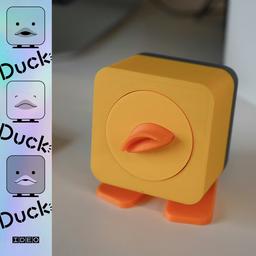
Duck, Duck, Duck! by IDEO
Duck, Duck, Duck! by IDEO is an AI-powered companion for Claude Code on Mac that watches coding sessions, provides voice-activated controls, handles permissions through speech, and delivers opinionated reactions through both a desktop widget and optional physical duck hardware.
https://duck-duck-duck.edges.ideo.com/?ref=producthunt
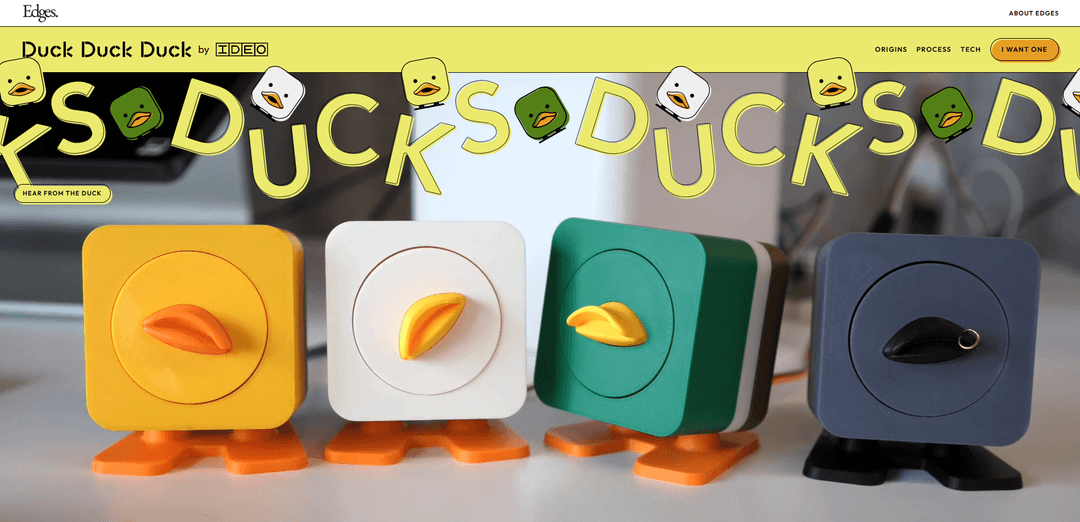
Product Information
Updated:Apr 10, 2026
What is Duck, Duck, Duck! by IDEO
Duck, Duck, Duck! is an innovative coding companion developed by IDEO that brings the traditional rubber duck debugging technique into the AI era. This unique tool integrates with Claude Code on Mac to create an interactive coding assistant that not only monitors your development sessions but actively responds with personality and opinions. Available as both a desktop widget and a physical hardware device, Duck Duck Duck transforms the passive rubber duck debugging method into an engaging, voice-enabled experience. The system watches every prompt and response in your coding workflow, scores interactions using on-device AI (designed for M3+ Apple Silicon), and provides real-time feedback through spoken reactions. Whether you choose the software-only widget or connect to the physical duck with servo-driven movements, this companion adds a layer of interactivity and humor to your development process while maintaining practical functionality for permission handling and voice commands.
Key Features of Duck, Duck, Duck! by IDEO
Duck Duck Duck by IDEO is an innovative rubber duck debugging companion that integrates with Claude Code to provide real-time, opinionated feedback during coding sessions. Available as both a physical hardware device and a desktop widget for Mac (M3+ Apple Silicon), it monitors your AI-assisted coding workflow, speaks reactions when Claude runs, fails, or hesitates, and enables voice-controlled permissions and commands. The duck features on-device AI scoring, physical reactions through servo motors, and personality-driven commentary that ranges from celebratory to sarcastically critical, transforming the traditional passive rubber duck debugging method into an interactive, vocal coding companion.
Voice-Activated Control: Say 'ducky' followed by commands to speak directly to your Claude Code session, enabling hands-free interaction and voice-based permission approvals without modal dialogs or context switching.
Opinionated AI Commentary: The duck provides personality-driven feedback with emotional reactions to your code, celebrating successes with enthusiasm and delivering witty criticisms for mistakes, including commentary on variable naming choices.
Physical Hardware Reactions: Built on ESP32-S3 with micro-servo, I2S amplifier, speaker, and MEMS microphone, the physical duck moves and responds in real-time to coding events via a single USB-C cable for power, data, and audio.
Real-Time Claude Code Integration: Shell hooks monitor every Claude prompt and response through tmux integration, firing evaluations and tracking when Claude runs, fails, or hesitates during coding sessions.
Dual Operating Modes: Toggle between Permissions mode for tracking when Claude needs approval and Companion mode for continuous inner monologue commentary on your coding interactions.
On-Device AI Processing: Designed for M3+ Apple Silicon with instant, free on-device AI scoring; M1/M2 supported with optional free Gemini API key for fast reactions, ensuring privacy and low latency.
Use Cases of Duck, Duck, Duck! by IDEO
AI-Assisted Development Workflow: Developers using Claude Code can maintain focus on their editor while the duck handles permission requests vocally and provides real-time feedback on AI coding suggestions without interrupting their workflow.
Solo Developer Companionship: Independent programmers working alone can benefit from the duck's personality-driven commentary as a form of rubber duck debugging that actually talks back, providing both functional feedback and entertainment during long coding sessions.
Code Review Learning Tool: Junior developers can use the duck's opinionated feedback to learn better coding practices, as it comments on decisions like variable naming and code structure in real-time during development.
Hands-Free Coding Sessions: Developers who prefer keyboard-centric workflows or have accessibility needs can use voice commands to control Claude Code without reaching for a mouse or navigating through UI dialogs.
Remote Work Engagement: Remote developers can add an element of personality and interaction to their isolated work environment, with the duck providing audio feedback and physical presence on their desk.
Educational Coding Demonstrations: Instructors teaching AI-assisted programming can use the duck to make Claude Code interactions more visible and engaging for students, with vocal announcements of what the AI is doing.
Pros
Innovative hands-free voice control for AI coding workflows eliminates context switching and modal dialogs
Available in both physical hardware and software-only widget versions, accommodating different user preferences and budgets
On-device AI processing on M3+ Apple Silicon ensures privacy and instant reactions without cloud dependencies
Adds personality and entertainment to coding sessions while maintaining functional utility for debugging and permission management
Cons
Limited to Mac users only (M3+ for best performance, M1/M2 with API key), excluding Windows and Linux developers
Requires Claude Code and tmux setup, creating a specific technical environment dependency that may not suit all workflows
Physical hardware version requires assembly or waiting for pre-built units, adding complexity compared to pure software solutions
The duck's opinionated commentary may be distracting or annoying for some developers who prefer minimal interruptions during focused work
How to Use Duck, Duck, Duck! by IDEO
1: Download the Duck Duck Duck application and drag it to your Applications folder on Mac (requires M3+ Apple Silicon for local operation, M1/M2 supported with free Gemini API key)
2: Launch the Duck Duck Duck application - the duck will walk you through the initial setup process
3: Install the Claude Code plugin - hooks are cached at session start, so start a new Claude Code session if the plugin doesn't load
4: If using the physical duck hardware, connect it via USB-C cable for power, data, and audio
5: Choose your preferred mode: Toggle between Permissions mode (helps track when Claude gets stuck) and Companion mode (duck shares inner monologue on how you engage with Claude)
6: Adjust intelligence settings if needed: Go to Preferences → Intelligence to switch between Gemini, Haiku, or local on-device AI for instant reactions
7: Start coding with Claude Code - Duck Duck Duck will automatically listen in and react when Claude runs, fails, or hesitates
8: Use voice commands by saying 'ducky' followed by your command to speak directly to your Claude Code session
9: Respond to permission requests by voice when Claude needs approval to run something - the duck will ask you out loud without modal dialogs
Duck, Duck, Duck! by IDEO FAQs
Duck Duck Duck is a companion tool for Claude Code on Mac that acts as an interactive rubber duck for debugging. It listens to your coding sessions, understands what's happening, speaks opinionated reactions, and handles permissions by voice. It can exist as either a physical hardware device or a desktop widget.
Duck, Duck, Duck! by IDEO Video
Popular Articles

Atoms: A Multi-Agent AI Platform That Transforms Ideas into Launch-Ready Products
May 22, 2026

Nano Banana SBTI: What It Is, How It Works, and How to Use It in 2026
Apr 15, 2026

Atoms Review — The AI Product Builder Redefining Digital Creation in 2026
Apr 10, 2026

Kilo Claw: How to Deploy and Use a True "Do‑It‑For‑You" AI Agent(2026 Update)
Apr 3, 2026
Latest AI Tools Similar to Duck, Duck, Duck! by IDEO

Gait
Gait is a collaboration tool that integrates AI-assisted code generation with version control, enabling teams to track, understand, and share AI-generated code context efficiently.

invoices.dev
invoices.dev is an automated invoicing platform that generates invoices directly from developers' Git commits, with integration capabilities for GitHub, Slack, Linear, and Google services.

EasyRFP
EasyRFP is an AI-powered edge computing toolkit that streamlines RFP (Request for Proposal) responses and enables real-time field phenotyping through deep learning technology.

Cart.ai
Cart.ai is an AI-powered service platform that provides comprehensive business automation solutions including coding, customer relations management, video editing, e-commerce setup, and custom AI development with 24/7 support.
Popular AI Tools Like Duck, Duck, Duck! by IDEO

GitHub Copilot Chat
GitHub Copilot Chat is an AI-powered coding assistant that provides natural language interactions, real-time code suggestions, and contextual support directly within supported IDEs and GitHub.com.

CopilotForXcode
CopilotForXcode is an Xcode Source Editor Extension that integrates GitHub Copilot, Codeium, and ChatGPT to provide AI-powered code suggestions, chat assistance, and prompt-to-code functionality within Xcode.

BrowserAI
BrowserAI is an open-source library that enables running local Large Language Models (LLMs) directly in web browsers with WebGPU acceleration, offering privacy-focused AI capabilities without requiring server infrastructure.

OpenAI Codex CLI
OpenAI Codex CLI is a lightweight, open-source coding agent that runs in your terminal, enabling developers to translate natural language into code execution while providing ChatGPT-level reasoning with the ability to run code, manipulate files, and iterate under version control.