
doXmind
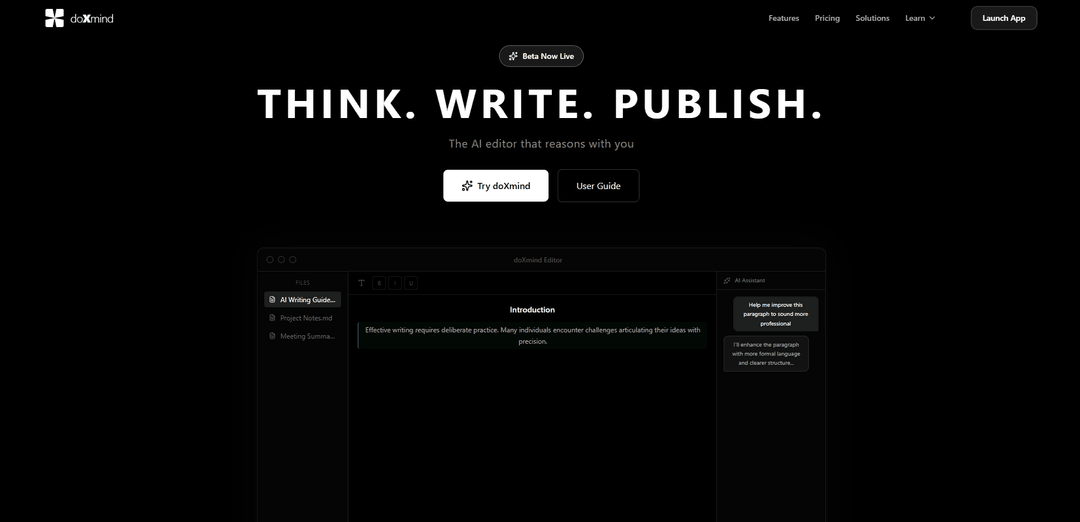
doXmind is an AI-native desktop editor that combines AI-powered writing assistance, data analysis, and document management with features like multi-agent systems and interactive visualizations.
https://doxmind.com/?ref=producthunt
Product Information
Updated:Feb 8, 2026
What is doXmind
doXmind is a cutting-edge AI-powered desktop editor designed to transform data workflows and enhance writing capabilities. Built with modern technologies including TipTap, Vue 3, and Tauri, it serves as a comprehensive platform that bridges the gap between traditional document editing and advanced AI assistance. The platform is currently in beta phase and offers both free and pro versions, making it accessible to users looking to improve their writing and data analysis processes.
Key Features of doXmind
doXmind is an AI-native desktop editor that combines advanced data analysis capabilities with AI-powered writing assistance. It features a multi-agent system, interactive visualizations, and a clean Markdown-based interface. The platform integrates AI chat assistance powered by Claude, real-time collaboration tools, and automated data analysis features, making it a comprehensive solution for both writing and data workflow management.
AI Chat Assistant: Powered by Claude AI that can read, understand, and directly modify content while maintaining contextual awareness of the entire document
Quick Edit Transformations: One-click functionality to improve, simplify, expand, translate, or fix grammar with granular control through inline diff view
Knowledge Base Integration: RAG-powered system that can search and reference uploaded PDFs, DOCX, or PPTX files when answering queries
AI Autocomplete: GitHub Copilot-like intelligent suggestions as you type with seamless tab completion
Use Cases of doXmind
Content Creation: Writers and content creators can use the AI assistance to draft, edit, and refine their work with intelligent suggestions and improvements
Data Analysis: Researchers and analysts can leverage the platform's visualization and automated analysis features to process and understand complex datasets
Document Management: Teams can collaborate on documents while utilizing the knowledge base feature to reference and incorporate information from existing materials
Pros
Clean, distraction-free Markdown editor interface
Comprehensive AI assistance features
Powerful knowledge base integration capabilities
Cons
Currently in beta testing phase
May require learning curve for non-technical users
How to Use doXmind
Launch the App: Go to beta.doxmind.com to access the web-based editor. No installation required.
Create New Document: Start a new document in the clean, distraction-free Markdown editor interface.
Write Content: Begin writing your content using Markdown formatting. The editor provides a clean interface for distraction-free writing.
Use AI Assistant: Access the AI chat assistant powered by Claude. Ask questions or request help with your writing by typing in the 'Ask anything...' prompt.
Quick Edit Features: Select text and use one-click transforms to improve, simplify, expand, translate, or fix grammar instantly.
Review AI Changes: Review AI-suggested changes using the inline diff view. Accept or reject each change individually to maintain control.
Use AI Autocomplete: Get intelligent suggestions as you type, similar to GitHub Copilot. Press Tab to accept suggestions and continue writing.
Upload Reference Documents: Upload PDFs, DOCX, or PPTX files to the knowledge base so AI can reference them when answering questions.
Check Writing Quality: Use the text review feature for Grammarly-like analysis with color-coded suggestions for grammar, clarity and style improvements.
Export/Save: Save your completed document with all the AI-assisted improvements and formatting intact.
doXmind FAQs
doXmind is an AI-powered desktop editor for data analysis and writing that features a multi-agent system, interactive visualizations, and automated data analysis. It is built with TipTap, Vue 3, and Tauri technologies.
doXmind Video
Popular Articles

Vosko AI: Localize and Dub Videos for Global Audiences
Oct 15, 2026

Atoms: A Multi-Agent AI Platform That Transforms Ideas into Launch-Ready Products
Oct 13, 2026

Nano Banana SBTI: What It Is, How It Works, and How to Use It in 2026
Apr 15, 2026

Atoms Review — The AI Product Builder Redefining Digital Creation in 2026
Apr 10, 2026
Latest AI Tools Similar to doXmind

Folderr
Folderr is a comprehensive AI platform that enables users to create custom AI assistants by uploading unlimited files, integrating with multiple language models, and automating workflows through a user-friendly interface.
InDesign Translator
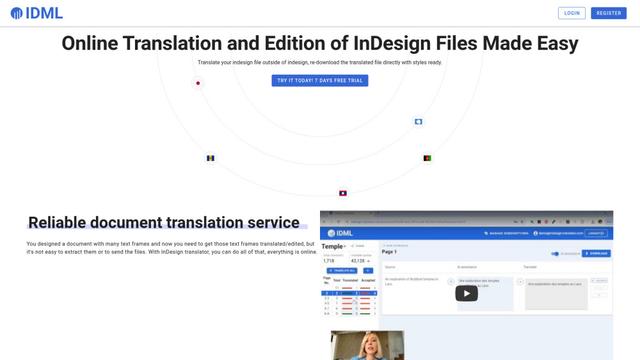
InDesign Translator is an online translation service that enables users to translate InDesign files while maintaining formatting and styles, offering AI-assisted translation and easy collaboration features without requiring translators to have InDesign installed.

Specgen.ai
Specgen.ai is an AI-powered platform that helps businesses optimize their bid responses by automatically analyzing tender requirements and generating personalized responses while ensuring 100% data confidentiality through proprietary AI models.

TurboDoc
TurboDoc is an AI-powered invoice processing software that automatically extracts and transforms unstructured invoice data into organized, easy-to-read structured data through Gmail integration and intelligent document processing.
Popular AI Tools Like doXmind

R2R
R2R (Reason to Retrieve) is an advanced AI retrieval system that provides production-ready Retrieval-Augmented Generation (RAG) capabilities with multimodal content ingestion, hybrid search, knowledge graphs, and comprehensive document management through a RESTful API.

Claude Folder Upload
A Chrome extension that enables users to upload entire folders to Claude AI while intelligently preserving directory structures and file relationships, with smart filtering capabilities for irrelevant files.

Web Clipper for NotebookLM
Web Clipper for NotebookLM is a Chrome extension that saves web pages, PDFs, YouTube content, social posts/threads, and even AI chat conversations directly into Google NotebookLM in one click, plus adds powerful export, sync, and notebook-management tools.

ReadHero
ReadHero is a comprehensive book tracking and note-taking app that helps readers remember and retain more of what they read by enabling progress tracking, note-taking, and book management all in one place.