
Didon
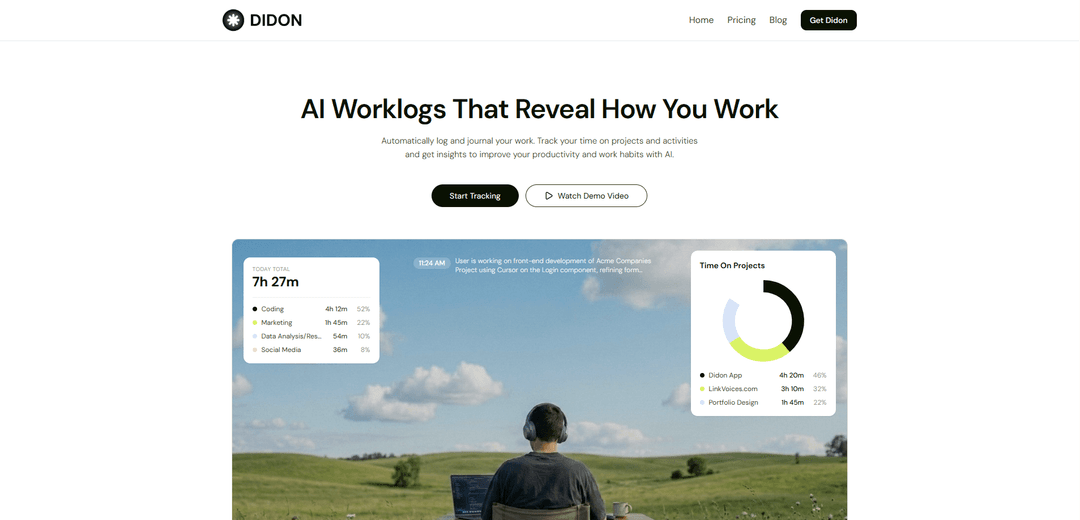
Didon is a privacy-first AI time tracker for Mac that automatically captures your work activity, analyzes it locally with an on-device LLM, and generates searchable daily work logs and exportable reports without manual timers.
https://www.didon.app/?ref=producthunt
Product Information
Updated:Jul 8, 2026
What is Didon
Didon is an automatic AI worklog and time-tracking app designed to help you understand how you spend your workday. Running quietly in the background, it builds a structured journal of your activities and produces clear daily summaries and time breakdowns by project and category. Unlike traditional time trackers that rely on manual start/stop timers, Didon focuses on passive capture and AI-generated reporting so you can review what you did, when you did it, and how it maps to your goals.
Key Features of Didon
Didon is a Mac-focused AI time tracker that automatically builds daily work logs by running in the background and analyzing periodic screenshots locally on your device. You define project goals and activity categories as context, and a local LLM (Qwen-3-VL:2b) turns what’s on your screen into structured journals, summaries, and time breakdowns—without manual timers. It supports exporting reports (CSV), provides searchable/askable work journals via natural-language queries, and emphasizes privacy by keeping screenshots and analysis on your machine.
Automatic background time tracking: Runs quietly and captures a screenshot about every 30 seconds to understand how you spend your workday with no manual check-ins.
Local AI privacy-first analysis: Uses a local LLM (Qwen-3-VL:2b) to analyze screenshots on-device so sensitive data and images never leave your Mac.
Context-aware project categorization: Lets you define projects, goals, and activity categories so the AI can map detected work to the right initiatives and produce meaningful stats.
Detailed task and app detection: Detects what you’re working on by identifying apps, windows, file names, and task signals from your screen activity.
Daily work reports + CSV export: Generates end-of-day summaries, time spent per project, and category breakdowns, with exportable (and auto-saved) CSV logs for billing or reporting.
Ask your work journal (natural language): Query your work logs conversationally to recall what you did last week, find patterns, and extract insights from your tracked activity.
Use Cases of Didon
Client billing for freelancers/consultants: Automatically produces time-on-project breakdowns and exportable CSVs to support accurate invoicing and reduce admin overhead.
Personal productivity and habit improvement: Helps individuals understand where time goes each day, spot distractions, and adjust routines using AI-generated summaries and insights.
Agency and studio project reporting: Creates structured daily logs across multiple projects to support internal status reporting, retrospectives, and workload balancing.
Engineering and product work journaling: Maintains a searchable record of tools, files, and tasks worked on—useful for standups, weekly updates, and post-incident documentation.
Operations and admin activity auditing: Provides a defensible activity trail (what apps/tasks were active) to improve process visibility and identify repetitive work worth automating.
Pros
Strong privacy posture: on-device analysis means screenshots/data don’t leave the Mac
Low friction: no manual timers; auto-launch and auto-pause reduce tracking gaps
Actionable outputs: daily summaries, project/category breakdowns, and CSV exports
Cons
Platform limitation: currently positioned as Mac-first; Windows users are waitlisted
Screenshot-based tracking may feel intrusive for some users despite local processing
Accuracy depends on screen context (e.g., ambiguous tasks or similar-looking workflows can be harder to categorize)
How to Use Didon
1. Install Didon on your Mac: Get Didon (Early Access) and install it on a single Mac system (as stated in the pricing/FAQ section).
2. Launch Didon and allow required permissions: Open Didon and grant the macOS permissions it needs to run in the background and capture screenshots (it takes a screenshot about every 30 seconds to understand your work).
3. Define your context (projects, goals, and categories): In Didon, set up your project goals, specific objectives, and activity categories. This context is used by the AI to categorize your work accurately and produce relevant insights.
4. Enable background monitoring: Let Didon run quietly in the background during your workday. It will continuously capture periodic screenshots (every ~30 seconds) to detect what you’re working on (apps, windows, file names, tasks).
5. Use auto-launch and auto-pause (recommended): Turn on Auto-Launch so tracking starts when your system starts. Enable Auto-Pause so tracking pauses automatically when your Mac sleeps, preventing idle time from being counted as work.
6. Let local AI analysis generate your work journal: Didon uses a local LLM (Qwen-3-VL:2b) to analyze your captured data on-device, extract a structured work journal, and save logs securely (your data does not leave your Mac).
7. Review your daily work report and breakdowns: At the end of the day, open Didon to view your AI work report, including time spent per project, category breakdowns, and a daily summary of what you did.
8. Ask your work logs questions in natural language: Use Didon’s Q&A feature to query your work journal (e.g., what you worked on, how time was distributed, or what you did last week) and get instant insights from your logs.
9. Export your daily logs to CSV: Export detailed daily work logs to CSV for client billing, internal reporting, or personal tracking. If available in your version, enable the feature that auto-saves a CSV report each day.
10. Iterate on your context to improve accuracy: Refine your project goals and activity categories over time so Didon’s categorization and statistics become more aligned with how you actually work.
Didon FAQs
Didon is an AI time tracker for Mac that automatically logs and journals your workday, tracks time across projects/activities, and generates insights to improve productivity and work habits.
Didon Video
Popular Articles

Atoms: A Multi-Agent AI Platform That Transforms Ideas into Launch-Ready Products
May 22, 2026

Nano Banana SBTI: What It Is, How It Works, and How to Use It in 2026
Apr 15, 2026

Atoms Review — The AI Product Builder Redefining Digital Creation in 2026
Apr 10, 2026

Kilo Claw: How to Deploy and Use a True "Do‑It‑For‑You" AI Agent(2026 Update)
Apr 3, 2026
Latest AI Tools Similar to Didon

Ticknotes
Ticknotes is an AI-powered meeting assistant that automatically records, transcribes, and generates personalized meeting summaries, action items, and key insights from audio, video, and text content.

Feta
Feta is an AI-powered meeting tool that helps product and engineering teams run efficient meetings by capturing discussions, automating tasks, and providing actionable insights through smart summaries and integrations.

Aimeet
Aimeet is a comprehensive AI-powered communication platform that combines real-time translation, transcription, screen sharing, and unlimited meeting capabilities for effective virtual collaboration.

MinutesLink
MinutesLink is an advanced AI-powered note-taking assistant that automatically records, transcribes, summarizes and organizes virtual meetings while building personalized digital avatars from meeting data.
Popular AI Tools Like Didon

Second Brain for AI
Second Brain for AI is a self-hosted, MCP-compatible persistent memory layer on Cloudflare that lets Claude, ChatGPT, Cursor, and other AI clients store and semantically recall shared context across sessions.

Slack
Slack is an AI-powered work platform that brings team communication, channels, files, automation, and app integrations into one conversational workspace.

24me Smart Personal Assistant
24me is an award-winning smart personal assistant app that combines calendar, to-do lists, notes, and personal accounts in one unified platform to help boost productivity and time management.

Granola for iOS
Granola for iOS is an AI-powered notepad app that helps users effortlessly capture, transcribe and summarize meeting conversations through intelligent note-taking and one-tap recording capabilities.