
Cursor AI Mobile: Remote IDE
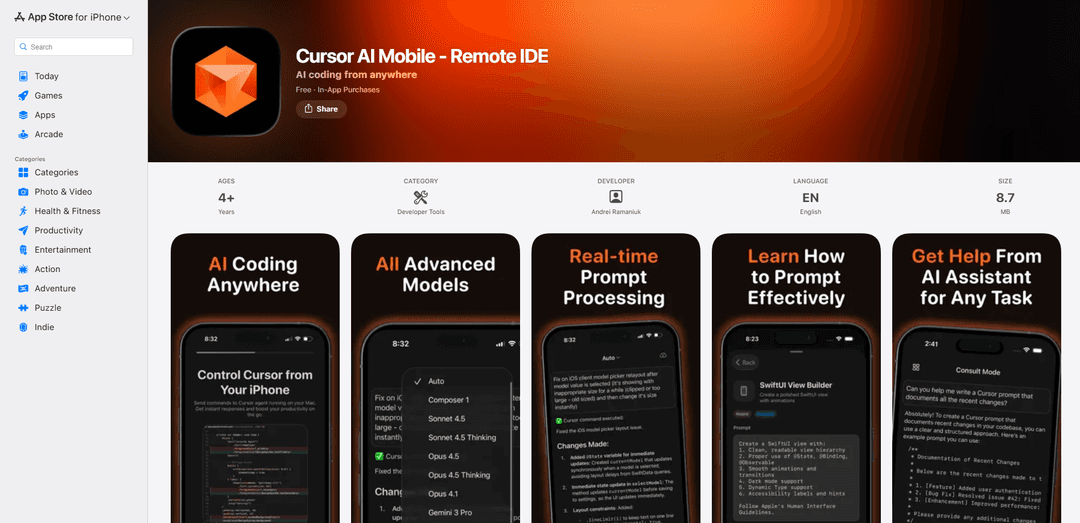
Cursor AI Mobile is a companion app that allows developers to control Cursor IDE on Mac from iPhone/iPad, featuring AI-powered coding assistance with GPT, Claude & copilot-style features, remote code execution and real-time synchronization.
https://apps.apple.com/us/app/cursor-mobile-remote-ide/id6755931330?ref=producthunt
Product Information
Updated:Jan 16, 2026
What is Cursor AI Mobile: Remote IDE
Cursor AI Mobile is a remote IDE companion app designed for developers who use Cursor IDE on Mac. It extends the power of Cursor's AI-assisted development environment to mobile devices, enabling developers to access their coding assistant anywhere. The app integrates with popular AI models including GPT-5, Claude Opus 4.5, Gemini 3 Pro, and other coding-focused models to provide intelligent coding assistance on the go. Built with modern Apple technologies, it offers a seamless connection between iOS devices and Mac for continuous development workflow.
Key Features of Cursor AI Mobile: Remote IDE
Cursor AI Mobile is a companion app for Cursor IDE that enables developers to access AI-powered coding assistance from their iPhone or iPad. It allows remote control of Cursor IDE on Mac, featuring real-time code execution, chat synchronization, and integration with multiple AI models including GPT-5, Claude, and coding-specific models. The app supports offline prompt creation, secure cloud syncing, and provides a continuous workflow between mobile and desktop environments.
Remote Code Execution: Send prompts from mobile devices that instantly execute on Mac through Cursor CLI, with real-time results syncing back to the device
Multi-Model AI Support: Access to premium AI models including GPT-5, Claude Opus 4.5, Gemini 3 Pro, and specialized coding models like GPT-5 Codex
Seamless Sync System: CloudKit-powered synchronization keeps chat history, project context, and AI interactions perfectly aligned across iOS and macOS devices
Offline Capability: Create prompts without internet connectivity that automatically sync once online, ensuring continuous workflow
Use Cases of Cursor AI Mobile: Remote IDE
Emergency Code Review: Review and debug critical code issues while away from the desk, perfect for on-call developers needing to address urgent problems
Mobile Code Architecture Planning: Continue architectural discussions and planning sessions while on the move, maintaining productivity during travel or remote work
Remote Team Collaboration: Review teammate's code and provide feedback from mobile devices, enabling efficient code review processes regardless of location
Pros
Deep integration with Cursor IDE ecosystem
Real-time synchronization capabilities
Support for multiple premium AI models
Cons
Requires macOS setup and Full Disk Access
UI issues with long prompts on iPhone
Limited to Apple ecosystem (iOS/iPadOS/macOS only)
How to Use Cursor AI Mobile: Remote IDE
Install Required Software: Install Cursor IDE on your Mac (requires macOS 14.0+) and download Cursor Mobile app from App Store on your iOS device (requires iOS 17.0+). Both devices must use the same Apple ID with iCloud enabled.
Set Up Mac Agent: Complete one-time setup of the Cursor CLI and macOS menu bar agent. Grant Full Disk Access permissions when prompted to allow processing prompts within your project directory.
Connect Devices: Ensure both your Mac and iOS device are signed into the same Apple ID and have iCloud enabled. The app will automatically sync between devices using CloudKit.
Open Project: Open your development project in Cursor IDE on your Mac. The mobile app will have access to the same project context.
Send Prompts: From your iOS device, send prompts through the mobile app. These will be instantly executed on your Mac through the Cursor CLI within your project directory.
View Results: Results and chat history will sync back to your mobile device in real-time. You can review code, debug issues, and continue discussions from your phone.
Use Premium Features: The free version includes one prompt per day. Subscribe to premium through your Apple ID to get unlimited prompts and access to advanced AI models like GPT-5 and Claude.
Work Offline: Create prompts even without internet connectivity - they will automatically sync once you're back online.
Cursor AI Mobile: Remote IDE FAQs
The app requires iOS 17.0 or later for iPhone/iPad, and macOS 14.0 or later for Mac. Both devices must use the same Apple ID with iCloud enabled. Cursor CLI installation and Full Disk Access on macOS are required.
Popular Articles

Vosko AI: Localize and Dub Videos for Global Audiences
Oct 15, 2026

Atoms: A Multi-Agent AI Platform That Transforms Ideas into Launch-Ready Products
Oct 13, 2026

Nano Banana SBTI: What It Is, How It Works, and How to Use It in 2026
Apr 15, 2026

Atoms Review — The AI Product Builder Redefining Digital Creation in 2026
Apr 10, 2026
Latest AI Tools Similar to Cursor AI Mobile: Remote IDE

Gait
Gait is a collaboration tool that integrates AI-assisted code generation with version control, enabling teams to track, understand, and share AI-generated code context efficiently.

invoices.dev
invoices.dev is an automated invoicing platform that generates invoices directly from developers' Git commits, with integration capabilities for GitHub, Slack, Linear, and Google services.

EasyRFP
EasyRFP is an AI-powered edge computing toolkit that streamlines RFP (Request for Proposal) responses and enables real-time field phenotyping through deep learning technology.

Cart.ai
Cart.ai is an AI-powered service platform that provides comprehensive business automation solutions including coding, customer relations management, video editing, e-commerce setup, and custom AI development with 24/7 support.
Popular AI Tools Like Cursor AI Mobile: Remote IDE

GitHub Copilot Chat
GitHub Copilot Chat is an AI-powered coding assistant that provides natural language interactions, real-time code suggestions, and contextual support directly within supported IDEs and GitHub.com.

CopilotForXcode
CopilotForXcode is an Xcode Source Editor Extension that integrates GitHub Copilot, Codeium, and ChatGPT to provide AI-powered code suggestions, chat assistance, and prompt-to-code functionality within Xcode.

BrowserAI
BrowserAI is an open-source library that enables running local Large Language Models (LLMs) directly in web browsers with WebGPU acceleration, offering privacy-focused AI capabilities without requiring server infrastructure.

OpenAI Codex CLI
OpenAI Codex CLI is a lightweight, open-source coding agent that runs in your terminal, enabling developers to translate natural language into code execution while providing ChatGPT-level reasoning with the ability to run code, manipulate files, and iterate under version control.