
Coworker AI
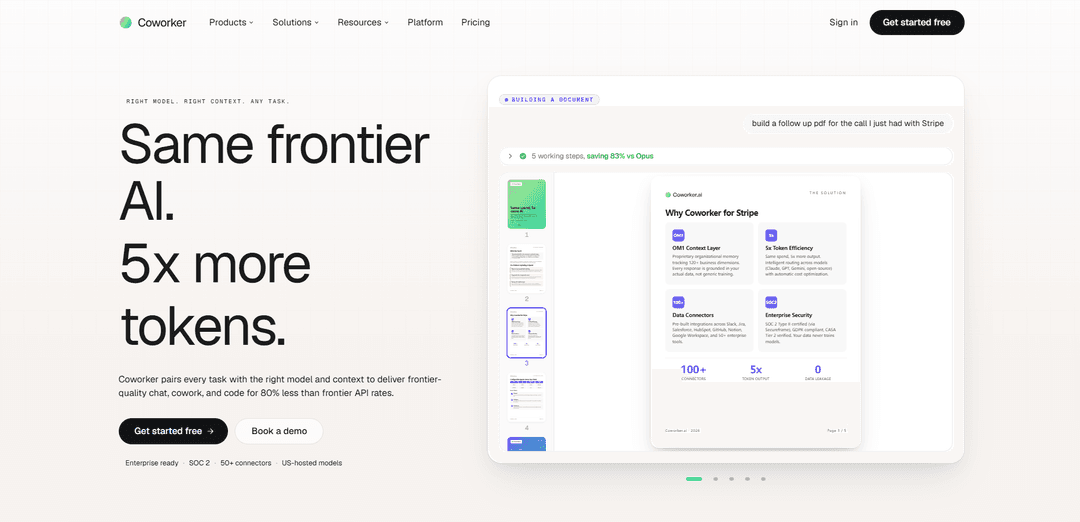
Coworker AI is an enterprise AI agent platform that connects to 50+ business tools, routes each task to the best AI model for cost/quality, and produces real work outputs (docs, decks, code, and automated workflows) using full company context.
https://coworker.ai/?ref=producthunt
Product Information
Updated:Jun 8, 2026
What is Coworker AI
Coworker AI is an enterprise-ready platform for “chat, cowork, and code” that lets teams ask questions across their systems, generate polished business artifacts, and run long-lived agents that execute multi-step workflows across the company tool stack. It integrates with 50+ connectors (e.g., Slack, Salesforce/CRM, Jira, Gmail/Docs, GitHub, Snowflake/BigQuery) and is designed to be permission-aware, SOC 2 Type II aligned, and focused on secure use of sensitive enterprise data. A core promise is delivering frontier-quality outcomes while reducing spend by intelligently routing work to the right model for each job and leveraging US-hosted open and closed models.
Key Features of Coworker AI
Coworker AI is an enterprise AI agent platform that combines chat, artifact creation (“cowork”), coding, and long-running agents. It connects to 50+ enterprise tools (read/write) and uses an organizational memory layer (OM2/OM1) to build deep, permission-aware company context beyond basic RAG. Coworker intelligently routes each task to the best open or closed model to balance cost, latency, and quality, supports repo-aware coding in a sandbox, and can execute multi-step workflows with approvals—while emphasizing enterprise security (e.g., SOC 2 Type II, GDPR, US-hosted models, no training on customer data).
Right-model routing (open + closed): Automatically (or manually) routes each request to the best-fit model across providers (e.g., Anthropic, OpenAI, Google, and US-hosted open models) to optimize quality, speed, and cost, reducing spend on routine work.
Organizational Memory context layer (OM2/OM1): Builds a structured understanding of the company across many dimensions (knowledge-graph-like), improving accuracy and actionability compared to naive RAG over raw documents and chats.
50+ permission-aware connectors (read/write): Connects to tools like Slack, Salesforce/HubSpot, Jira/Linear, Google Workspace, GitHub, Zendesk/Intercom, Snowflake/BigQuery, inheriting existing permissions and enabling the AI to both retrieve information and take actions (create/update).
Cowork artifacts: polished deliverables on demand: Generates editable, shareable outputs such as decks, docs, dashboards, financial models, branded PDFs, and interactive apps—turning requests into finished work products, not just answers.
Repo-aware coding with sandbox execution: Supports multi-file code edits with tests/execution in an isolated sandbox, using org and repo context to produce PR-ready changes and technical documentation.
Long-running agents with triggers + approvals: Build agents in plain English that run continuously across your stack (e.g., CRM stage changes, ticket events), perform multi-step workflows, and wait for approval before taking sensitive actions.
Use Cases of Coworker AI
Sales pipeline + account execution: Pulls CRM data, scans call transcripts, and reads Slack threads to summarize deal status, recommend next steps, draft follow-ups, and keep pipeline hygiene (e.g., flagging stalled opportunities).
Customer support automation and insight: Drafts ticket responses, routes tickets, detects trends and sentiment, monitors SLAs, and turns resolved tickets into knowledge base articles across Zendesk/Intercom and internal docs.
Engineering operations and delivery acceleration: Assists with bug triage/deduping, PR context assembly, code review pre-screening, deploy risk analysis, incident coordination, sprint summaries, and doc staleness detection.
Legal/ops contract review workflows: Fetches incoming MSAs from email, flags non-standard clauses, prepares review summaries for legal, and supports vendor renewal/contract operations with tracked approvals.
Finance and revenue operations: Automates arrears/dunning checks, reconciles cross-system data, builds financial models and dashboards, and produces recurring reporting packs for leadership.
Regulated/industry-specific operations: Supports workflows like KYC/compliance reviews, claims processing/prior authorization packages, fraud/anomaly investigation briefs, and procurement scoring—by pulling evidence from connected systems and producing auditable artifacts.
Pros
Strong enterprise integration story: 50+ connectors with read/write actions and permission inheritance.
Better relevance/accuracy potential via Organizational Memory (OM2/OM1) vs basic RAG approaches.
Cost optimization through intelligent routing across multiple model providers, including US-hosted open models.
Broad capability surface: chat + deliverables + coding sandbox + always-on agents with triggers.
Cons
Effectiveness depends on connector coverage and data hygiene; weak/limited integrations reduce value.
Multi-model routing can introduce governance/consistency challenges (e.g., standardizing outputs across models).
Agents that can act across systems raise operational risk and require careful approvals and access controls.
Some advanced functionality may be gated by usage limits or higher-tier plans in practice (per plan-based access/limits).
How to Use Coworker AI
1) Create an account: Go to https://app.coworker.ai/start/register and complete sign-up. After registration, you can access the web app and (if available to your plan) enable additional product surfaces like Chat, Cowork, Code, and Agents.
2) Choose your primary surface (Chat, Cowork, Code, or Agents): Use Chat for Q&A across connected systems, Cowork for generating polished artifacts (decks/docs/dashboards/PDFs), Code for repo-aware coding in a sandbox, and Agents for long-running automations with triggers and approvals.
3) Connect your tools (connectors): Open the Connectors area (see https://coworker.ai/connectors) and connect the apps your team uses (e.g., Slack, Salesforce/HubSpot, Jira/Linear, Gmail/Google Workspace, GitHub, Zendesk/Intercom, Snowflake/BigQuery). Coworker’s connectors are read + write and inherit existing permissions in those tools.
4) Verify permission-aware access: Confirm Coworker can only see and act on what your account is authorized to access in each connected tool. This ensures the assistant respects existing access controls and does not bypass your organization’s permissions.
5) Start with a simple cross-tool question in Chat: In Chat, ask a question that requires pulling context from multiple systems (example from the site: “Where is the Acme renewal at?”). Coworker will retrieve relevant records (e.g., CRM opportunity, recent call transcripts, Slack threads) and return a consolidated summary.
6) Ask Chat to take an action (write-back) when appropriate: Because connectors are read + write, you can request actions like drafting a document, posting a Slack update, or creating/updating a ticket/record—while keeping approvals and governance aligned to your org’s setup.
7) Use Cowork to generate a polished artifact: Switch to Cowork when you want an output like a deck, branded PDF, dashboard, spreadsheet model, or board deck. Provide a clear instruction (example from the site: “build a follow up pdf for the call I just had with Stripe”).
8) Review the visible working steps (skills) during Cowork runs: Cowork may show a multi-step workflow (e.g., Skill Search → Retrieve → Read meeting transcript → Internet search → Create paginated PDF). Monitor these steps to understand what sources were used and what was produced.
9) Export or share the Cowork output: Once the artifact is generated, export/share it in the needed format (e.g., PDF for brochures, slides for decks). Cowork outputs are designed to be editable and shareable.
10) Use Code for repo-aware changes in a sandbox: Open the Code surface to work on code with multi-file edits and sandboxed execution. Provide the task (e.g., implement a small fix), review the diff, and run tests in the sandbox before merging.
11) Control which model is used (optional): If you’re an engineer/power user, configure which model handles which tasks. Otherwise, let Coworker’s routing choose the best model based on cost/latency/quality for the job.
12) Build an Agent for a recurring workflow: Go to Agents and pick a template (e.g., Pipeline Hygiene Agent, Post-Meeting Actions Agent, Sprint Summary Agent). Define: trigger (e.g., a CRM stage condition), actions (e.g., pull call transcripts, post to Slack), and the approval behavior (wait for approval before acting).
13) Configure triggers across your stack: Set event-based triggers (e.g., “Opportunity stage = Negotiation for 14+ days”) or scheduled runs (e.g., daily/weekly reporting). Agents can pull from one tool and push updates to another (e.g., CRM → Gong → Slack).
14) Run the Agent and validate outputs: Start the agent, review its first few runs, and confirm it’s producing the right summaries/actions (e.g., next-best-action recommendations posted to the right channel). Adjust instructions and scope until it matches your team’s expectations.
15) Expand gradually to more use cases and connectors: After one workflow is stable, add additional agents for other functions (Sales, CS, Support, Eng, Ops, Finance, People). Reuse patterns like shared skills/templates and keep governance consistent with your permission model.
Coworker AI FAQs
Coworker AI is an enterprise AI agent platform that connects to your company’s tools and context to do work end-to-end—creating artifacts (docs, decks, dashboards), running agents, and taking actions across systems—rather than only answering questions.
Coworker AI Video
Popular Articles

Vosko AI: Localize and Dub Videos for Global Audiences
Oct 15, 2026

Atoms: A Multi-Agent AI Platform That Transforms Ideas into Launch-Ready Products
Oct 13, 2026

Nano Banana SBTI: What It Is, How It Works, and How to Use It in 2026
Apr 15, 2026

Atoms Review — The AI Product Builder Redefining Digital Creation in 2026
Apr 10, 2026
Latest AI Tools Similar to Coworker AI

Gait
Gait is a collaboration tool that integrates AI-assisted code generation with version control, enabling teams to track, understand, and share AI-generated code context efficiently.

invoices.dev
invoices.dev is an automated invoicing platform that generates invoices directly from developers' Git commits, with integration capabilities for GitHub, Slack, Linear, and Google services.

EasyRFP
EasyRFP is an AI-powered edge computing toolkit that streamlines RFP (Request for Proposal) responses and enables real-time field phenotyping through deep learning technology.

Cart.ai
Cart.ai is an AI-powered service platform that provides comprehensive business automation solutions including coding, customer relations management, video editing, e-commerce setup, and custom AI development with 24/7 support.
Popular AI Tools Like Coworker AI

GitHub Copilot Chat
GitHub Copilot Chat is an AI-powered coding assistant that provides natural language interactions, real-time code suggestions, and contextual support directly within supported IDEs and GitHub.com.

CopilotForXcode
CopilotForXcode is an Xcode Source Editor Extension that integrates GitHub Copilot, Codeium, and ChatGPT to provide AI-powered code suggestions, chat assistance, and prompt-to-code functionality within Xcode.

BrowserAI
BrowserAI is an open-source library that enables running local Large Language Models (LLMs) directly in web browsers with WebGPU acceleration, offering privacy-focused AI capabilities without requiring server infrastructure.

OpenAI Codex CLI
OpenAI Codex CLI is a lightweight, open-source coding agent that runs in your terminal, enabling developers to translate natural language into code execution while providing ChatGPT-level reasoning with the ability to run code, manipulate files, and iterate under version control.