
Command Center
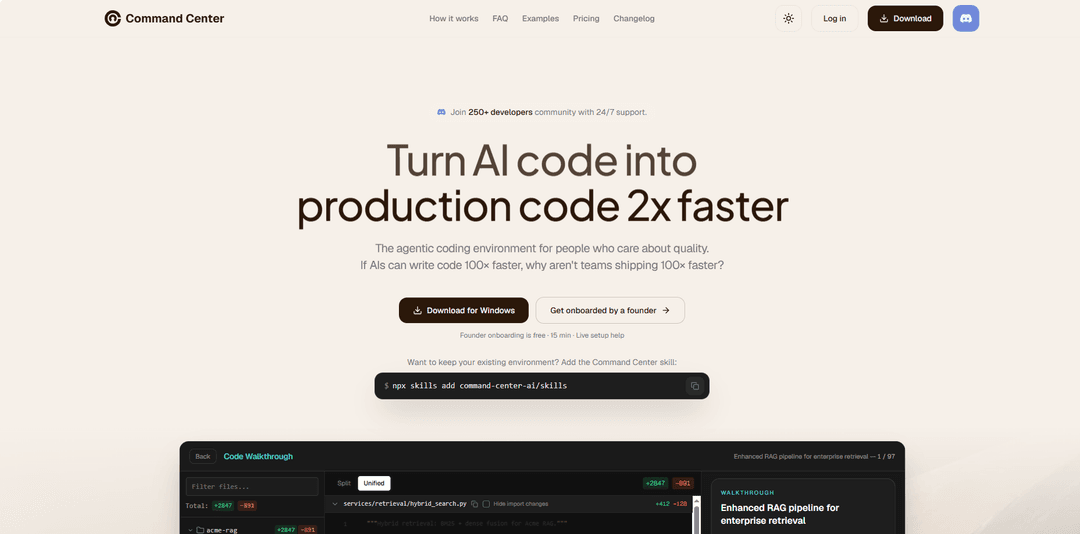
Command Center is a local desktop app for running AI coding agents in parallel workspaces, understanding changes with guided code walkthroughs, and refactoring code before merge. Available for macOS, Windows, and Linux.
https://cc.dev
Product Information
Updated:Oct 19, 2026
What is Command Center
Command Center (cc.dev) is a desktop app for running AI coding agents such as Claude Code, Codex, and OpenCode in parallel workspaces, then understanding their changes with guided code walkthroughs and cleaning them up with refactoring agents before merge. It runs on macOS, Windows, and Linux, runs locally, and does not send your code to Command Center servers.
Key Features of Command Center
Command Center is a desktop app for running AI coding agents in parallel workspaces, understanding their changes through guided code walkthroughs, and improving code with refactoring agents before merge. It supports Claude Code, Codex, OpenCode, and the bundled CC Basic, and is available for macOS, Windows, and Linux. Users can also add Command Center as a skill to an existing coding agent.
Parallel Agent Workspaces: Run Claude Code, Codex, OpenCode, or the bundled CC Basic in parallel workspaces and switch between tasks.
Guided Code Walkthroughs: Review AI-generated changes in a logical sequence to understand how the code fits together.
Refactoring Agents: Identify and clean up duplication, brittle design, and maintainability issues before merging code.
Local Desktop App: Available for macOS, Windows, and Linux. Command Center runs locally and does not send your code to Command Center servers.
Skill for Existing Coding Agents: Use Command Center as a skill in an existing coding agent with npx skills add command-center-ai/skills.
Use Cases of Command Center
Parallel AI Coding Workflows: Run AI coding agents in parallel workspaces to work on different tasks while keeping their activities organized in one desktop app.
Understanding AI-Generated Changes: Use guided code walkthroughs to review changes in a logical order rather than navigating large diffs only by file name.
Pre-Merge Code Refactoring: Run a refactoring agent to identify duplication, brittle design, and maintainability issues and clean up code before merging.
Adding Review Tools to Existing Agent Workflows: Add the Command Center skill to an existing coding agent to use it without switching entirely to the desktop app.
Pros
Supports Claude Code, Codex, OpenCode, and the bundled CC Basic.
Combines parallel agent workspaces, guided code walkthroughs, and pre-merge refactoring in one workflow.
Available for macOS, Windows, and Linux.
Can also be added as a skill to an existing coding agent.
Cons
The desktop app requires signing in with Google or GitHub.
Developers may need time to become familiar with the workspace, walkthrough, and refactoring workflow.
How to Use Command Center
1) Download Command Center or add the skill: Download Command Center for macOS, Windows, or Linux from https://www.cc.dev, or add it to an existing coding agent with: npx skills add command-center-ai/skills.
2) Sign in: Sign in with Google or GitHub.
3) Open a repository and start workspaces: Open a repository and start one or more workspaces with Claude Code, Codex, OpenCode, or the bundled CC Basic.
4) Open a guided walkthrough: Open a guided walkthrough to understand the changes.
5) Refactor before merging: Run the refactoring agent to clean up the code before you merge.
Command Center FAQs
Command Center (cc.dev) is a desktop app for running AI coding agents such as Claude Code, Codex, and OpenCode in parallel workspaces, then understanding their changes with guided code walkthroughs and cleaning them up with refactoring agents before merge. It runs on macOS, Windows, and Linux, runs locally, and does not send your code to Command Center servers.
Official Posts
Loading...Popular Articles

Vosko AI: Localize and Dub Videos for Global Audiences
Oct 15, 2026

Atoms: A Multi-Agent AI Platform That Transforms Ideas into Launch-Ready Products
Oct 13, 2026

Nano Banana SBTI: What It Is, How It Works, and How to Use It in 2026
Apr 15, 2026

Atoms Review — The AI Product Builder Redefining Digital Creation in 2026
Apr 10, 2026
Latest AI Tools Similar to Command Center

Gait
Gait is a collaboration tool that integrates AI-assisted code generation with version control, enabling teams to track, understand, and share AI-generated code context efficiently.

invoices.dev
invoices.dev is an automated invoicing platform that generates invoices directly from developers' Git commits, with integration capabilities for GitHub, Slack, Linear, and Google services.

EasyRFP
EasyRFP is an AI-powered edge computing toolkit that streamlines RFP (Request for Proposal) responses and enables real-time field phenotyping through deep learning technology.

Cart.ai
Cart.ai is an AI-powered service platform that provides comprehensive business automation solutions including coding, customer relations management, video editing, e-commerce setup, and custom AI development with 24/7 support.
Popular AI Tools Like Command Center

GitHub Copilot Chat
GitHub Copilot Chat is an AI-powered coding assistant that provides natural language interactions, real-time code suggestions, and contextual support directly within supported IDEs and GitHub.com.

CopilotForXcode
CopilotForXcode is an Xcode Source Editor Extension that integrates GitHub Copilot, Codeium, and ChatGPT to provide AI-powered code suggestions, chat assistance, and prompt-to-code functionality within Xcode.

BrowserAI
BrowserAI is an open-source library that enables running local Large Language Models (LLMs) directly in web browsers with WebGPU acceleration, offering privacy-focused AI capabilities without requiring server infrastructure.

OpenAI Codex CLI
OpenAI Codex CLI is a lightweight, open-source coding agent that runs in your terminal, enabling developers to translate natural language into code execution while providing ChatGPT-level reasoning with the ability to run code, manipulate files, and iterate under version control.