Carousels Generator
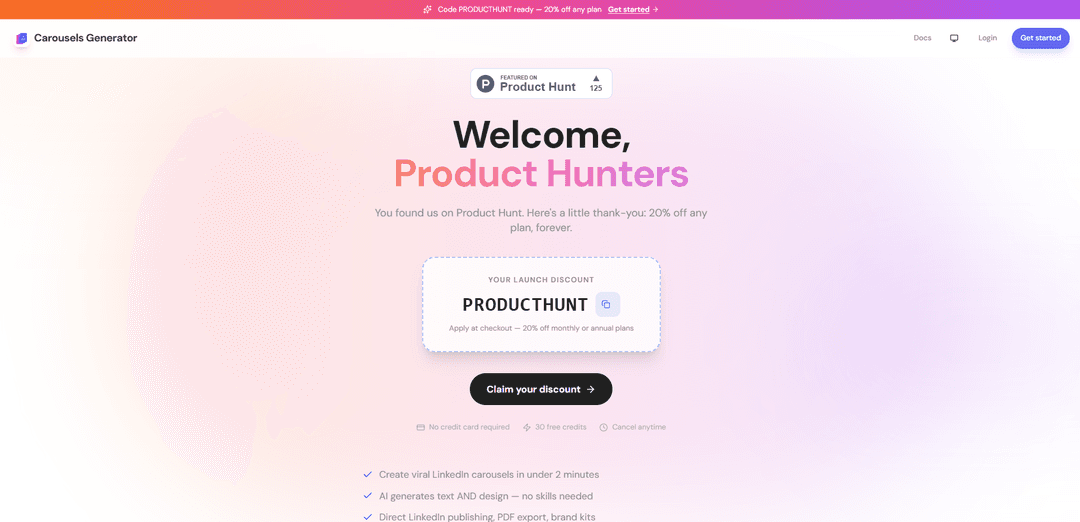
Carousels Generator is an AI-powered tool that creates branded LinkedIn carousels in under 2 minutes, automatically generating both text content and professional designs without requiring any design skills.
https://www.carousels-generator.com/welcome/producthunt?utm_source=aipure&utm_medium=launch&utm_campaign=ph_april2026&ref=producthunt
Product Information
Updated:Apr 16, 2026
What is Carousels Generator
Carousels Generator is a specialized AI-driven platform designed to simplify the creation of LinkedIn carousels, which are proven to get 3x more impressions than standard text posts. The tool addresses the common pain point of manually designing carousels, which traditionally requires transforming content into proper-sized images, assembling them in a PDF, and managing complex design layouts. By leveraging artificial intelligence, Carousels Generator automates both the content writing and visual design process, enabling users to create professional, on-brand carousels in just a couple of minutes. The platform offers features including real-time web research, direct LinkedIn publishing, PDF export capabilities, unlimited brand kits, and the ability to create private carousels. With a freemium model starting at 30 credits per month and scaling up to enterprise plans with 1500 credits, the tool caters to individual content creators, professionals, and agencies alike.
Key Features of Carousels Generator
Carousels Generator is an AI-powered platform that enables users to create professional LinkedIn carousels in under 2 minutes without requiring design skills. The tool automatically generates both text content and visual design, offering features like real-time web research, direct LinkedIn publishing, PDF export, unlimited brand kits, and customizable templates. Users can repurpose various content types including tweets, Reddit posts, articles, and text into visually engaging carousel formats optimized for maximum engagement on LinkedIn and other social media platforms.
AI-Powered Content & Design Generation: Automatically generates both carousel text content and visual design from simple prompts or topics, eliminating the need for design expertise or manual layout creation.
Direct LinkedIn Publishing: Seamlessly publish carousels directly to LinkedIn from the platform, streamlining the content distribution workflow without requiring manual downloads and uploads.
Unlimited Brand Kits: Create and save multiple brand kits with custom colors, fonts, and logos to maintain brand consistency across all carousel content and ensure instant brand recognition.
Real-Time Web Research: Leverages AI to conduct real-time web research to generate relevant, up-to-date content for carousels, ensuring accuracy and topical relevance.
Multi-Format Content Repurposing: Transform various content types including tweets, Reddit posts, articles, YouTube videos, and PDFs into optimized carousel formats for maximum content reusability.
Watermark-Free PDF Export: Export professional carousels as PDF files without watermarks on paid plans, suitable for sharing across multiple platforms and archival purposes.
Use Cases of Carousels Generator
Content Creator Growth Strategy: Individual content creators can repurpose their existing tweets, blog posts, and ideas into high-engagement LinkedIn carousels to expand their reach and establish thought leadership, with carousels generating up to 3x more impressions than standard text posts.
Marketing Team Campaign Amplification: Marketing teams can quickly produce branded carousel content at scale to promote products, share company updates, and drive engagement across LinkedIn campaigns while maintaining consistent brand identity through custom brand kits.
Educational Content Distribution: Educators and trainers can transform complex articles, tutorials, and educational materials into digestible carousel slides that make learning content more accessible and shareable on professional networks.
Agency Client Content Production: Digital agencies can efficiently create multiple branded carousels for different clients using the unlimited brand kits feature, streamlining content production workflows and delivering consistent results across client accounts.
Thought Leadership Positioning: Business professionals and consultants can convert industry insights, research findings, and expertise into visually compelling carousels that establish authority and generate meaningful engagement with their target audience.
Product Launch Announcements: Companies can design attention-grabbing carousel announcements for new product launches, feature releases, or company milestones that tell a compelling story across multiple slides and drive conversions.
Pros
Extremely fast carousel creation process (under 2 minutes) with AI handling both content writing and design automatically
No design skills required, making professional carousel creation accessible to non-designers and small teams
Direct LinkedIn publishing eliminates manual export/import steps and streamlines the content distribution workflow
Flexible pricing with a free plan available and reasonable paid tiers starting at €15.83/month with a Product Hunt discount
Cons
Free plan includes watermarks on exports and limited to 30 credits (approximately 5 carousels) per month
Primarily focused on LinkedIn with limited mention of optimization for other platforms like Instagram or Twitter
API access is listed as 'coming soon' for the highest tier, indicating the feature is not yet available for automation needs
May require refinement of AI-generated content to match specific brand voice or messaging nuances
How to Use Carousels Generator
1: Sign up for a free account at carousels-generator.com or log in if you already have an account. You can start with the free plan which includes 30 credits per month for up to 5 carousels.
2: Choose your input method. You can create a carousel from: a topic/prompt, text content, a website URL, a YouTube video URL, or a PDF. Select the option that best fits your content source.
3: Enter your content. If using the AI generation feature, provide a clear topic or prompt. For best results, use a 'listicle' or 'how-to' format (e.g., '7 common workout mistakes' or 'How to start a podcast in 3 steps'). Specify the number of slides you want if needed.
4: Click 'Generate Carousel' and wait for the AI to automatically create both the text content and design for your carousel slides. The AI will structure your information into bite-sized, swipeable slides.
5: Review the AI-generated carousel content. Use the real-time visual editor to make any edits to the text, layout, or design as needed.
6: Customize the design with your branding. Set up or apply your brand kit, which includes your brand colors, fonts, and logo. Add your profile picture, name, and handle for greater visibility.
7: Choose your background theme and color scheme to match your brand identity and ensure consistency across all slides.
8: Preview your carousel to see how it will look on LinkedIn. Make any final adjustments to ensure everything is perfectly formatted.
9: Download or publish your carousel. You can either: (1) Export as a PDF file to upload manually to LinkedIn, or (2) Use the direct LinkedIn publishing feature to post immediately to your LinkedIn profile (available on paid plans without watermark).
10: If using the free plan, note that exports will include a watermark. Upgrade to a paid plan (Starter, Pro, or Scale) to remove watermarks and access additional features like unlimited carousels, unlimited brand kits, and priority support.
Carousels Generator FAQs
Carousels Generator is an AI-powered tool that creates LinkedIn carousels in under 2 minutes. It automatically generates both text and design content, eliminating the need for manual image creation and PDF assembly. The platform transforms your content into properly-sized, engaging LinkedIn carousels without requiring design skills.
Carousels Generator Video
Popular Articles

Nano Banana SBTI: What It Is, How It Works, and How to Use It in 2026
Apr 15, 2026

Atoms Review — The AI Product Builder Redefining Digital Creation in 2026
Apr 10, 2026

Kilo Claw: How to Deploy and Use a True "Do‑It‑For‑You" AI Agent(2026 Update)
Apr 3, 2026

OpenAI Shuts Down Sora App: What the Future Holds for AI Video Generation in 2026
Mar 25, 2026