CakewordAI
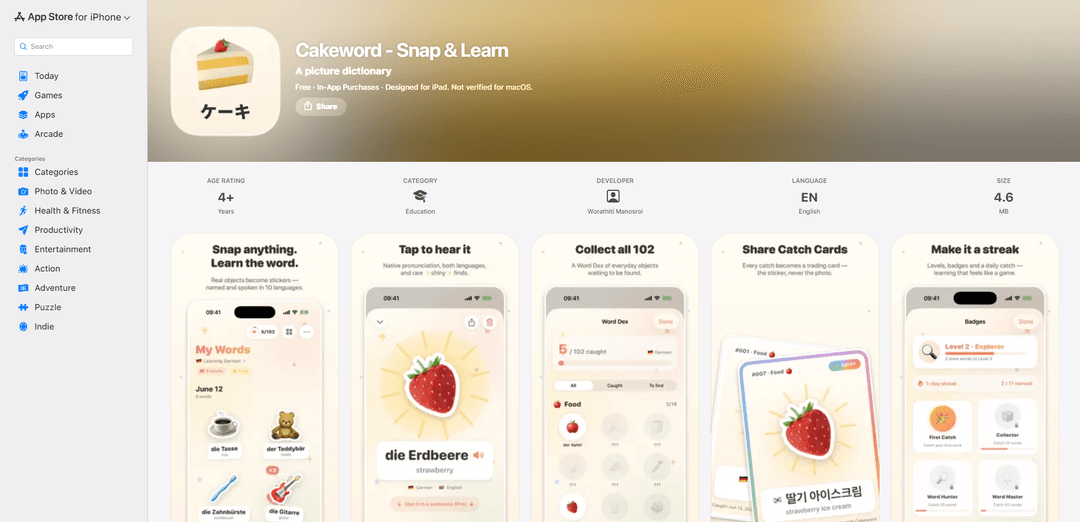
CakewordAI is a camera-based picture dictionary that recognizes real-world objects, turns them into collectible stickers in a Pokédex-style “Word Dex,” and speaks the words aloud in your chosen languages—privately, on-device.
https://apps.apple.com/de/app/cakeword-snap-learn/id6775628982?l=en-GB&ref=producthunt

Product Information
Updated:Jun 16, 2026
What is CakewordAI
CakewordAI (Cakeword – Snap & Learn) is a playful language-learning app that helps you build everyday vocabulary from the world around you. By simply pointing your camera at objects—like food, toys, or items at home—the app identifies what you’re seeing, shows the word in both your learning language and your native language, and reads it out loud for pronunciation practice. Designed as a “vocabulary treasure hunt,” it organizes your discoveries into a collectible Word Dex across categories such as Food, Animals, Home, Toys, Nature, Clothes, School, and Vehicles, with progress mechanics like badges and streaks to keep learning consistent.
Key Features of CakewordAI
CakewordAI (Cakeword - Snap & Learn) is an on-device “picture dictionary” app that turns everyday objects you photograph into collectible stickers, shows the object’s name in your learning language and your native language, speaks the pronunciation aloud, and stores everything in a Pokédex-style “Word Dex.” It gamifies vocabulary building with categories, badges, streaks, levels, daily challenges, and rare finds, while emphasizing privacy by processing recognition/translation locally, requiring no account, and syncing collections via iCloud.
Snap-to-vocabulary capture: Point your camera at an object and the app recognizes it, labels it in the target language (and your native language), and reads it aloud for instant learning.
Sticker cutout collectibles: Each captured object is cut out into a “cute sticker,” making vocabulary feel like collecting items rather than memorizing lists.
Word Dex collection system: A Pokédex-style catalog organizes your captured words across categories like Food, Animals, Home, Toys, Nature, Clothes, School, and Vehicles.
Pronunciation playback: Every catch includes spoken audio so learners can hear correct pronunciation alongside the written word.
Gamified learning loop: Badges, daily streaks, leveling, “Catch of the day,” and rare “shiny” catches encourage consistent practice and exploration.
Private by design + iCloud sync: Recognition and translation run locally (no account; photos not uploaded), while your collection can sync privately across devices using iCloud.
Use Cases of CakewordAI
Kids’ at-home language discovery: Children can scan toys, food, and household items to build practical vocabulary through play and collection-based motivation.
Beginner self-study for everyday vocabulary: New learners can quickly learn high-frequency nouns by scanning objects they actually use, reinforcing memory through repeated real-world exposure.
Classroom scavenger-hunt activities: Teachers can run “find and catch” challenges by category (e.g., classroom objects) to make vocabulary lessons interactive and measurable via the Word Dex.
Travel and immersion practice: While traveling, users can capture common objects around them to expand situational vocabulary and practice pronunciation on the spot.
Speech/pronunciation practice routines: Learners can use the audio playback per object to drill pronunciation in short daily sessions supported by streaks and “catch of the day.”
Pros
On-device recognition/translation with no account required, designed to keep photos private.
Highly engaging, game-like collection mechanics (Word Dex, badges, streaks, rare catches) that support habit formation.
Practical, real-world vocabulary focus: learn words for objects you see and use daily.
Cons
Language support is limited to the listed set (9 languages).
Effectiveness depends on object recognition accuracy; mislabels require manual correction.
Some functionality is gated behind in-app purchases (Pro upgrade/subscription options listed).
How to Use CakewordAI
1. Install Cakeword - Snap & Learn: Download and install “Cakeword - Snap & Learn” from the App Store on your iPhone or iPad.
2. Choose your languages: In the app, pick the language you’re learning and your native language (supported: English, German, Spanish, French, Italian, Portuguese, Korean, Japanese, Chinese).
3. Open the camera capture: Start a new “snap” so the in-app camera view is ready to recognize objects around you.
4. Point at a real-world object: Aim your camera at any everyday item (e.g., banana, teddy bear, key, car, mug, traffic cone).
5. Tap to capture: Tap to take the photo; Cakeword recognizes the object and cuts it out into a collectible sticker.
6. Learn the word in two languages: View the object’s name in the language you’re learning and in your native language.
7. Listen to pronunciation: Play the spoken audio to hear correct pronunciation for the captured word.
8. Save it to your Word Dex: The captured sticker/word is added to your Pokédex-style “Word Dex” collection.
9. Explore categories and grow your collection: Keep snapping items to complete categories like Food, Animals, Home, Toys, Nature, Clothes, School, and Vehicles.
10. Re-catch items to build your photo history: Capture the same object more than once; each photo is saved as part of your collection.
11. Correct a wrong label (if needed): If the recognized word is incorrect, tap to correct it; the app updates and re-speaks the corrected word instantly.
12. Keep a daily habit: Use “Catch of the day,” badges, daily streaks, leveling, and rare “shiny” catches to stay motivated.
13. Sync across devices (optional): Enable iCloud to privately sync your Word Dex across your Apple devices (no account required).
14. Unlock Cakeword Pro (optional): Upgrade to Cakeword Pro to unlock every language and all practice games that turn your collected words into play.
CakewordAI FAQs
Cakeword - Snap & Learn is an education app described as “a picture dictionary” that turns photos of real-world objects into collectible stickers and teaches their names in a new language, with spoken pronunciation.
Popular Articles

Atoms: A Multi-Agent AI Platform That Transforms Ideas into Launch-Ready Products
May 22, 2026

Nano Banana SBTI: What It Is, How It Works, and How to Use It in 2026
Apr 15, 2026

Atoms Review — The AI Product Builder Redefining Digital Creation in 2026
Apr 10, 2026

Kilo Claw: How to Deploy and Use a True "Do‑It‑For‑You" AI Agent(2026 Update)
Apr 3, 2026