
CogniMemo Extension
CogniMemo is a browser extension that adds long-term memory capabilities to AI tools like ChatGPT, Claude, Gemini, and DeepSeek by enabling context-aware conversations and knowledge management through saved notes and past chats.
https://chromewebstore.google.com/detail/cognimemo/eilaoaachiokcineopoejpecgfgigeee?ref=producthunt
Product Information
Updated:Jan 8, 2026
What is CogniMemo Extension
CogniMemo is an innovative browser extension designed to enhance AI interactions by providing AI assistants with long-term memory capabilities. Launched in 2026, it serves as a bridge between various AI models (ChatGPT, Claude, Gemini, DeepSeek) and users' personal knowledge bases. The extension allows users to maintain context across conversations, save important information, and access their accumulated knowledge seamlessly while interacting with AI tools.
Key Features of CogniMemo Extension
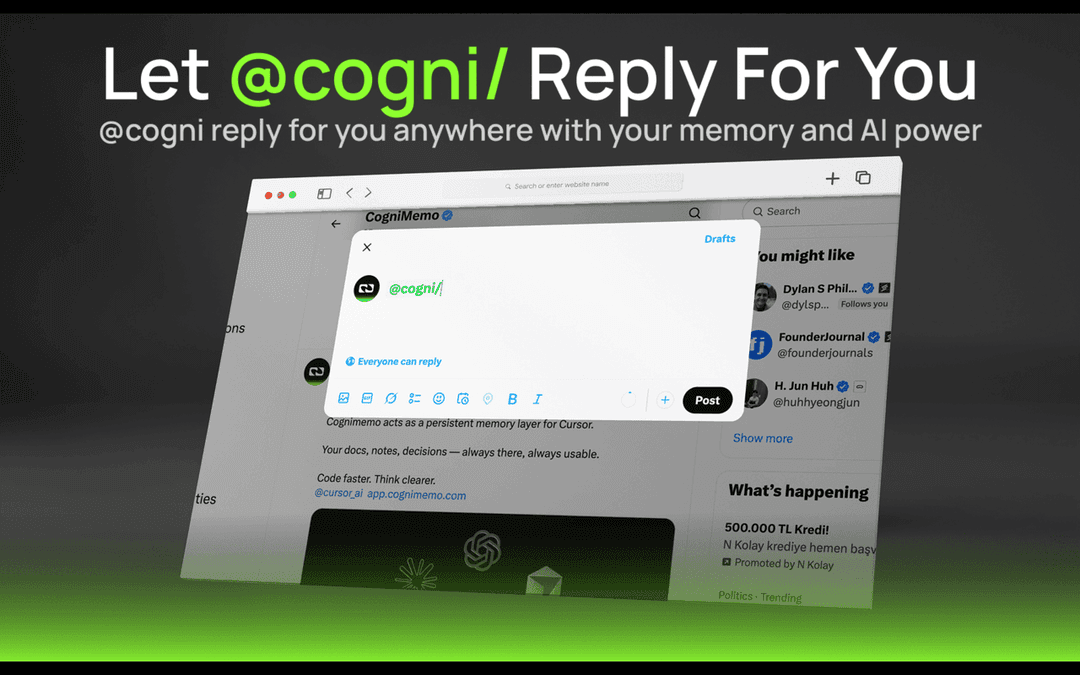
CogniMemo is a browser extension that adds long-term memory capabilities to AI tools like ChatGPT, Claude, Gemini and DeepSeek. It allows users to search and access saved notes, past conversations, and web content directly within any chat interface using @cogni commands. The extension enables inline AI responses in any text field while building a searchable knowledge base from various sources like Twitter posts, AI conversations, and web page selections.
Inline AI Integration: Type @cogni in any text field to get AI responses streamed directly inline without switching contexts
Knowledge Base Building: Capture and organize information from web pages, social media, and AI conversations into a searchable personal memory graph
Multi-Platform Support: Works across multiple AI platforms including ChatGPT, Claude, Gemini and DeepSeek
Context-Aware Responses: AI responses are generated with awareness of previously saved content and conversation history
Use Cases of CogniMemo Extension
Research & Writing: Researchers and writers can save relevant content while browsing and easily reference it later through AI-powered search
Customer Support: Support teams can build knowledge bases from past conversations and quickly access relevant information while helping customers
Personal Knowledge Management: Individual users can create a 'second brain' by saving and organizing information from various sources with AI-powered retrieval
Pros
Seamless integration into existing workflows
Builds persistent knowledge base over time
Works across multiple AI platforms
Cons
Limited to Chrome/Chromium browsers
Requires active internet connection
How to Use CogniMemo Extension
Install the Extension: Visit Chrome Web Store and search for 'CogniMemo'. Click 'Add to Chrome' to install the extension.
Configure Site Access: In Chrome extensions settings, select Details for CogniMemo and configure site access permissions to either 'On select sites', 'On specific sites', or 'On all sites' as needed.
Using @cogni Command: Type '@cogni' in any text field (input box, textarea, or rich text editor) followed by your prompt to interact with the AI assistant.
Save Content: Select text on any webpage to capture and save information to your personal memory graph for later recall.
Search Past Content: Type '@cogni' in any chat to search through your saved notes, past conversations, and archived content.
Sync External Sources: Connect and sync content from external platforms like X/Twitter and OpenAI interactions into your CogniMemo memory graph.
Use Floating Assistant: Access the floating assistant on any website to explain content or write using your stored knowledge.
CogniMemo Extension FAQs
CogniMemo is a browser extension that adds long-term memory capabilities to AI tools like ChatGPT, Claude, Gemini, and DeepSeek. It allows users to search saved notes, past chats, and content by typing @cogni in any text field.
CogniMemo Extension Video
Popular Articles

Vosko AI: Localize and Dub Videos for Global Audiences
Oct 15, 2026

Atoms: A Multi-Agent AI Platform That Transforms Ideas into Launch-Ready Products
Oct 13, 2026

Nano Banana SBTI: What It Is, How It Works, and How to Use It in 2026
Apr 15, 2026

Atoms Review — The AI Product Builder Redefining Digital Creation in 2026
Apr 10, 2026
Latest AI Tools Similar to CogniMemo Extension

Snapmark
Snapmark is an AI-powered search engine for bookmarks that allows users to save, search, and organize websites, images, and text without manual tagging or categorization.
Uměl.cz
Uměl.cz is a Czech AI-powered search engine that provides intelligent and contextual answers to user queries.

想读 (WantRead)
想读(WantRead) is an AI-powered reading and note-taking platform that helps users easily import, read, annotate and build their personal knowledge base.

PodExtra AI
PodExtra AI is an advanced AI-powered podcast tool that transforms podcast content into digestible formats through transcripts, summaries, mind maps, outlines, highlights and takeaways.
Popular AI Tools Like CogniMemo Extension

Rememberall
Rememberall is a secure, open-source long-term memory solution that enables AI applications and GPT models to maintain persistent memory across conversations through semantic search and vector storage capabilities.

iglu
Iglu is a private, AI-powered micro-journaling app that helps users record, organize, and revisit their thoughts, memories, and ideas through text and media entries with intelligent search and recommendation features.
FishPic
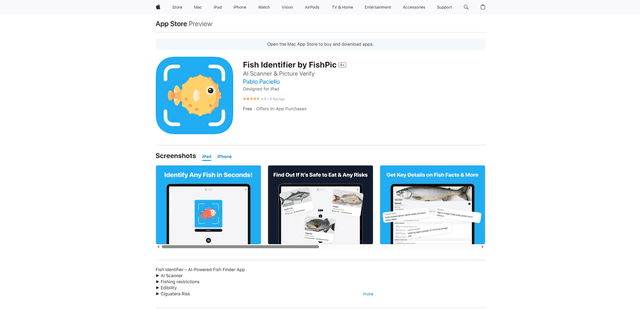
FishPic is an AI-powered fish identification app that instantly recognizes fish species from photos while providing comprehensive information about edibility, regulations, and recipes.

Remem AI
Remem is an AI-powered memory assistant app that helps users capture, organize and rediscover life's important moments through intelligent memory management and personalized archiving.