
Auriko
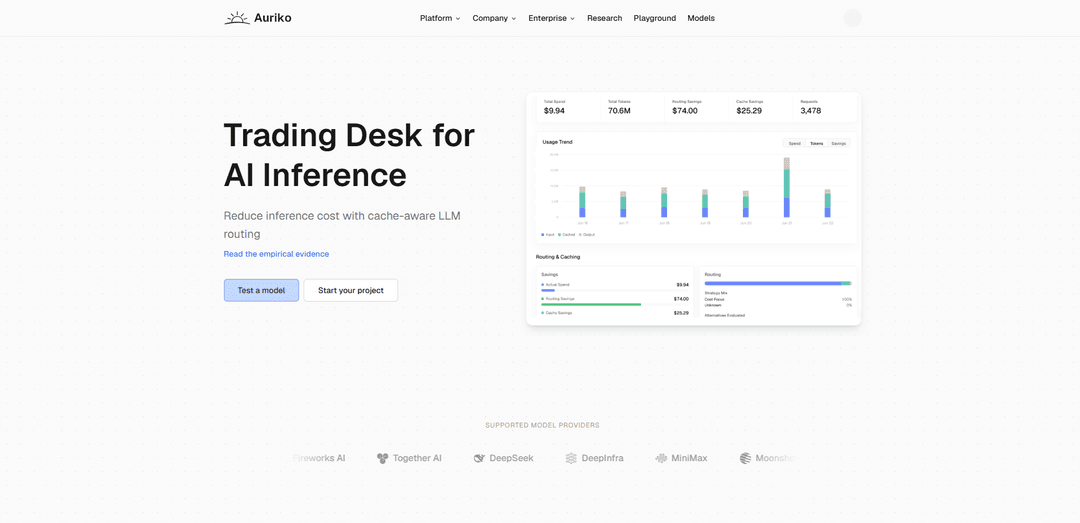
Auriko is a zero-markup, OpenAI-compatible LLM routing and inference optimization layer that lets you access many model providers through one API while automatically arbitraging for lower cost, better latency, and higher reliability with cache-aware routing and failover.
https://www.auriko.ai/?ref=producthunt
Product Information
Updated:Jul 15, 2026
What is Auriko
Auriko is an inference routing platform for AI developers and teams that want to use multiple LLMs and providers without building and maintaining separate integrations. It provides a single, OpenAI-compatible API (Chat Completions and the Responses API preview) plus native Python and TypeScript SDKs, enabling you to switch models via configuration and preserve provider-specific capabilities where supported. Auriko’s core focus is cost and performance optimization—applying quantitative, trading-style methodology to route each request to the best provider/model combination—while charging zero price markup and supporting BYOK (bring your own keys), platform keys, or both.
Key Features of Auriko
Auriko is a zero-markup LLM inference routing layer that lets teams access many models and providers through a single, OpenAI-compatible API while optimizing routing for cost, latency, throughput, and reliability. It applies cache-aware, quantitative optimization using real-time provider health/performance signals and your usage patterns, supports BYOK and platform keys with key orchestration, provides automatic failover and global edge deployment, and enables configurable routing strategies, constraints, and budget controls for production-grade uptime and spend management.
Unified, OpenAI-compatible API: Use a drop-in OpenAI-style base_url to call models across many providers without changing application code, while preserving provider-specific features where supported.
Deep cost optimization (cache-aware arbitrage): Routes requests to the lowest effective-cost provider by modeling workload behavior, token pricing, and prompt-caching mechanics; designed to reduce inference cost versus direct/provider-by-provider usage.
Configurable routing strategies & constraints: Choose defaults or define custom routing objectives (cost, latency/TTFT, throughput) and enforce constraints like max TTFT, percentile targets, structured output only, or data policy requirements (e.g., ZDR).
Automatic failover & reliability layer: Back each request with redundancy and fallback options to improve uptime and reduce the impact of provider outages or capacity shortfalls.
Key orchestration (BYOK + platform keys): Bring your own provider keys, use Auriko-managed platform keys, or both—then maximize utilization with orchestration across providers and keys.
Capacity intelligence, global edge, and budget controls: Route through a globally distributed edge network with capacity awareness, tap into capacity reserves when needed, and set workspace/API-key spending limits and alerts.
Use Cases of Auriko
Production LLM apps needing lower cost and higher uptime: SaaS products can route each request to the best provider/model based on cost and health signals, with automatic failover to maintain reliable user experiences.
Agentic coding tools and developer workflows: Teams running coding agents (e.g., IDE copilots, automated refactoring, code review bots) can switch models quickly and reduce inference spend without tool rewrites.
LLM experimentation and A/B model evaluation: Research and applied AI teams can rapidly compare providers/models via one API, tune routing policies (cost/latency/quality), and iterate faster.
Enterprise governance with spend and data-policy constraints: Organizations can enforce budget limits/alerts and route only to providers meeting policies (e.g., ZDR) while still optimizing latency and cost.
High-traffic customer support and chat automation: Support bots can use latency/TTFT constraints and fallback routing to keep response times consistent during provider congestion, while minimizing per-ticket cost.
Burst workloads requiring capacity-aware routing: Marketing campaigns, launches, or batch generation jobs can leverage capacity intelligence and multi-provider routing to avoid throttling and reduce time-to-complete.
Pros
Zero price markup positioning with cost-optimized routing to reduce inference spend
OpenAI-compatible drop-in integration simplifies multi-provider access and switching
Reliability features (automatic failover, health signals, capacity awareness) improve uptime
Flexible controls (routing constraints, data policy options, budgets/alerts) suit production needs
Cons
Some provider-specific features may not be available through the unified layer (per documentation)
Adds an extra routing layer/vendor dependency between your app and underlying model providers
Best savings/latency gains may require tuning routing strategy and constraints to your workload
How to Use Auriko
1) Create an Auriko account and get an API key: Sign up on Auriko and generate an API key for your workspace. You will use this key to authenticate requests to Auriko’s OpenAI-compatible API endpoint.
2) Set the AURIKO_API_KEY environment variable: Export your Auriko key as an environment variable so SDKs and tools can pick it up automatically (e.g., AURIKO_API_KEY=your_key).
3) Choose an integration style (OpenAI-compatible drop-in vs Auriko SDK): If you already use an OpenAI client/framework, point it to Auriko’s base URL for minimal code changes. If you need Auriko-specific features (routing metadata, cost tracking, multi-model routing), use the native Auriko SDK.
4) Install an OpenAI-compatible client library: Install the OpenAI client for your language (example shown in Python). This lets you call Auriko using the standard /chat/completions interface while changing only the base_url.
5) Configure the client to use Auriko’s API base URL: Initialize the client with base_url set to https://api.auriko.ai/v1 and api_key set to your AURIKO_API_KEY. This routes requests through Auriko instead of directly to a single model provider.
6) Make your first chat completion request: Call the OpenAI-compatible chat.completions endpoint with a model name supported by Auriko (e.g., deepseek-v4-pro) and standard messages. Read the assistant output from response.choices[0].message.content.
7) Enable Auriko routing (cost/latency/throughput optimization) via extra_body: Pass Auriko routing controls in extra_body.gateway.routing to optimize per request. Example controls include optimize (e.g., cost-focus), max_ttft_ms, ttft_percentile (e.g., p50), and data_policy (e.g., zdr).
8) Add constraints and fallbacks for reliability: Use Auriko’s routing strategy options to enforce constraints (e.g., target TTFT, throughput thresholds, input cost ceilings) and enable fallback so requests can fail over to alternate providers/models automatically.
9) Use BYOK, platform keys, or both (key orchestration): Decide whether to bring your own provider keys (BYOK), use Auriko-managed platform keys, or combine both. Auriko can orchestrate keys to maximize utilization and manage provider-aware rate limits.
10) Deploy globally and benefit from edge routing: Run your app normally; Auriko routes through a globally distributed edge network to reduce latency and improve performance consistency across regions.
11) Set budget controls for environments (dev/staging/prod): Configure spending limits and alerts at the workspace or API key level to prevent overruns. Budget enforcement behavior is handled by Auriko error codes when limits are exceeded.
12) Monitor savings, usage analytics, and routing outcomes: Use Auriko’s dashboard/analytics to review usage, routing savings, and cost optimization metrics. Iterate on routing strategies based on observed latency, cache behavior, and cost.
13) Integrate with agentic coding tools and frameworks (optional): Point tools that support OpenAI-compatible endpoints (e.g., agent frameworks or coding tools) at Auriko’s base URL and provide AURIKO_API_KEY. Note that some provider-specific features may not be available through the generic /chat/completions interface.
14) Discover available models and providers (optional): Use Auriko’s model directory to list supported models/providers and select the best fit for your workload. This helps when you want to switch models without changing application code.
Auriko FAQs
Auriko is an LLM routing and inference platform that provides one API to access models across many providers, and applies quantitative, cache-aware cost optimization (similar to trading/arbitrage methodology) to route requests for better cost/latency/quality outcomes.
Auriko Video
Popular Articles

Vosko AI: Localize and Dub Videos for Global Audiences
Oct 15, 2026

Atoms: A Multi-Agent AI Platform That Transforms Ideas into Launch-Ready Products
Oct 13, 2026

Nano Banana SBTI: What It Is, How It Works, and How to Use It in 2026
Apr 15, 2026

Atoms Review — The AI Product Builder Redefining Digital Creation in 2026
Apr 10, 2026
Latest AI Tools Similar to Auriko

Gait
Gait is a collaboration tool that integrates AI-assisted code generation with version control, enabling teams to track, understand, and share AI-generated code context efficiently.

invoices.dev
invoices.dev is an automated invoicing platform that generates invoices directly from developers' Git commits, with integration capabilities for GitHub, Slack, Linear, and Google services.

EasyRFP
EasyRFP is an AI-powered edge computing toolkit that streamlines RFP (Request for Proposal) responses and enables real-time field phenotyping through deep learning technology.

Cart.ai
Cart.ai is an AI-powered service platform that provides comprehensive business automation solutions including coding, customer relations management, video editing, e-commerce setup, and custom AI development with 24/7 support.
Popular AI Tools Like Auriko

GitHub Copilot Chat
GitHub Copilot Chat is an AI-powered coding assistant that provides natural language interactions, real-time code suggestions, and contextual support directly within supported IDEs and GitHub.com.

CopilotForXcode
CopilotForXcode is an Xcode Source Editor Extension that integrates GitHub Copilot, Codeium, and ChatGPT to provide AI-powered code suggestions, chat assistance, and prompt-to-code functionality within Xcode.

BrowserAI
BrowserAI is an open-source library that enables running local Large Language Models (LLMs) directly in web browsers with WebGPU acceleration, offering privacy-focused AI capabilities without requiring server infrastructure.

OpenAI Codex CLI
OpenAI Codex CLI is a lightweight, open-source coding agent that runs in your terminal, enabling developers to translate natural language into code execution while providing ChatGPT-level reasoning with the ability to run code, manipulate files, and iterate under version control.