
App Cleaner & Uninstaller
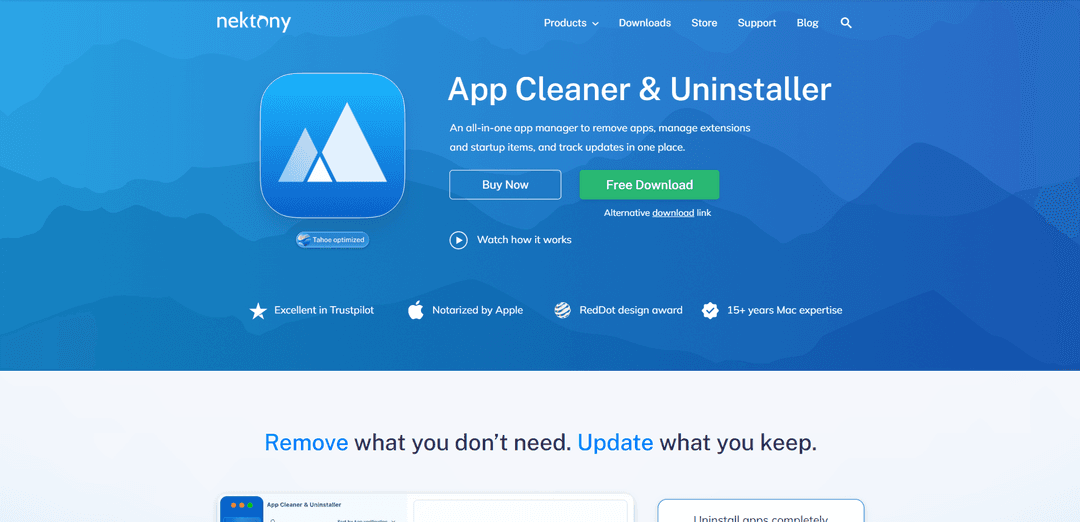
App Cleaner & Uninstaller is a comprehensive Mac utility that helps users completely uninstall applications, manage extensions, optimize startup items, and track software updates all in one place.
https://nektony.com/mac-app-cleaner?ref=producthunt
Product Information
Updated:Mar 8, 2026
What is App Cleaner & Uninstaller
App Cleaner & Uninstaller, developed by Nektony, is a professional-grade utility tool designed specifically for macOS that goes beyond the basic drag-to-trash uninstallation process. It's a smart application manager that helps users maintain a clean and optimized Mac by providing complete control over installed applications, their associated files, and system components. The software supports over 1000 Mac applications and offers a user-friendly interface with both Basic and Expert modes to accommodate different user needs.
Key Features of App Cleaner & Uninstaller
App Cleaner & Uninstaller is a comprehensive Mac utility that helps users completely remove applications and their associated files, manage startup programs, track app updates, and clean system extensions. It offers both basic and expert modes, supports 1000+ Mac applications, and includes features for security auditing through permission insights and notarization status checking.
Complete App Removal: Thoroughly removes applications along with all associated service files, caches, and hidden leftovers that typically remain when apps are dragged to trash
Bulk Update Management: Centralizes updates for both App Store and third-party applications in one place, allowing users to keep all their apps current with one-click updates
Startup Optimization: Manages login items, background apps, and system daemons to improve Mac boot time and overall performance
Security Insights: Provides detailed permission auditing, AI-powered app behavior summaries, and verification of Apple notarization status for installed applications
Use Cases of App Cleaner & Uninstaller
System Maintenance: Regular cleanup of unused applications and their remnants to maintain optimal system performance and free up storage space
Privacy Protection: Auditing app permissions and removing potentially intrusive extensions or background processes to enhance system privacy
Software Migration: Clean removal of old applications when switching to new software or transferring to a new Mac to ensure no conflicting files remain
Pros
User-friendly interface with both basic and expert modes
Comprehensive cleaning that includes hidden files and leftovers
Strong customer support with quick response times
Cons
Limited free trial period of only 2 days
Major upgrades may require additional payment beyond the one-time purchase
How to Use App Cleaner & Uninstaller
Download and Launch: Download App Cleaner & Uninstaller from Nektony's official website and launch it. The app will automatically start scanning your hard drive.
View Applications: In the Applications section, you'll see a complete list of all installed apps on your Mac. The left panel shows apps while the right panel displays associated service files.
Select Apps to Uninstall: Select the app(s) you want to remove. You can select multiple apps for bulk removal. Click the 'Uninstall' button and confirm the removal.
Remove Leftover Files: Go to the 'Remaining Files' section to find and remove leftover files from previously deleted applications. Select the files and click 'Remove' to delete them.
Manage Extensions: Use the 'Extensions' section to view and manage web browser extensions, preference panes, widgets, screen savers, and internet plugins. Enable/disable or remove them as needed.
Control Startup Items: In the Startup Items section, view and manage programs that launch automatically when your Mac starts. Use the switch button to enable/disable startup items.
Update Apps: Use the Updates feature to check for and install available updates for your installed applications. You can perform bulk updates with one click.
Empty Trash: After removing apps and files, empty the Trash bin and restart your Mac to complete the cleanup process.
App Cleaner & Uninstaller FAQs
When you drag an app to the Trash, its service files (like system scripts, caches, and support files) often remain on your disk, taking up valuable space and potentially slowing down your Mac. App Cleaner & Uninstaller finds these 'hidden' leftovers and removes them completely, keeping your macOS clean and optimized.
App Cleaner & Uninstaller Video
Popular Articles

Atoms: A Multi-Agent AI Platform That Transforms Ideas into Launch-Ready Products
May 22, 2026

Nano Banana SBTI: What It Is, How It Works, and How to Use It in 2026
Apr 15, 2026

Atoms Review — The AI Product Builder Redefining Digital Creation in 2026
Apr 10, 2026

Kilo Claw: How to Deploy and Use a True "Do‑It‑For‑You" AI Agent(2026 Update)
Apr 3, 2026
Latest AI Tools Similar to App Cleaner & Uninstaller

GPT Engineer
GPT Engineer is an AI-powered software development tool that enables anyone to build web applications by chatting with an AI engineer.


Lucky Robots
Lucky Robots is a premier virtual training boot camp for robots, offering a simulation platform to rapidly iterate, train, and test robot models using cutting-edge technologies.
Popular AI Tools Like App Cleaner & Uninstaller


GPT Engineer
GPT Engineer is an AI-powered software development tool that enables anyone to build web applications by chatting with an AI engineer.
IBM
IBM (International Business Machines Corporation) is a leading multinational technology company that pioneered the computer industry and continues to innovate in areas like AI, cloud computing, consulting, and enterprise solutions.