
AI Hotkeys
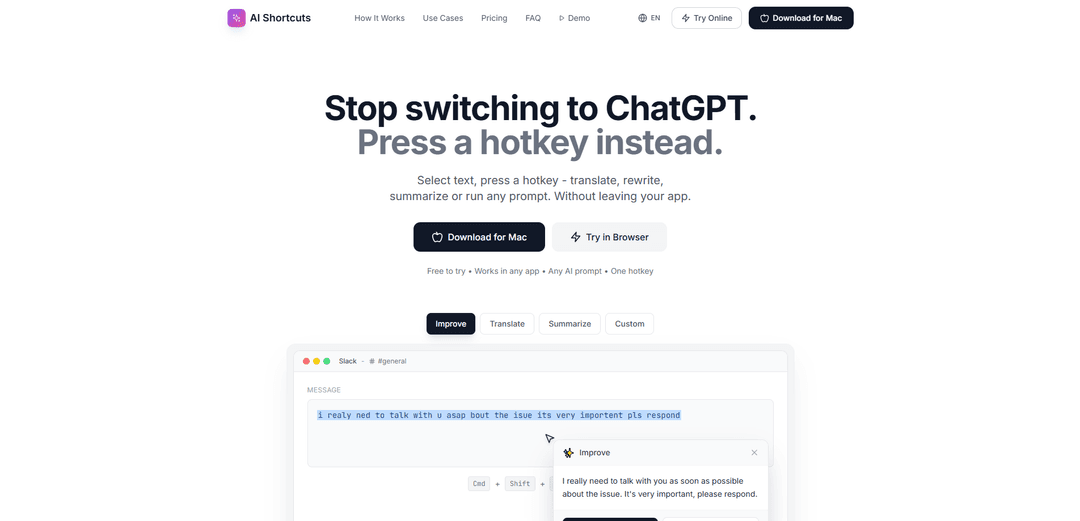
AI Hotkeys is a productivity tool that enables users to access AI capabilities like translation, rewriting, and summarization directly from any application using customizable keyboard shortcuts.
https://www.aihotkeys.tech/?ref=producthunt
Product Information
Updated:Mar 8, 2026
What is AI Hotkeys
AI Hotkeys is a macOS application designed to streamline AI-powered text operations without the need to constantly switch between applications. It eliminates the traditional workflow of copying text, switching to ChatGPT or other AI tools, and pasting back and forth. The tool works universally across all applications and comes with both free and pro versions, with the free tier offering 20 requests per day and the option to use your own API key for unlimited access.
Key Features of AI Hotkeys
AI Hotkeys is a productivity tool that integrates AI capabilities directly into your workflow through keyboard shortcuts. It allows users to select text in any application and perform AI-powered operations like translation, rewriting, summarization, or custom prompts with just a hotkey press, eliminating the need to switch between applications and saving significant time.
Universal App Compatibility: Works seamlessly across all applications on your system, allowing you to use AI features wherever you're typing
Customizable Shortcuts: Create unlimited custom hotkeys mapped to specific AI prompts and actions based on your needs
Instant Results: Provides immediate AI responses in a popup window without leaving your current application
API Integration Options: Supports bringing your own API key for unlimited free usage and integration with various AI providers
Use Cases of AI Hotkeys
Professional Communication: Quick grammar fixes and tone adjustments for emails, messages, and business documents
Content Creation: Instant text improvements and rewrites for writers, bloggers, and content creators
International Collaboration: Real-time translation capabilities for teams working across different languages
Research and Analysis: Quick summarization of long articles and documents into key points
Pros
Significant time savings by eliminating context switching
Flexible customization options for different needs
Simple and intuitive user interface
Cons
Limited to 20 requests per day in free version
Requires macOS 13.0 or later
May require subscription or API key for unlimited use
How to Use AI Hotkeys
Download and Install: Download AI Hotkeys from www.aihotkeys.tech for Mac (requires macOS 13.0 or later) or try it in browser through their playground
Select Text: In any application, select the text you want to modify using AI
Use Default Hotkey: Press Cmd+Shift+I (default hotkey for improve) to activate the AI assistant
Get Results: An AI popup will appear with the improved/modified text. You can choose to copy or replace the original text
Create Custom Shortcuts: Set up unlimited custom shortcuts with your own prompts for different purposes like translation, summarization, tone adjustment, etc.
Manage API Key: Optionally use your own API key for unlimited free requests, otherwise use the free tier (20 requests/day) or upgrade to Pro for unlimited requests
AI Hotkeys FAQs
AI Shortcuts is a Mac application that lets you use AI features like translation, rewriting, and summarization directly in any app using keyboard shortcuts, without having to switch to ChatGPT.
Popular Articles

Atoms: A Multi-Agent AI Platform That Transforms Ideas into Launch-Ready Products
May 22, 2026

Nano Banana SBTI: What It Is, How It Works, and How to Use It in 2026
Apr 15, 2026

Atoms Review — The AI Product Builder Redefining Digital Creation in 2026
Apr 10, 2026

Kilo Claw: How to Deploy and Use a True "Do‑It‑For‑You" AI Agent(2026 Update)
Apr 3, 2026
Latest AI Tools Similar to AI Hotkeys

Gait
Gait is a collaboration tool that integrates AI-assisted code generation with version control, enabling teams to track, understand, and share AI-generated code context efficiently.

invoices.dev
invoices.dev is an automated invoicing platform that generates invoices directly from developers' Git commits, with integration capabilities for GitHub, Slack, Linear, and Google services.

EasyRFP
EasyRFP is an AI-powered edge computing toolkit that streamlines RFP (Request for Proposal) responses and enables real-time field phenotyping through deep learning technology.

Cart.ai
Cart.ai is an AI-powered service platform that provides comprehensive business automation solutions including coding, customer relations management, video editing, e-commerce setup, and custom AI development with 24/7 support.
Popular AI Tools Like AI Hotkeys

GitHub Copilot Chat
GitHub Copilot Chat is an AI-powered coding assistant that provides natural language interactions, real-time code suggestions, and contextual support directly within supported IDEs and GitHub.com.

CopilotForXcode
CopilotForXcode is an Xcode Source Editor Extension that integrates GitHub Copilot, Codeium, and ChatGPT to provide AI-powered code suggestions, chat assistance, and prompt-to-code functionality within Xcode.

BrowserAI
BrowserAI is an open-source library that enables running local Large Language Models (LLMs) directly in web browsers with WebGPU acceleration, offering privacy-focused AI capabilities without requiring server infrastructure.

OpenAI Codex CLI
OpenAI Codex CLI is a lightweight, open-source coding agent that runs in your terminal, enabling developers to translate natural language into code execution while providing ChatGPT-level reasoning with the ability to run code, manipulate files, and iterate under version control.