1DevTool
1DevTool is an AI-powered code editor that combines AI coding assistant, terminal, browser, HTTP client, and database capabilities in one comprehensive workspace for $29 one-time payment.
https://1devtool.com/?ref=producthunt
Product Information
Updated:Apr 8, 2026
What is 1DevTool
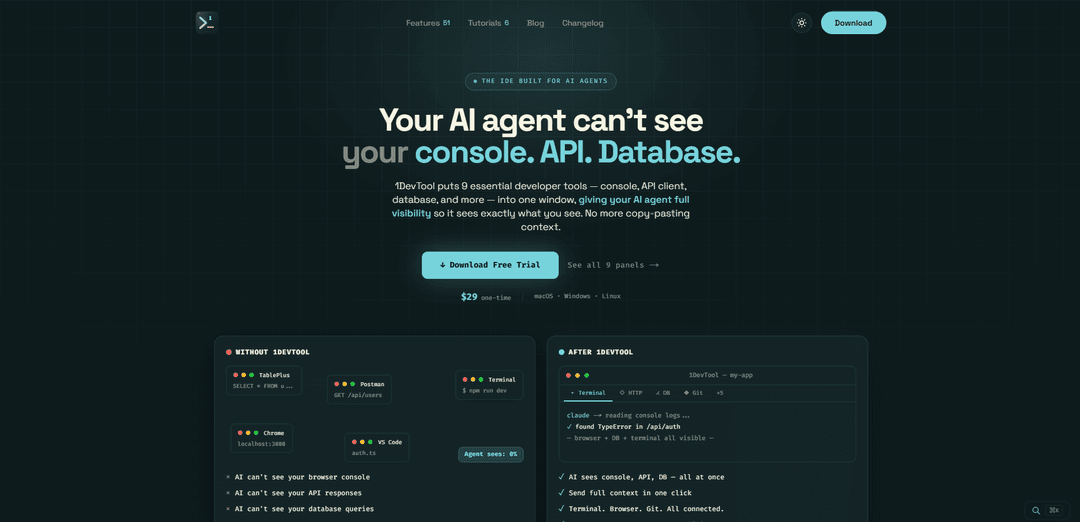
1DevTool is an all-in-one IDE designed specifically for AI agents, providing developers with a comprehensive workspace that integrates nine essential development tools. It's built from the ground up to help developers write better code faster by combining multiple AI models with a beautiful, developer-friendly interface. Unlike other AI coding tools that require monthly subscriptions, 1DevTool offers a complete solution with a one-time payment of $29, making it an attractive alternative to platforms like Cursor, GitHub Copilot, and Windsurf.
Key Features of 1DevTool
1DevTool is an all-in-one AI-powered IDE that combines 9 essential developer tools including an IDE, terminal, browser, HTTP client, database client, Git UI, markdown preview, and AI coding assistant in a single workspace. It offers full AI agent visibility across all tools, persistent terminal sessions, and seamless context sharing, available for a one-time payment of $29 without recurring subscriptions.
Integrated Development Environment: Features Monaco editor with syntax highlighting, multi-tab support, autocomplete, and file explorer, eliminating the need for separate VS Code instances
AI Agent Integration: Provides full context visibility to AI agents across all tools, allowing them to see console logs, API responses, and database queries without manual copy-pasting
Persistent Workspace: Maintains all terminal sessions, running processes, and agent conversations across app restarts or machine reboots, saving setup time
Smart Notifications: Sends native OS notifications when AI agents complete tasks, eliminating the need to constantly check terminal tabs
Use Cases of 1DevTool
Full-Stack Development: Developers can manage frontend, backend, and database operations in one workspace while getting AI assistance for debugging and coding
API Development and Testing: Create, test, and document APIs using the built-in HTTP client and markdown preview, with AI assistance for optimization
Database Management: Connect to and query SQL/NoSQL databases while maintaining development context and getting AI suggestions for query optimization
Pros
One-time payment of $29 instead of multiple subscription fees
All-in-one solution eliminating the need for multiple separate tools
Saves approximately 40+ minutes per day by reducing context switching
Cons
Relatively new product with developing feature set
May require learning curve to adapt to the integrated workspace
How to Use 1DevTool
Download and Install: Download 1DevTool for your platform (macOS, Windows, or Linux) from 1devtool.com and install it. One-time $29 purchase required.
Set up Workspace: Open 1DevTool and create a new workspace for your project. The workspace will contain all your development tools in one window.
Configure Terminal: Set up terminal sessions using the Multiple Terminal Management feature. Terminal sessions persist across restarts so you won't lose your work.
Set up Browser Panel: Use the embedded browser panel to preview your app, test endpoints, and read documentation without switching windows. Browser captures console logs and errors.
Connect Database: Use the built-in database client to connect to your SQL/NoSQL databases. Your database queries and data will be accessible alongside your code.
Configure HTTP Client: Set up API requests and collections using the built-in HTTP client for testing endpoints without needing Postman.
Set up Git Integration: Use the Git client interface to manage version control with visual staging, commits, branches, diffs and merges.
Enable AI Integration: Connect your preferred AI coding assistant (Claude, Codex, Gemini etc). Use Cmd+I overlay for writing prompts and sending context to AI.
Use Canvas Layout: Arrange your workspace using the canvas layout feature - drag terminals and panels anywhere for your optimal setup.
Enable Notifications: Turn on native OS notifications to get alerts when AI agents complete tasks or generate files across your projects.
1DevTool FAQs
1DevTool is an all-in-one AI code editor that combines 9 essential developer tools: IDE, terminal, browser, HTTP client, database client, Git UI, markdown preview, AI logs, and file explorer - all in a single window. It's designed to give AI agents full visibility into your development environment.
1DevTool Video
Popular Articles

Vosko AI: Localize and Dub Videos for Global Audiences
Oct 15, 2026

Atoms: A Multi-Agent AI Platform That Transforms Ideas into Launch-Ready Products
Oct 13, 2026

Nano Banana SBTI: What It Is, How It Works, and How to Use It in 2026
Apr 15, 2026

Atoms Review — The AI Product Builder Redefining Digital Creation in 2026
Apr 10, 2026
Latest AI Tools Similar to 1DevTool

Gait
Gait is a collaboration tool that integrates AI-assisted code generation with version control, enabling teams to track, understand, and share AI-generated code context efficiently.

invoices.dev
invoices.dev is an automated invoicing platform that generates invoices directly from developers' Git commits, with integration capabilities for GitHub, Slack, Linear, and Google services.

EasyRFP
EasyRFP is an AI-powered edge computing toolkit that streamlines RFP (Request for Proposal) responses and enables real-time field phenotyping through deep learning technology.

Cart.ai
Cart.ai is an AI-powered service platform that provides comprehensive business automation solutions including coding, customer relations management, video editing, e-commerce setup, and custom AI development with 24/7 support.
Popular AI Tools Like 1DevTool

GitHub Copilot Chat
GitHub Copilot Chat is an AI-powered coding assistant that provides natural language interactions, real-time code suggestions, and contextual support directly within supported IDEs and GitHub.com.

CopilotForXcode
CopilotForXcode is an Xcode Source Editor Extension that integrates GitHub Copilot, Codeium, and ChatGPT to provide AI-powered code suggestions, chat assistance, and prompt-to-code functionality within Xcode.

BrowserAI
BrowserAI is an open-source library that enables running local Large Language Models (LLMs) directly in web browsers with WebGPU acceleration, offering privacy-focused AI capabilities without requiring server infrastructure.

OpenAI Codex CLI
OpenAI Codex CLI is a lightweight, open-source coding agent that runs in your terminal, enabling developers to translate natural language into code execution while providing ChatGPT-level reasoning with the ability to run code, manipulate files, and iterate under version control.