
Google Workspace CLI
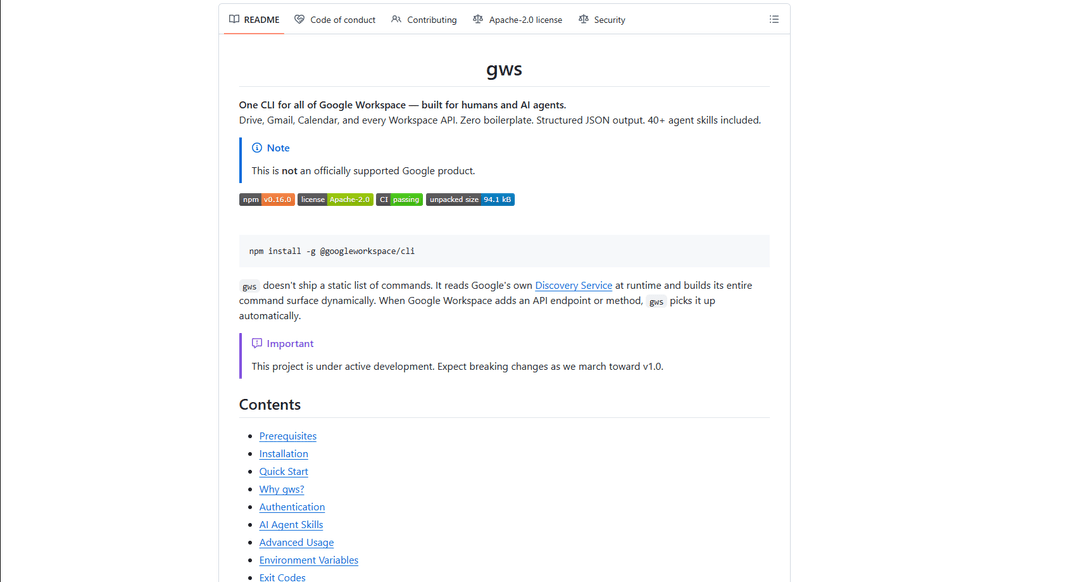
Google Workspace CLI is a unified command-line tool that provides access to all Google Workspace services (Drive, Gmail, Calendar, Sheets, Docs, Chat, Admin) through a single interface, with built-in AI agent skills and dynamic command generation.
https://github.com/googleworkspace/cli?ref=producthunt
제품 정보
업데이트됨:Mar 16, 2026
Google Workspace CLI이란?
Google Workspace CLI (gws) is an open-source command-line interface that enables users to interact with all Google Workspace services directly from their terminal, eliminating the need for multiple browser tabs or custom API integrations. Built with Rust and distributed as a Node.js package, it offers a streamlined way to automate Workspace tasks through command-line operations. While not an officially supported Google product, it provides comprehensive access to Google Workspace APIs with features like OAuth authentication, structured JSON output, and built-in AI agent capabilities.
Google Workspace CLI의 주요 기능
Google Workspace CLI (gws) is a unified command-line tool that provides seamless access to all Google Workspace services including Drive, Gmail, Calendar, Sheets, Docs, Chat, and Admin. It dynamically builds its command surface from Google's Discovery Service, offers structured JSON output for AI agent integration, includes 100+ pre-built agent skills, and supports multiple authentication workflows. The tool simplifies automation and management of Google Workspace services through a single command-line interface, making it ideal for both human users and AI agents.
Dynamic Command Generation: Automatically builds commands from Google's Discovery Service, ensuring up-to-date access to all API endpoints without manual updates
AI Agent Integration: Includes 100+ pre-built agent skills and provides structured JSON output, making it easy for AI agents to interact with Google Workspace services
Flexible Authentication: Supports multiple authentication workflows including interactive desktop, browser-assisted, headless/CI, and service account authentication
Helper Commands: Provides hand-crafted helper commands (prefixed with '+') for common workflows across different services, simplifying complex operations
Google Workspace CLI의 사용 사례
Enterprise Automation: Automate routine tasks like email management, document creation, and calendar scheduling across an organization using scripts and AI agents
Development Integration: Integrate Google Workspace services into development workflows and CI/CD pipelines for automated testing and deployment
Personal Productivity: Streamline personal workflow management through command-line access to emails, calendar, and documents without switching between browser tabs
AI Assistant Development: Build AI assistants that can interact with Google Workspace services using structured JSON outputs and pre-built agent skills
장점
Unified interface for all Google Workspace services
Automatic updates through Discovery Service integration
Rich support for AI agent integration with structured outputs
단점
Project is still under active development with potential breaking changes
Requires technical knowledge to set up and use effectively
OAuth scope limitations for unverified apps in testing mode
Google Workspace CLI 사용 방법
Install Google Workspace CLI: Run 'npm install -g @googleworkspace/cli' in your terminal to install the CLI globally
Set up authentication: Run 'gws auth setup' which will walk you through creating a Google Cloud project and enabling necessary APIs. If you don't have gcloud CLI, you'll need to set up OAuth credentials manually in Google Cloud Console.
Log in to your Google account: Run 'gws auth login' to authenticate. This will open a browser window for you to sign in to your Google account and grant permissions.
Select required API scopes: During login, choose which Google Workspace APIs you need access to (e.g., 'gws auth login -s drive,gmail,sheets' for specific services)
Test the connection: Try a simple command like 'gws drive files list --params '{"pageSize": 5}'' to verify everything is working
Learn basic commands: Use helper commands prefixed with '+' for common tasks. For example: 'gws gmail +send' to send emails, 'gws drive +upload' for file uploads, 'gws calendar +agenda' to see upcoming events
Handle pagination: Use --page-all flag to auto-paginate results, --page-limit <N> to set max pages, and --page-delay <MS> to set delay between pages
Work with Google Sheets: Always use single quotes when specifying sheet ranges, e.g. 'gws sheets spreadsheets values get --params '{"spreadsheetId": "ID", "range": "Sheet1!A1:C10"}'
Enable debug logging (optional): Set GOOGLE_WORKSPACE_CLI_LOG environment variable for debug output, e.g. 'export GOOGLE_WORKSPACE_CLI_LOG=gws=debug'
Install AI agent skills (optional): Run 'npx skills add https://github.com/googleworkspace/cli' to install all agent skills, or install specific ones like 'npx skills add https://github.com/googleworkspace/cli/tree/main/skills/gws-drive'
Google Workspace CLI 자주 묻는 질문
Google Workspace CLI (gws) is a command-line tool that provides unified access to all Google Workspace services including Drive, Gmail, Calendar, Sheets, Docs, Chat, and Admin. It dynamically builds its command surface from Google's Discovery Service and includes AI agent skills. It's designed for both human users and AI agents to interact with Google Workspace services.




Google Workspace CLI와(과) 유사한 최신 AI 도구

Gait
Gait는 AI 지원 코드 생성을 버전 관리와 통합하여 팀이 AI 생성 코드 맥락을 효율적으로 추적, 이해 및 공유할 수 있도록 하는 협업 도구입니다.

invoices.dev
invoices.dev는 개발자의 Git 커밋에서 직접 청구서를 생성하는 자동화된 청구 플랫폼으로, GitHub, Slack, Linear 및 Google 서비스와의 통합 기능을 제공합니다.

EasyRFP
EasyRFP는 RFP(제안 요청) 응답을 간소화하고 딥 러닝 기술을 통해 실시간 현장 표현형을 가능하게 하는 AI 기반 엣지 컴퓨팅 툴킷입니다.

Cart.ai
Cart.ai는 코딩, 고객 관계 관리, 비디오 편집, 전자상거래 설정 및 맞춤형 AI 개발을 포함한 종합적인 비즈니스 자동화 솔루션을 제공하는 AI 기반 서비스 플랫폼으로, 24/7 지원을 제공합니다.
Google Workspace CLI와(과) 유사한 인기 AI 도구

GitHub Copilot Chat
GitHub Copilot Chat은 자연어 상호작용, 실시간 코드 제안 및 지원되는 IDE와 GitHub.com 내에서 직접 제공되는 맥락 지원을 제공하는 AI 기반 코딩 도우미입니다.

CopilotForXcode
CopilotForXcode는 Xcode 내에서 AI 기반 코드 제안, 채팅 지원 및 프롬프트-투-코드 기능을 제공하기 위해 GitHub Copilot, Codeium 및 ChatGPT를 통합한 Xcode 소스 편집기 확장입니다.

BrowserAI
BrowserAI는 서버 인프라 없이 개인 정보 보호에 중점을 둔 AI 기능을 제공하여 WebGPU 가속을 통해 웹 브라우저에서 직접 로컬 대규모 언어 모델(LLM)을 실행할 수 있도록 하는 오픈 소스 라이브러리입니다.

OpenAI Codex CLI
OpenAI Codex CLI는 터미널에서 실행되는 경량 오픈 소스 코딩 에이전트로, 개발자가 자연어를 코드 실행으로 변환하고 코드 실행, 파일 조작, 버전 제어 하에서 반복 작업을 수행할 수 있는 ChatGPT 수준의 추론 기능을 제공합니다.