
Bookshelf for NotebookLM
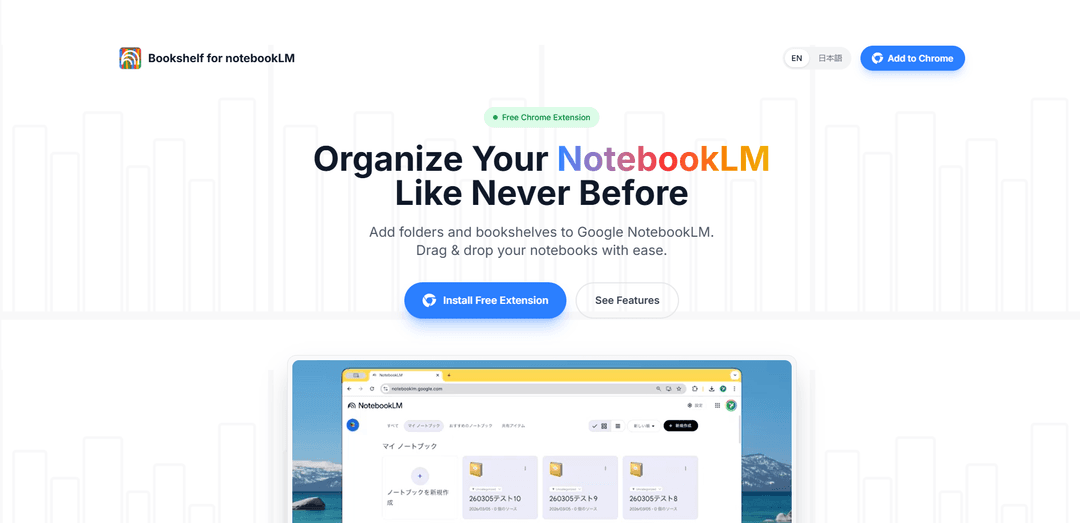
Bookshelf for NotebookLM is a free Chrome extension that adds much-needed folder management capabilities to Google NotebookLM, allowing users to organize and manage their notebooks through an intuitive drag-and-drop interface.
https://bookshelf-notebooklm.com/?ref=producthunt
製品情報
更新日:2026年04月08日
Bookshelf for NotebookLMとは
Bookshelf for NotebookLM is a productivity-focused Chrome extension designed to enhance Google's NotebookLM interface by introducing folder management functionality. As NotebookLM users create more notebooks for their research, study, and work, the standard interface can become cluttered and difficult to navigate. This extension solves this limitation by adding a customizable bookshelf system that helps users organize their growing collection of notebooks efficiently.
Bookshelf for NotebookLMの主な機能
Bookshelf for NotebookLM is a free Chrome extension that adds much-needed folder management functionality to Google's NotebookLM interface. It allows users to organize their notebooks into custom categories using an intuitive drag-and-drop system, featuring a collapsible sidebar for better workspace management and automatic detection of new notebooks, all while maintaining user privacy through local storage.
Custom Bookshelves: Create and customize categories like 'Work', 'Study', or 'Personal' to organize notebooks into logical groups
Drag-and-Drop Interface: Intuitively organize notebooks by dragging them into different folders and reordering them to prioritize workflow
Auto-Sync Functionality: Automatically detects and places new notebooks in an 'Uncategorized' list for easy management
Collapsible Sidebar: Toggle the bookshelf sidebar open or closed to maximize screen space when needed
Bookshelf for NotebookLMのユースケース
Research Organization: Researchers can categorize different studies and projects into separate folders for better project management
Student Study Management: Students can organize course materials and study notes by subject or semester
Professional Content Management: Writers and content creators can separate client work, personal projects, and reference materials into distinct categories
メリット
Privacy-focused with local storage only
Simple and intuitive drag-and-drop interface
Free to use
デメリット
Settings don't sync across different devices
Limited to Chrome browser only
Categorizations may be lost if browser data is cleared
Bookshelf for NotebookLMの使い方
Install the Extension: Add the 'Bookshelf for NotebookLM' extension to Chrome browser from the Chrome Web Store
Access NotebookLM: Open NotebookLM in your Chrome browser where you'll see your existing notebooks displayed in a grid layout
Open Bookshelf Sidebar: Look for the new bookshelf sidebar feature that has been added to your NotebookLM interface. You can toggle it open or closed as needed
Create Folders: Create custom folders/categories like 'Work', 'Study', or 'Personal' to organize your notebooks
Organize Notebooks: Use the intuitive drag-and-drop feature to move notebooks into your created folders. New notebooks will automatically appear in the 'Uncategorized' folder
Manage Folders: Reorder folders to prioritize your workflow and collapse/expand them as needed for better workspace management
Toggle Sidebar: Use the toggle feature to hide or show the bookshelf sidebar when you need more screen space for reading or writing
Bookshelf for NotebookLMのよくある質問
Bookshelf for NotebookLM is a free Chrome extension that adds folder management functionality to Google NotebookLM, allowing users to organize their notebooks using drag-and-drop bookshelves and folders.




Bookshelf for NotebookLMに類似した最新のAIツール

MultipleWords
MultipleWordsは、音声、ビデオ、画像編集にわたるコンテンツ作成と操作のための16の強力なツールを提供する包括的なAIプラットフォームで、クロスプラットフォームのアクセスが可能です。

Athena AI
Athena AIは、ドキュメント分析、クイズ生成、フラッシュカード、インタラクティブチャット機能などを通じて、個別化された学習支援、ビジネスソリューション、ライフコーチングを提供する多用途のAI駆動プラットフォームです

Taidai.io
Taidai.ioは、ノート、メール、テキストコンテンツを自動的に実行可能なtodoリストに変換するAI駆動のツールです

Repliio
Repliioは、カスタマイズ可能なトーンとマルチランゲージサポートを備えたプロフェッショナルでコンテキストに応じたメール返信を迅速に生成するのを助けるAI駆動のメールアシスタントChrome拡張機能です
Bookshelf for NotebookLMに似た人気のAIツール

Microsoft Excel: Spreadsheets
Microsoft Excelは、ユーザーがデータを整理、分析、視覚化できる業界をリードするスプレッドシートソフトウェアであり、数式、チャート、AIによる洞察などの強力な機能を提供します。

Standboy
Standboyは、AIエージェントの活動中にサイドバーにゲームボーイ(GB/GBC/GBA)エミュレーターを自動展開し、その後自動的に非表示にして一時停止し、次回はフレーム途中から再開するVS Code/Cursor拡張機能です。永続的なROMライブラリ、セーブデータ、カバーアートを保持します。
Omniaxe
Omniaxeは、データ抽出、AI駆動の分析、中央集中的なノート取り機能を組み合わせたオールインワンのChrome拡張機能研究ツールで、アナリスト、研究者、学生向けに特別に設計されています

Finesse by Skippr AI
Skippr AIのFinesseは、専門のAIレビュー担当者を通じて、設計、コンテンツ戦略、アクセシビリティ、および製品の方向性に関する即時の専門家レベルの製品フィードバックと批評を提供するブラウザ拡張機能です。