
Google Workspace CLI
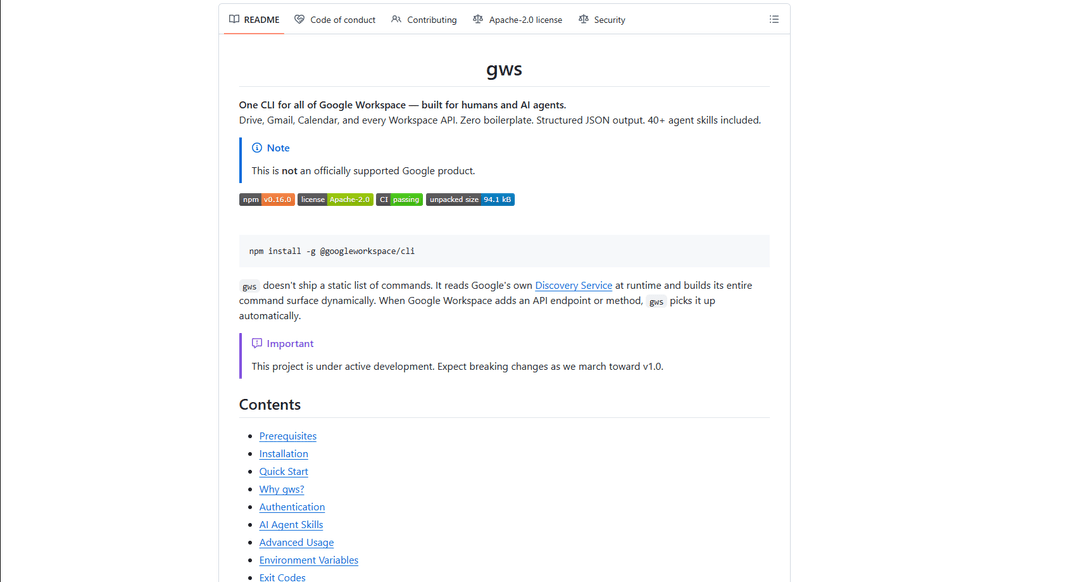
Google Workspace CLI is a unified command-line tool that provides access to all Google Workspace services (Drive, Gmail, Calendar, Sheets, Docs, Chat, Admin) through a single interface, with built-in AI agent skills and dynamic command generation.
https://github.com/googleworkspace/cli?ref=producthunt
Informasi Produk
Diperbarui:Mar 16, 2026
Apa itu Google Workspace CLI
Google Workspace CLI (gws) is an open-source command-line interface that enables users to interact with all Google Workspace services directly from their terminal, eliminating the need for multiple browser tabs or custom API integrations. Built with Rust and distributed as a Node.js package, it offers a streamlined way to automate Workspace tasks through command-line operations. While not an officially supported Google product, it provides comprehensive access to Google Workspace APIs with features like OAuth authentication, structured JSON output, and built-in AI agent capabilities.
Fitur Utama Google Workspace CLI
Google Workspace CLI (gws) is a unified command-line tool that provides seamless access to all Google Workspace services including Drive, Gmail, Calendar, Sheets, Docs, Chat, and Admin. It dynamically builds its command surface from Google's Discovery Service, offers structured JSON output for AI agent integration, includes 100+ pre-built agent skills, and supports multiple authentication workflows. The tool simplifies automation and management of Google Workspace services through a single command-line interface, making it ideal for both human users and AI agents.
Dynamic Command Generation: Automatically builds commands from Google's Discovery Service, ensuring up-to-date access to all API endpoints without manual updates
AI Agent Integration: Includes 100+ pre-built agent skills and provides structured JSON output, making it easy for AI agents to interact with Google Workspace services
Flexible Authentication: Supports multiple authentication workflows including interactive desktop, browser-assisted, headless/CI, and service account authentication
Helper Commands: Provides hand-crafted helper commands (prefixed with '+') for common workflows across different services, simplifying complex operations
Kasus Penggunaan Google Workspace CLI
Enterprise Automation: Automate routine tasks like email management, document creation, and calendar scheduling across an organization using scripts and AI agents
Development Integration: Integrate Google Workspace services into development workflows and CI/CD pipelines for automated testing and deployment
Personal Productivity: Streamline personal workflow management through command-line access to emails, calendar, and documents without switching between browser tabs
AI Assistant Development: Build AI assistants that can interact with Google Workspace services using structured JSON outputs and pre-built agent skills
Kelebihan
Unified interface for all Google Workspace services
Automatic updates through Discovery Service integration
Rich support for AI agent integration with structured outputs
Kekurangan
Project is still under active development with potential breaking changes
Requires technical knowledge to set up and use effectively
OAuth scope limitations for unverified apps in testing mode
Cara Menggunakan Google Workspace CLI
Install Google Workspace CLI: Run 'npm install -g @googleworkspace/cli' in your terminal to install the CLI globally
Set up authentication: Run 'gws auth setup' which will walk you through creating a Google Cloud project and enabling necessary APIs. If you don't have gcloud CLI, you'll need to set up OAuth credentials manually in Google Cloud Console.
Log in to your Google account: Run 'gws auth login' to authenticate. This will open a browser window for you to sign in to your Google account and grant permissions.
Select required API scopes: During login, choose which Google Workspace APIs you need access to (e.g., 'gws auth login -s drive,gmail,sheets' for specific services)
Test the connection: Try a simple command like 'gws drive files list --params '{"pageSize": 5}'' to verify everything is working
Learn basic commands: Use helper commands prefixed with '+' for common tasks. For example: 'gws gmail +send' to send emails, 'gws drive +upload' for file uploads, 'gws calendar +agenda' to see upcoming events
Handle pagination: Use --page-all flag to auto-paginate results, --page-limit <N> to set max pages, and --page-delay <MS> to set delay between pages
Work with Google Sheets: Always use single quotes when specifying sheet ranges, e.g. 'gws sheets spreadsheets values get --params '{"spreadsheetId": "ID", "range": "Sheet1!A1:C10"}'
Enable debug logging (optional): Set GOOGLE_WORKSPACE_CLI_LOG environment variable for debug output, e.g. 'export GOOGLE_WORKSPACE_CLI_LOG=gws=debug'
Install AI agent skills (optional): Run 'npx skills add https://github.com/googleworkspace/cli' to install all agent skills, or install specific ones like 'npx skills add https://github.com/googleworkspace/cli/tree/main/skills/gws-drive'
FAQ Google Workspace CLI
Google Workspace CLI (gws) is a command-line tool that provides unified access to all Google Workspace services including Drive, Gmail, Calendar, Sheets, Docs, Chat, and Admin. It dynamically builds its command surface from Google's Discovery Service and includes AI agent skills. It's designed for both human users and AI agents to interact with Google Workspace services.
Video Google Workspace CLI
Artikel Populer

Vosko AI: Lokalisasi dan Sulih Suara Video untuk Audiens Global
Oct 15, 2026

Atoms: Platform AI Multi-Agen yang Mengubah Ide menjadi Produk Siap Diluncurkan
May 22, 2026

Nano Banana SBTI: Apa Itu, Bagaimana Cara Kerjanya, dan Cara Menggunakannya di Tahun 2026
Apr 15, 2026

Ulasan Atoms — Pembuat Produk AI yang Mendefinisikan Ulang Kreasi Digital di Tahun 2026
Apr 10, 2026
Alat AI Terbaru Serupa dengan Google Workspace CLI

Gait
Gait adalah alat kolaborasi yang mengintegrasikan generasi kode yang dibantu AI dengan kontrol versi, memungkinkan tim untuk melacak, memahami, dan membagikan konteks kode yang dihasilkan AI dengan efisien.

invoices.dev
invoices.dev adalah platform penagihan otomatis yang menghasilkan faktur langsung dari komit Git pengembang, dengan kemampuan integrasi untuk layanan GitHub, Slack, Linear, dan Google.

EasyRFP
EasyRFP adalah toolkit komputasi tepi yang didukung AI yang memperlancar respons RFP (Permintaan Proposal) dan memungkinkan fenotip lapangan waktu nyata melalui teknologi pembelajaran mendalam.

Cart.ai
Cart.ai adalah platform layanan bertenaga AI yang menyediakan solusi otomatisasi bisnis yang komprehensif termasuk pengkodean, manajemen hubungan pelanggan, pengeditan video, pengaturan e-commerce, dan pengembangan AI kustom dengan dukungan 24/7.
Alat AI Populer Seperti Google Workspace CLI

GitHub Copilot Chat
GitHub Copilot Chat adalah asisten pengkodean bertenaga AI yang menyediakan interaksi bahasa alami, saran kode waktu nyata, dan dukungan kontekstual langsung di dalam IDE yang didukung dan GitHub.com.

CopilotForXcode
CopilotForXcode adalah Ekstensi Editor Sumber Xcode yang mengintegrasikan GitHub Copilot, Codeium, dan ChatGPT untuk memberikan saran kode yang didukung AI, bantuan obrolan, dan fungsionalitas prompt-to-code di dalam Xcode.

BrowserAI
BrowserAI adalah pustaka sumber terbuka yang memungkinkan menjalankan Model Bahasa Besar (LLM) lokal langsung di browser web dengan akselerasi WebGPU, menawarkan kemampuan AI yang berfokus pada privasi tanpa memerlukan infrastruktur server.

OpenAI Codex CLI
OpenAI Codex CLI adalah agen pengkodean sumber terbuka ringan yang berjalan di terminal Anda, memungkinkan pengembang untuk menerjemahkan bahasa alami ke dalam eksekusi kode sambil memberikan penalaran tingkat ChatGPT dengan kemampuan untuk menjalankan kode, memanipulasi file, dan melakukan iterasi di bawah kontrol versi.