
Google Workspace CLI
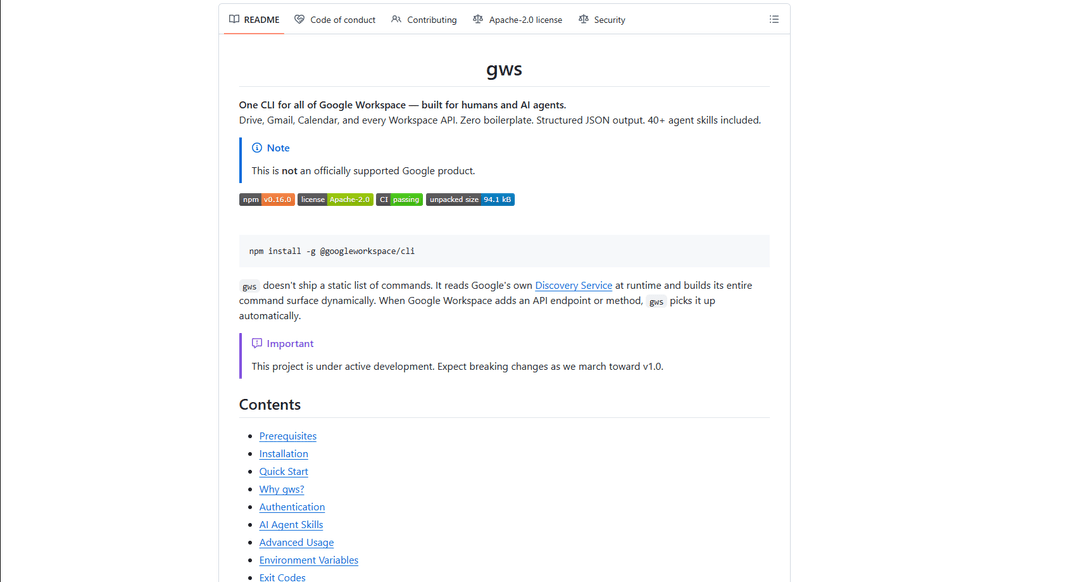
Google Workspace CLI is a unified command-line tool that provides access to all Google Workspace services (Drive, Gmail, Calendar, Sheets, Docs, Chat, Admin) through a single interface, with built-in AI agent skills and dynamic command generation.
https://github.com/googleworkspace/cli?ref=producthunt
Informations sur le produit
Mis à jour:Mar 16, 2026
Qu'est-ce que Google Workspace CLI
Google Workspace CLI (gws) is an open-source command-line interface that enables users to interact with all Google Workspace services directly from their terminal, eliminating the need for multiple browser tabs or custom API integrations. Built with Rust and distributed as a Node.js package, it offers a streamlined way to automate Workspace tasks through command-line operations. While not an officially supported Google product, it provides comprehensive access to Google Workspace APIs with features like OAuth authentication, structured JSON output, and built-in AI agent capabilities.
Caractéristiques principales de Google Workspace CLI
Google Workspace CLI (gws) is a unified command-line tool that provides seamless access to all Google Workspace services including Drive, Gmail, Calendar, Sheets, Docs, Chat, and Admin. It dynamically builds its command surface from Google's Discovery Service, offers structured JSON output for AI agent integration, includes 100+ pre-built agent skills, and supports multiple authentication workflows. The tool simplifies automation and management of Google Workspace services through a single command-line interface, making it ideal for both human users and AI agents.
Dynamic Command Generation: Automatically builds commands from Google's Discovery Service, ensuring up-to-date access to all API endpoints without manual updates
AI Agent Integration: Includes 100+ pre-built agent skills and provides structured JSON output, making it easy for AI agents to interact with Google Workspace services
Flexible Authentication: Supports multiple authentication workflows including interactive desktop, browser-assisted, headless/CI, and service account authentication
Helper Commands: Provides hand-crafted helper commands (prefixed with '+') for common workflows across different services, simplifying complex operations
Cas d'utilisation de Google Workspace CLI
Enterprise Automation: Automate routine tasks like email management, document creation, and calendar scheduling across an organization using scripts and AI agents
Development Integration: Integrate Google Workspace services into development workflows and CI/CD pipelines for automated testing and deployment
Personal Productivity: Streamline personal workflow management through command-line access to emails, calendar, and documents without switching between browser tabs
AI Assistant Development: Build AI assistants that can interact with Google Workspace services using structured JSON outputs and pre-built agent skills
Avantages
Unified interface for all Google Workspace services
Automatic updates through Discovery Service integration
Rich support for AI agent integration with structured outputs
Inconvénients
Project is still under active development with potential breaking changes
Requires technical knowledge to set up and use effectively
OAuth scope limitations for unverified apps in testing mode
Comment utiliser Google Workspace CLI
Install Google Workspace CLI: Run 'npm install -g @googleworkspace/cli' in your terminal to install the CLI globally
Set up authentication: Run 'gws auth setup' which will walk you through creating a Google Cloud project and enabling necessary APIs. If you don't have gcloud CLI, you'll need to set up OAuth credentials manually in Google Cloud Console.
Log in to your Google account: Run 'gws auth login' to authenticate. This will open a browser window for you to sign in to your Google account and grant permissions.
Select required API scopes: During login, choose which Google Workspace APIs you need access to (e.g., 'gws auth login -s drive,gmail,sheets' for specific services)
Test the connection: Try a simple command like 'gws drive files list --params '{"pageSize": 5}'' to verify everything is working
Learn basic commands: Use helper commands prefixed with '+' for common tasks. For example: 'gws gmail +send' to send emails, 'gws drive +upload' for file uploads, 'gws calendar +agenda' to see upcoming events
Handle pagination: Use --page-all flag to auto-paginate results, --page-limit <N> to set max pages, and --page-delay <MS> to set delay between pages
Work with Google Sheets: Always use single quotes when specifying sheet ranges, e.g. 'gws sheets spreadsheets values get --params '{"spreadsheetId": "ID", "range": "Sheet1!A1:C10"}'
Enable debug logging (optional): Set GOOGLE_WORKSPACE_CLI_LOG environment variable for debug output, e.g. 'export GOOGLE_WORKSPACE_CLI_LOG=gws=debug'
Install AI agent skills (optional): Run 'npx skills add https://github.com/googleworkspace/cli' to install all agent skills, or install specific ones like 'npx skills add https://github.com/googleworkspace/cli/tree/main/skills/gws-drive'
FAQ de Google Workspace CLI
Google Workspace CLI (gws) is a command-line tool that provides unified access to all Google Workspace services including Drive, Gmail, Calendar, Sheets, Docs, Chat, and Admin. It dynamically builds its command surface from Google's Discovery Service and includes AI agent skills. It's designed for both human users and AI agents to interact with Google Workspace services.
Vidéo de Google Workspace CLI
Articles populaires

Vosko AI : Localisez et doublez vos vidéos pour une audience mondiale
Oct 15, 2026

Atoms : Une plateforme d'IA multi-agents qui transforme les idées en produits prêts à être lancés
May 22, 2026

Nano Banana SBTI : Qu'est-ce que c'est, comment ça marche et comment l'utiliser en 2026
Apr 15, 2026

Atoms : L'outil de création de produits IA qui redéfinit la création numérique en 2026
Apr 10, 2026
Derniers outils d'IA similaires à Google Workspace CLI

Gait
Gait est un outil de collaboration qui intègre la génération de code assistée par l'IA avec le contrôle de version, permettant aux équipes de suivre, comprendre et partager efficacement le contexte du code généré par l'IA.

invoices.dev
invoices.dev est une plateforme de facturation automatisée qui génère des factures directement à partir des commits Git des développeurs, avec des capacités d'intégration pour GitHub, Slack, Linear et les services Google.

EasyRFP
EasyRFP est un outil de calcul en périphérie alimenté par l'IA qui rationalise les réponses aux RFP (demande de proposition) et permet le phénotypage des champs en temps réel grâce à la technologie d'apprentissage profond.

Cart.ai
Cart.ai is an AI-powered service platform that provides comprehensive business automation solutions including coding, customer relations management, video editing, e-commerce setup, and custom AI development with 24/7 support.
Outils d'IA populaires comme Google Workspace CLI

GitHub Copilot Chat
GitHub Copilot Chat est un assistant de codage alimenté par l'IA qui fournit des interactions en langage naturel, des suggestions de code en temps réel et un soutien contextuel directement dans les IDE pris en charge et sur GitHub.com.

CopilotForXcode
CopilotForXcode est une extension d'Éditeur de Source Xcode qui intègre GitHub Copilot, Codeium et ChatGPT pour fournir des suggestions de code alimentées par l'IA, une assistance par chat et une fonctionnalité de prompt-à-code au sein de Xcode.

BrowserAI
BrowserAI est une bibliothèque open source qui permet d'exécuter des grands modèles de langage (LLM) locaux directement dans les navigateurs Web avec l'accélération WebGPU, offrant des capacités d'IA axées sur la confidentialité sans nécessiter d'infrastructure de serveur.

OpenAI Codex CLI
OpenAI Codex CLI est un agent de codage open source léger qui s'exécute dans votre terminal, permettant aux développeurs de traduire le langage naturel en exécution de code tout en fournissant un raisonnement de niveau ChatGPT avec la possibilité d'exécuter du code, de manipuler des fichiers et d'itérer sous contrôle de version.