
Open Claude in Chrome
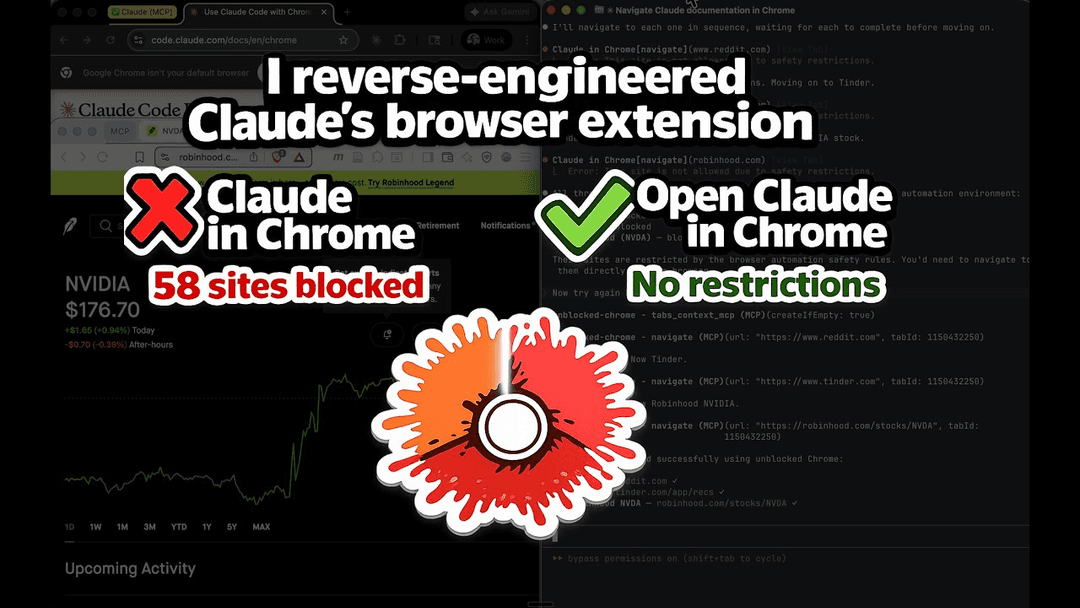
Open Claude in Chrome is an open-source reimplementation of Claude's browser automation extension that removes domain restrictions and supports any Chromium browser while maintaining 100% feature parity with the official version.
https://github.com/noemica-io/open-claude-in-chrome?ref=producthunt
Produktinformationen
Aktualisiert:Apr 10, 2026
Was ist Open Claude in Chrome
Open Claude in Chrome is a clean-room, open-source implementation of Anthropic's Claude in Chrome extension that provides full browser automation capabilities for Claude Code without the limitations of the official version. Built under the MIT license, this extension removes the 58-domain blocklist that restricts access to banking, investing, dating, social media, and other sites in the official extension. While maintaining identical performance and all 18 MCP (Model Context Protocol) tools, Open Claude in Chrome extends browser support beyond Chrome and Edge to work with any Chromium-based browser including Brave, Arc, Opera, and Vivaldi. The project was reverse-engineered by Sebastian Sosa at Noemica and represents a fully functional alternative that gives developers unrestricted browser automation for AI-assisted workflows.
Hauptfunktionen von Open Claude in Chrome
Open Claude in Chrome is an open-source, clean-room reimplementation of Anthropic's official Claude in Chrome extension that removes domain restrictions while maintaining 100% feature and performance parity. It provides Claude Code with full browser automation capabilities across any Chromium-based browser (Chrome, Edge, Brave, Arc, Opera, Vivaldi, etc.) through 18 MCP tools, enabling AI-powered navigation, interaction, and data extraction from websites without the 58-domain blocklist present in the official extension. The architecture consists of a Chrome extension, MCP server, and native messaging host that work together to give Claude Code the ability to see, click, navigate, execute JavaScript, read console logs, capture screenshots, and perform complex multi-step browser workflows.
No Domain Restrictions: Unlike the official Claude in Chrome which blocks 58 domains across banking, investing, payments, dating, adult content, news, and social media categories, Open Claude in Chrome has no blocklist and can navigate to any website including Reddit, Tinder, Robinhood, and financial institutions.
Universal Chromium Browser Support: Works with any Chromium-based browser including Chrome, Edge, Brave, Arc, Opera, and Vivaldi, whereas the official extension only supports Chrome and Edge.
18 Complete MCP Browser Automation Tools: Provides full browser control through tools including navigation, mouse/keyboard input, screenshots, accessibility tree reading, page text extraction, element finding, form input, JavaScript execution, console reading, network monitoring, window resizing, and image uploading.
Open Source MIT License: Completely open-source code available on GitHub with MIT licensing, allowing full transparency, community contributions, and customization unlike the closed-source official extension.
Seamless Claude Code Integration: Integrates directly with Claude Code through MCP (Model Context Protocol) server, enabling natural language commands to control browser workflows without switching contexts between coding and browser tasks.
Live Debugging and Testing Capabilities: Enables developers to build web applications in Claude Code and immediately test them in the browser by reading console errors, DOM state, network requests, and verifying UI behavior without leaving the development environment.
Anwendungsfälle von Open Claude in Chrome
Financial Research and Trading Automation: Access previously blocked financial platforms like Robinhood, Schwab, Fidelity, and banking sites to gather market data, monitor portfolios, analyze competitor pricing, and automate research workflows that were restricted in the official extension.
Web Application Development and Testing: Developers can use Claude to automatically test localhost applications, verify form validations, check error messages, read console logs, and debug UI issues directly from the command line or VS Code without manual browser interaction.
Competitive Intelligence and Market Research: Navigate competitor websites, extract pricing information, analyze product features, gather positioning data, and compile comprehensive market analysis across any domain including previously blocked news sites like NYT, WSJ, and Bloomberg.
Social Media and Content Management: Automate interactions with social platforms like Reddit, manage content posting, monitor discussions, extract trending topics, and perform sentiment analysis without domain restrictions that blocked these sites in the official version.
Data Extraction from Restricted Sites: Scrape and analyze data from dating platforms, adult content sites, gambling platforms, and other previously blocked domains for research, analytics, or business intelligence purposes in a controlled development environment.
Cross-Browser Testing and Automation: Test web applications across multiple Chromium browsers (Brave, Arc, Opera, Vivaldi) beyond just Chrome and Edge, ensuring consistent behavior and compatibility across different browser environments.
Vorteile
Complete removal of domain blocklist allows access to all 58 previously restricted sites across banking, investing, dating, adult content, news, and social media categories
Open-source transparency with MIT license enables community auditing, customization, and contributions unlike the closed-source official extension
Universal Chromium browser compatibility supports Chrome, Edge, Brave, Arc, Opera, and Vivaldi instead of just Chrome and Edge
Identical feature set and performance to official Claude in Chrome with all 18 MCP tools maintained at 100% parity
Nachteile
Requires manual installation process including loading unpacked extension, running shell scripts, and configuring absolute paths rather than one-click installation from Chrome Web Store
Beta feature with inherent risks when automating sensitive actions on financial, dating, or restricted websites without the safety guardrails of domain blocking
No official support from Anthropic and requires separate maintenance as an independent community project
Browser must be completely restarted for native messaging configuration changes to take effect, which can disrupt workflow
Wie verwendet man Open Claude in Chrome
1: Install Node.js v18 or higher on your system
2: Ensure you have Claude Code v2.0.73 or higher installed
3: Clone or download the Open Claude in Chrome repository from GitHub
4: Navigate to the host directory and run 'npm install' to install dependencies
5: Open your Chromium browser (Chrome, Edge, Brave, Arc, Opera, or Vivaldi) and navigate to the extensions page (chrome://extensions or equivalent)
6: Enable Developer mode in the extensions page
7: Click 'Load unpacked' and select the 'extension/' directory from the repository
8: Copy the extension ID shown under the extension name in the extensions page
9: Run the installation script from the repository root: './install.sh <your-extension-id>' (if using multiple browsers, pass all extension IDs)
10: Close all browser windows completely and restart your browser to load the native messaging host configuration
11: Get the absolute path to the MCP server by running 'echo "node $(pwd)/host/mcp-server.js"' from the repository root
12: Add the MCP server to Claude Code by running 'claude mcp add open-claude-in-chrome -- node /absolute/path/to/host/mcp-server.js'
13: Start a new Claude Code session and test the installation by asking Claude to navigate to a website (e.g., 'Navigate to reddit.com and take a screenshot')
14: Verify that Claude can access any website without domain restrictions and use all 18 available browser automation tools
Open Claude in Chrome FAQs
Open Claude in Chrome is an open-source, clean-room reimplementation of Claude in Chrome that removes restrictions while maintaining 100% feature and performance parity. The key differences are: (1) No domain blocklist - the official version blocks 58 domains across 11 categories including banking, investing, dating, and social media sites, while Open Claude in Chrome has no restrictions; (2) Browser support - official version only works with Chrome and Edge, while Open Claude in Chrome supports any Chromium browser (Chrome, Edge, Brave, Arc, Opera, Vivaldi, etc.); (3) Open source - the official version is closed source, while this is MIT licensed and fully open source.
Open Claude in Chrome Video
Beliebte Artikel

Atoms: Eine Multi-Agenten-KI-Plattform, die Ideen in startbereite Produkte verwandelt
May 22, 2026

Nano Banana SBTI: Was es ist, wie es funktioniert und wie man es im Jahr 2026 einsetzt
Apr 15, 2026

Atoms Review – Der KI-Produkt-Builder, der die digitale Erstellung im Jahr 2026 neu definiert
Apr 10, 2026

Kilo Claw: Wie man einen echten "Do-It-For-You" KI-Agenten bereitstellt und verwendet (2026 Update)
Apr 3, 2026
Neueste KI-Tools ähnlich wie Open Claude in Chrome

Gait
Gait ist ein Collaboration-Tool, das KI-unterstützte Codegenerierung mit Versionskontrolle integriert und es Teams ermöglicht, KI-generierten Codekontext effizient zu verfolgen, zu verstehen und zu teilen.

invoices.dev
invoices.dev ist eine automatisierte Rechnungsplattform, die Rechnungen direkt aus den Git-Commits der Entwickler generiert und Integrationsmöglichkeiten für GitHub, Slack, Linear und Google-Dienste bietet.

EasyRFP
EasyRFP ist ein KI-gestütztes Edge-Computing-Toolkit, das RFP (Request for Proposal)-Antworten optimiert und eine Echtzeit-Feldphänotypisierung durch Deep-Learning-Technologie ermöglicht.

Cart.ai
Cart.ai ist eine KI-gestützte Dienstleistungsplattform, die umfassende Lösungen zur Automatisierung von Geschäftsprozessen bietet, einschließlich Programmierung, Kundenbeziehungsmanagement, Videobearbeitung, E-Commerce-Setup und benutzerdefinierter KI-Entwicklung mit 24/7 Unterstützung.
Beliebte KI-Tools wie Open Claude in Chrome

GitHub Copilot Chat
GitHub Copilot Chat ist ein KI-gestützter Codierungsassistent, der Interaktionen in natürlicher Sprache, Echtzeit-Codevorschläge und kontextuelle Unterstützung direkt innerhalb unterstützter IDEs und GitHub.com bietet.

CopilotForXcode
CopilotForXcode ist eine Xcode-Quell-Editor-Erweiterung, die GitHub Copilot, Codeium und ChatGPT integriert, um KI-gestützte Codevorschläge, Chat-Unterstützung und Prompt-to-Code-Funktionalität innerhalb von Xcode bereitzustellen.

BrowserAI
BrowserAI ist eine Open-Source-Bibliothek, die die Ausführung lokaler Large Language Models (LLMs) direkt in Webbrowsern mit WebGPU-Beschleunigung ermöglicht und datenschutzorientierte KI-Funktionen bietet, ohne dass eine Serverinfrastruktur erforderlich ist.

OpenAI Codex CLI
OpenAI Codex CLI ist ein schlanker Open-Source-Coding-Agent, der in Ihrem Terminal ausgeführt wird und es Entwicklern ermöglicht, natürliche Sprache in Codeausführung zu übersetzen und gleichzeitig ChatGPT-ähnliche Argumentation mit der Möglichkeit, Code auszuführen, Dateien zu bearbeiten und unter Versionskontrolle zu iterieren, bereitzustellen.