
Google Workspace CLI
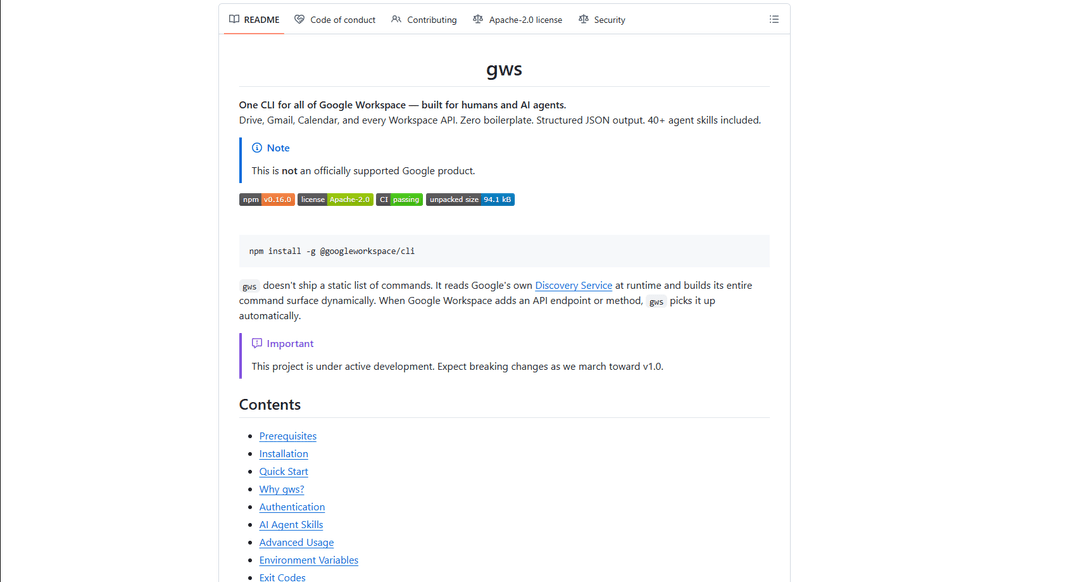
Google Workspace CLI is a unified command-line tool that provides access to all Google Workspace services (Drive, Gmail, Calendar, Sheets, Docs, Chat, Admin) through a single interface, with built-in AI agent skills and dynamic command generation.
https://github.com/googleworkspace/cli?ref=producthunt
Informações do Produto
Atualizado:Mar 16, 2026
O que é Google Workspace CLI
Google Workspace CLI (gws) is an open-source command-line interface that enables users to interact with all Google Workspace services directly from their terminal, eliminating the need for multiple browser tabs or custom API integrations. Built with Rust and distributed as a Node.js package, it offers a streamlined way to automate Workspace tasks through command-line operations. While not an officially supported Google product, it provides comprehensive access to Google Workspace APIs with features like OAuth authentication, structured JSON output, and built-in AI agent capabilities.
Principais Recursos do Google Workspace CLI
Google Workspace CLI (gws) is a unified command-line tool that provides seamless access to all Google Workspace services including Drive, Gmail, Calendar, Sheets, Docs, Chat, and Admin. It dynamically builds its command surface from Google's Discovery Service, offers structured JSON output for AI agent integration, includes 100+ pre-built agent skills, and supports multiple authentication workflows. The tool simplifies automation and management of Google Workspace services through a single command-line interface, making it ideal for both human users and AI agents.
Dynamic Command Generation: Automatically builds commands from Google's Discovery Service, ensuring up-to-date access to all API endpoints without manual updates
AI Agent Integration: Includes 100+ pre-built agent skills and provides structured JSON output, making it easy for AI agents to interact with Google Workspace services
Flexible Authentication: Supports multiple authentication workflows including interactive desktop, browser-assisted, headless/CI, and service account authentication
Helper Commands: Provides hand-crafted helper commands (prefixed with '+') for common workflows across different services, simplifying complex operations
Casos de Uso do Google Workspace CLI
Enterprise Automation: Automate routine tasks like email management, document creation, and calendar scheduling across an organization using scripts and AI agents
Development Integration: Integrate Google Workspace services into development workflows and CI/CD pipelines for automated testing and deployment
Personal Productivity: Streamline personal workflow management through command-line access to emails, calendar, and documents without switching between browser tabs
AI Assistant Development: Build AI assistants that can interact with Google Workspace services using structured JSON outputs and pre-built agent skills
Vantagens
Unified interface for all Google Workspace services
Automatic updates through Discovery Service integration
Rich support for AI agent integration with structured outputs
Desvantagens
Project is still under active development with potential breaking changes
Requires technical knowledge to set up and use effectively
OAuth scope limitations for unverified apps in testing mode
Como Usar o Google Workspace CLI
Install Google Workspace CLI: Run 'npm install -g @googleworkspace/cli' in your terminal to install the CLI globally
Set up authentication: Run 'gws auth setup' which will walk you through creating a Google Cloud project and enabling necessary APIs. If you don't have gcloud CLI, you'll need to set up OAuth credentials manually in Google Cloud Console.
Log in to your Google account: Run 'gws auth login' to authenticate. This will open a browser window for you to sign in to your Google account and grant permissions.
Select required API scopes: During login, choose which Google Workspace APIs you need access to (e.g., 'gws auth login -s drive,gmail,sheets' for specific services)
Test the connection: Try a simple command like 'gws drive files list --params '{"pageSize": 5}'' to verify everything is working
Learn basic commands: Use helper commands prefixed with '+' for common tasks. For example: 'gws gmail +send' to send emails, 'gws drive +upload' for file uploads, 'gws calendar +agenda' to see upcoming events
Handle pagination: Use --page-all flag to auto-paginate results, --page-limit <N> to set max pages, and --page-delay <MS> to set delay between pages
Work with Google Sheets: Always use single quotes when specifying sheet ranges, e.g. 'gws sheets spreadsheets values get --params '{"spreadsheetId": "ID", "range": "Sheet1!A1:C10"}'
Enable debug logging (optional): Set GOOGLE_WORKSPACE_CLI_LOG environment variable for debug output, e.g. 'export GOOGLE_WORKSPACE_CLI_LOG=gws=debug'
Install AI agent skills (optional): Run 'npx skills add https://github.com/googleworkspace/cli' to install all agent skills, or install specific ones like 'npx skills add https://github.com/googleworkspace/cli/tree/main/skills/gws-drive'
Perguntas Frequentes do Google Workspace CLI
Google Workspace CLI (gws) is a command-line tool that provides unified access to all Google Workspace services including Drive, Gmail, Calendar, Sheets, Docs, Chat, and Admin. It dynamically builds its command surface from Google's Discovery Service and includes AI agent skills. It's designed for both human users and AI agents to interact with Google Workspace services.
Vídeo do Google Workspace CLI
Artigos Populares

Vosko AI: Localize e Duble Vídeos para Públicos Globais
Oct 15, 2026

Atoms: Uma Plataforma de IA Multiagente Que Transforma Ideias em Produtos Prontos para Lançamento
May 22, 2026

Nano Banana SBTI: O Que É, Como Funciona e Como Usá-lo em 2026
Apr 15, 2026

Análise do Atoms — O Construtor de Produtos de IA Redefinindo a Criação Digital em 2026
Apr 10, 2026
Ferramentas de IA Mais Recentes Semelhantes a Google Workspace CLI

Gait
O Gait é uma ferramenta de colaboração que integra a geração de código assistida por IA com controle de versão, permitindo que as equipes rastreiem, entendam e compartilhem o contexto do código gerado por IA de forma eficiente.

invoices.dev
invoices.dev é uma plataforma de faturamento automatizada que gera faturas diretamente dos commits do Git dos desenvolvedores, com capacidades de integração para GitHub, Slack, Linear e serviços do Google.

EasyRFP
EasyRFP é um kit de ferramentas de computação de borda alimentado por IA que agiliza as respostas a RFP (Pedido de Proposta) e possibilita fenotipagem de campo em tempo real por meio de tecnologia de aprendizado profundo.

Cart.ai
O Cart.ai é uma plataforma de serviços impulsionada por IA que fornece soluções abrangentes de automação de negócios, incluindo codificação, gerenciamento de relações com clientes, edição de vídeo, configuração de e-commerce e desenvolvimento de IA personalizado com suporte 24/7.
Ferramentas de IA Populares Como Google Workspace CLI

GitHub Copilot Chat
O GitHub Copilot Chat é um assistente de codificação alimentado por IA que fornece interações em linguagem natural, sugestões de código em tempo real e suporte contextual diretamente dentro de IDEs suportadas e GitHub.com.

CopilotForXcode
O CopilotForXcode é uma Extensão do Editor de Código do Xcode que integra GitHub Copilot, Codeium e ChatGPT para fornecer sugestões de código impulsionadas por IA, assistência por chat e funcionalidade de prompt-para-código dentro do Xcode.

BrowserAI
BrowserAI é uma biblioteca de código aberto que permite executar Modelos de Linguagem Grandes (LLMs) locais diretamente em navegadores da web com aceleração WebGPU, oferecendo recursos de IA focados na privacidade sem exigir infraestrutura de servidor.

OpenAI Codex CLI
OpenAI Codex CLI é um agente de codificação leve e de código aberto que é executado no seu terminal, permitindo que os desenvolvedores traduzam linguagem natural em execução de código, ao mesmo tempo em que fornece raciocínio em nível de ChatGPT com a capacidade de executar código, manipular arquivos e iterar sob controle de versão.