Veo 4
Veo 4 enables creators to use reference images and motion examples to guide AI video generation, helping maintain visual consistency, artistic style, character identity, and scene composition throughout production.
https://aiveo4.ai/?utm_source=aipure
Product Information
Updated:May 9, 2026
What is Veo 4
Veo 4 is a next-generation AI video creation platform centered on multi-modal generation and natural-language control. It’s designed to help creators and teams generate cinematic, production-ready video clips by mixing text prompts with reference assets—such as images, video clips, and audio—in a single workflow. The product emphasizes high creative control, multi-shot storytelling, and improved consistency for faces, clothing, text, scenes, and visual styles, aiming to reduce common AI video issues like character drift, style breaks, and continuity loss across frames and cuts.
Key Features of Veo 4
Veo 4 is positioned as a controllable multi-modal AI video generation system that can combine text, images, video clips, and audio references to produce cinematic, multi-shot videos with native synchronized audio (lip-synced dialogue, Foley, and music). It emphasizes strong temporal and character consistency (faces, clothing, text, scenes, and style) across frames and cuts, plus natural-language “reference anything” control to borrow motion, camera moves, effects, and sound from uploaded references. It also highlights targeted editing and extension workflows—modifying or extending specific segments without regenerating the entire video—along with flexible aspect ratios and watermark-free downloads.
Multi-modal input in one generation: Mix and match text prompts with image, video, and audio files as references to guide a single video generation toward a specific look, motion, and sound.
Reference-anything natural language control: Describe what to borrow from each uploaded asset (e.g., camera movement from a clip, character look from an image, beat timing from audio) without overly complex prompt engineering.
Native audio generation (lip-sync + Foley + music): Generates synchronized audio alongside video, including dialogue with lip-sync, sound effects, ambient layers, and background music; can also sync visuals to an uploaded track.
Multi-shot storytelling with continuity: Creates cohesive sequences from a single prompt using multiple short shots, maintaining consistent characters, outfits, lighting, and visual rhythm across cuts.
Superior temporal & identity consistency: Focuses on reducing common AI video issues like character drift, style breaks, and detail loss so faces, clothing, text, and environments remain stable across frames and scenes.
Video extension & targeted editing: Extend clips seamlessly or edit specific segments (replace characters, adjust actions, add/remove elements) while preserving the rest of the video to avoid full re-generation.
Use Cases of Veo 4
Advertising & marketing creatives: Rapidly produce product ads and brand content by referencing proven templates/camera styles while keeping product appearance and brand look consistent across variants.
Education & training videos: Generate explainers, demonstrations, and visual lessons with coherent scenes and integrated narration/sound design, reducing reliance on separate editing and audio tools.
Short-form social content: Create Reels/Shorts/TikTok-ready clips in multiple aspect ratios by referencing trending effects and pacing, then iterating quickly via targeted edits and extensions.
Creative storytelling & pre-visualization: Storyboard multi-shot sequences from a script-like prompt, replicate cinematic camera moves from reference clips, and explore looks/transitions before live production.
Motion, dance, and action replication: Upload choreography or action references and apply similar motion/camera dynamics to new characters or scenes, enabling fast concepting for music/dance/action content.
Real estate & architecture visualization: Turn property or design images into dynamic walkthrough-style clips with consistent lighting/style and optional ambient audio for more immersive presentations.
Pros
Strong consistency across frames and multi-shot sequences (identity, wardrobe, text, style), addressing a common failure mode in AI video.
Reference-driven control (motion/camera/effects/audio) via natural language reduces prompt complexity and improves repeatability.
Native audio generation (lip-sync, Foley, music) streamlines production by reducing external toolchain needs.
Targeted editing and extension can save time versus regenerating entire clips.
Cons
Shot-based generation is typically short (often cited as ~4–15 seconds per shot), so longer narratives may require stitching workflows.
Some public claims about “Veo 4” vary across sources (including whether it is officially announced/released), so capabilities and availability may differ by platform/provider.
High-fidelity, multi-modal generation and editing can be compute-intensive, potentially impacting render time and cost on paid tiers.
How to Use Veo 4
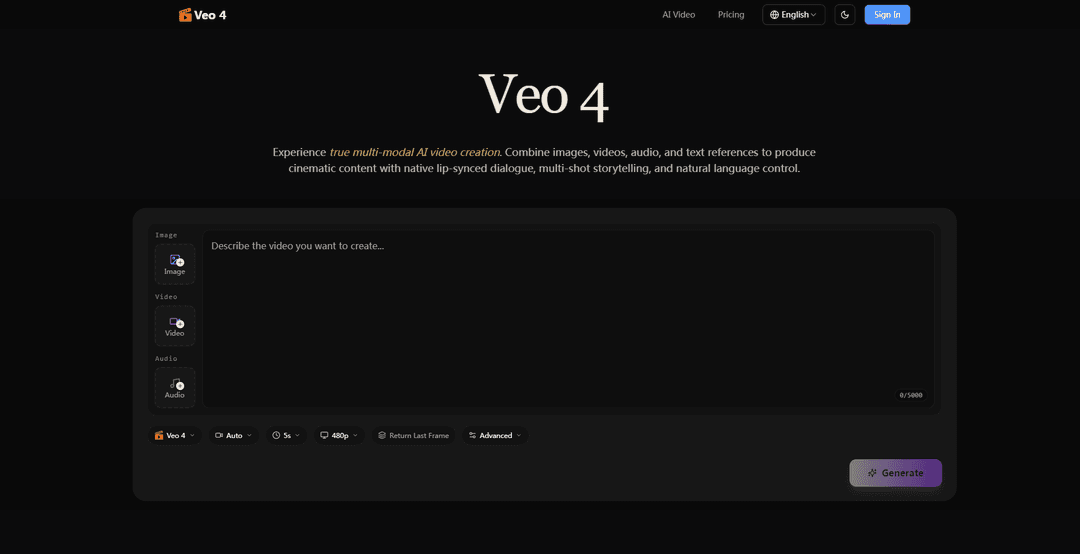
1. Open Veo 4 and start a new generation: Go to the Veo 4 site/app and locate the generator area (the prompt box that says “Describe the video you want to create…”). Decide whether you’re doing text-only or using reference assets (images/video/audio).
2. Choose your output format (aspect ratio, duration, resolution): Set the clip format before generating: pick an aspect ratio (e.g., 16:9 for YouTube, 9:16 for Shorts/Reels), select a duration (commonly 4–15 seconds per shot), and choose a resolution option (often 480p/720p/1080p depending on the interface).
3. Upload reference assets (optional but recommended): Use the upload slots to add any combination of: (a) images to anchor character identity, wardrobe, or first frame; (b) video clips to reference motion, choreography, or camera movement; (c) audio (MP3) to drive beat timing or guide dialogue/music style.
4. Write a scene brief (intent + camera + tone): In the prompt, describe the scene’s purpose and vibe in plain language. Include: what’s happening, where it happens, lighting/time of day, and the emotional tone. Add camera direction (shot size, movement, pacing) so motion is intentional rather than random.
5. Explicitly “lock” references in natural language: Tell Veo 4 exactly what to borrow from each uploaded asset. Use the platform’s tagging style (example: “Use @image1 as the first frame and character identity; use @video1 for camera movement and pacing; sync cuts to @audio1 beats”).
6. Specify audio behavior (native audio generation): If you want sound generated, request it directly: lip-synced dialogue, Foley, and background music. If you uploaded audio, instruct Veo 4 to sync motion/cuts to the rhythm or to match the mood and timing.
7. Generate the first draft: Click Generate. Treat the first output as a draft: you’re validating composition, motion, character consistency, and audio sync.
8. Iterate with tighter prompt structure: Refine by adjusting only what’s wrong: camera move speed, framing, lighting continuity, facial consistency, or action clarity. Keep the successful parts of the prompt unchanged to maintain a steady visual direction while testing alternate outputs.
9. Create multi-shot sequences from one prompt (multi-shot storytelling): To get a cohesive narrative across cuts, describe the sequence as multiple shots in one prompt (Shot 1/Shot 2/Shot 3), including consistent character/outfit/lighting notes. Veo 4 is designed to keep identity and style consistent across these cuts.
10. Extend an existing clip (video extension): Upload the generated clip (or your own clip) and request an extension. Match the generation length to the extension length (e.g., extend by 5 seconds using a 5-second generation) and describe how the action should continue while preserving continuity.
11. Edit specific segments instead of regenerating everything (targeted editing): Upload the video and describe the exact change: replace a character, modify an action, add/remove an element, or adjust a segment—while instructing Veo 4 to preserve everything else (scene, lighting, framing, and timing).
12. Replicate complex motion or camera moves via reference video: If you need precise choreography or cinematic camera movement, upload a reference video and instruct Veo 4 to replicate the motion/camera path with your characters and setting. This reduces the need for overly detailed prompting.
13. Export and organize for repeatable results: Download the final clip (the site claims watermark-free downloads). Save your best prompts and reference sets as a reusable “prompt log” so you can reproduce the same brand look, character identity, and pacing across future videos.
Veo 4 FAQs
Veo 4 is a next-generation multi-modal AI video generation model/platform that can create cinematic video using text prompts and reference assets (images, video, and audio), with natural-language control over what to borrow (e.g., motion, camera moves, characters, scenes) and with native synchronized audio.
Popular Articles

Vosko AI: Localize and Dub Videos for Global Audiences
Oct 15, 2026

Atoms: A Multi-Agent AI Platform That Transforms Ideas into Launch-Ready Products
Oct 13, 2026

Nano Banana SBTI: What It Is, How It Works, and How to Use It in 2026
Apr 15, 2026

Atoms Review — The AI Product Builder Redefining Digital Creation in 2026
Apr 10, 2026
Latest AI Tools Similar to Veo 4

Loud Fame
Loud Fame is an AI-powered video transformation tool that allows users to convert regular videos into anime-style animations and create AI-generated celebrity talking videos.

BizBoom.ai
BizBoom.ai is an AI-powered platform that automatically generates professional product videos from product links and images with 95% less cost.

EzVideos
EzVideos is an all-in-one video creation tool that helps users generate viral videos for social media platforms like Instagram, TikTok, and YouTube with automated editing features and built-in resources.

Illuminix
Illuminix is an AI-powered platform that empowers businesses with autonomous hyper-experts and specialized tools for automated business processes, data management, and video content creation.
Popular AI Tools Like Veo 4

HunyuanVideo-I2V
HunyuanVideo-I2V is an open-source AI framework developed by Tencent that transforms static images into high-quality, dynamic videos with customizable motion effects and exceptional visual consistency.

Google Veo 2
Veo 2 is Google DeepMind's state-of-the-art AI video generation model that can create high-quality videos up to 4K resolution with realistic motion, extensive camera controls, and improved physics simulation from text prompts.

Vibing
Vibing is an AI-powered dating app that helps users share authentic moments through video stories and make genuine connections based on personality matching and interactive features.

Edits, an Instagram app
Edits is Instagram's free video creation app that provides creators with professional editing tools, AI features, and analytics capabilities to create high-quality videos directly from their phones.