
Vela
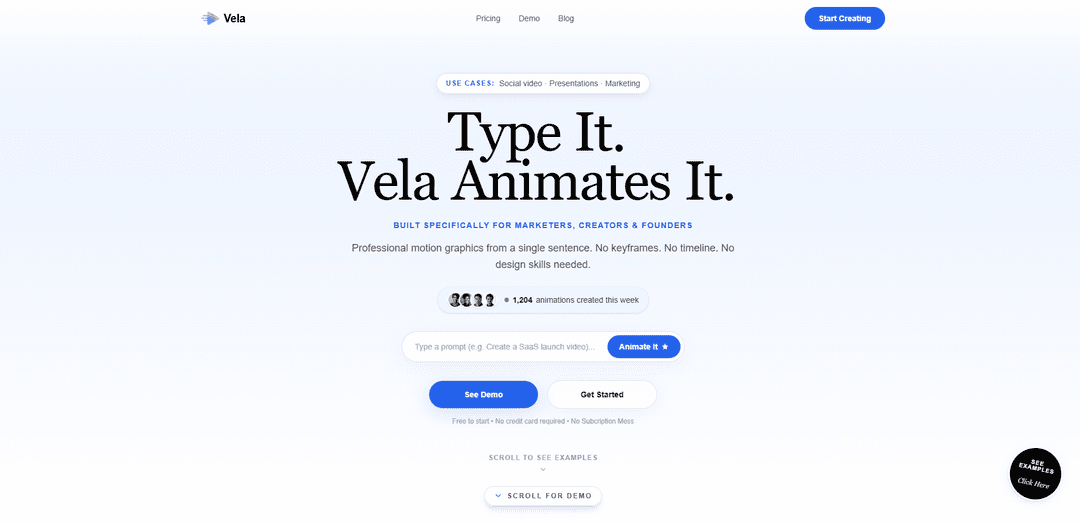
Vela is an AI motion-graphics generator that turns a single sentence into polished animated videos, then lets you refine the result through chat—no timelines, keyframes, or design skills required.
https://www.vela.video/?ref=producthunt
Product Information
Updated:Jun 8, 2026
What is Vela
Vela (vela.video) is a web-based tool built for marketers, creators, founders, and teams who need professional-looking motion graphics quickly. Instead of traditional animation software, Vela uses natural-language prompts to generate short animated videos for use cases like social promos, presentations, product launches, explainers, and data visualizations. It supports multiple aspect ratios (including 16:9, 9:16, and 1:1), allows image/asset uploads, and focuses on fast creation and iteration so users can produce agency-style animations without opening After Effects.
Key Features of Vela
Vela is an AI motion-graphics generator built for marketers, creators, founders, and teams to produce professional animated videos from a single sentence. Instead of keyframes or timelines, you describe what you want in plain English, choose an aspect ratio (e.g., TikTok vertical or YouTube widescreen), and Vela generates a polished motion graphic in minutes. It also supports iterative, chat-based editing—letting you refine colors, text, backgrounds, timing, and even direction—plus image/asset uploads and HD exports, with credit-based (non-subscription) pricing options.
Text-to-motion-graphics generation: Create complete animated motion graphics from a plain-English prompt—no After Effects skills, keyframes, or timeline editing required.
Chat-based iterative editing: Refine videos by chatting (change colors, text, timing, backgrounds, add elements like animated routes/maps) rather than rebuilding projects manually.
Fast turnaround rendering: Designed for quick production, with most videos generating in under ~3 minutes (often around 2 minutes), enabling rapid content iteration.
Multi-format aspect ratios: Supports common social and presentation formats including landscape (16:9), portrait (9:16), and square (1:1) for platforms like YouTube, TikTok, and Instagram.
Asset and image uploads: Upload images/assets and have Vela incorporate them into the animation without manual placement or masking workflows.
Export and commercial-ready options: Export in 720p/1080p, with higher plans offering zero watermarks and a full commercial license; built to scale with bulk generation features for teams.
Use Cases of Vela
Social ads and promos: Generate scroll-stopping short-form motion graphics for TikTok/Reels/YouTube Shorts, including promos, announcements, and campaign creatives.
SaaS launch and product marketing: Create launch videos, feature highlights, and lightweight demo-style motion pieces without opening complex animation software.
Presentations and data storytelling: Turn key metrics, charts, and narratives into animated presentation segments (e.g., corporate infographics, visualized data clips).
Travel and location-based content: Produce animated map sequences and route visualizations for travel reels, recaps, or destination storytelling.
Education and explainers: Help educators convert lesson concepts into engaging animated explainers suitable for classroom, online courses, or training content.
Agency-scale motion graphics production: Enable agencies to deliver more client motion assets faster via rapid generation, iterative chat edits, and bulk export workflows.
Pros
Very fast creation of polished motion graphics from simple text prompts (minutes, not hours).
Chat-based editing supports rapid iteration without complex animation tools.
Multi-aspect output (vertical/landscape/square) fits major social and marketing channels.
Credit-based, no-subscription pricing with commercial licensing available on higher tiers.
Cons
Focused on motion graphics/animated content rather than full realistic video generation.
Length and format constraints (e.g., up to ~30 seconds per generation as described).
Advanced creative control may be less granular than traditional timeline tools like After Effects.
How to Use Vela
1) Open Vela in your browser and start a project: Go to https://www.vela.video/ and open the app (web-based). Create/sign in if prompted. Vela is designed to work best on a laptop/desktop.
2) Choose your output format (aspect ratio) before generating: Pick the format that matches where you’ll post: Landscape (16:9 for YouTube), Portrait (9:16 for TikTok/Reels), or Square (1:1 for Instagram).
3) Describe what you want in one plain-English sentence: Type a clear prompt describing the motion graphic/video you want (e.g., a brand story, product promo, explainer, data viz, or animated map sequence). Vela generates professional motion graphics from your text—no keyframes, timeline, or design skills required.
4) (Optional) Upload your assets: Add images/photos/brand assets if you have them. Vela can incorporate uploaded images into the motion graphic without manual placement or masking.
5) Generate the first version: Run the generation. Vela will create a complete motion graphic based on your description and chosen format (up to ~30 seconds).
6) Refine by chatting (iterate instead of editing a timeline): Use the chat to request changes and keep iterating: adjust style, pacing, and messaging; change backgrounds; swap colors; add or modify animated routes/maps; tweak timing and transitions. Vela updates the animation based on your instructions.
7) Optimize for vertical platforms (if posting to TikTok/Reels): If using 9:16, keep key text/graphics away from the very top and bottom edges (platform overlays can cover them). Use large, bold fonts and stack information vertically for readability in fast-scrolling feeds.
8) Export your final video: When satisfied, export the motion graphic in your chosen format. Vela supports 720p and 1080p exports.
9) Reuse the workflow for new variations: Create additional versions by changing the prompt or asking for alternate cuts (different hooks, pacing, colors, or messaging). Vela is designed for unlimited chat-based iterations to quickly produce multiple deliverables.
Vela FAQs
Vela is an AI motion-graphics generator that creates animated videos from a plain-English prompt—no keyframes, timeline, or design skills required.
Vela Video
Popular Articles

Atoms: A Multi-Agent AI Platform That Transforms Ideas into Launch-Ready Products
May 22, 2026

Nano Banana SBTI: What It Is, How It Works, and How to Use It in 2026
Apr 15, 2026

Atoms Review — The AI Product Builder Redefining Digital Creation in 2026
Apr 10, 2026

Kilo Claw: How to Deploy and Use a True "Do‑It‑For‑You" AI Agent(2026 Update)
Apr 3, 2026
Latest AI Tools Similar to Vela

Loud Fame
Loud Fame is an AI-powered video transformation tool that allows users to convert regular videos into anime-style animations and create AI-generated celebrity talking videos.

BizBoom.ai
BizBoom.ai is an AI-powered platform that automatically generates professional product videos from product links and images with 95% less cost.

EzVideos
EzVideos is an all-in-one video creation tool that helps users generate viral videos for social media platforms like Instagram, TikTok, and YouTube with automated editing features and built-in resources.

Illuminix
Illuminix is an AI-powered platform that empowers businesses with autonomous hyper-experts and specialized tools for automated business processes, data management, and video content creation.
Popular AI Tools Like Vela

HunyuanVideo-I2V
HunyuanVideo-I2V is an open-source AI framework developed by Tencent that transforms static images into high-quality, dynamic videos with customizable motion effects and exceptional visual consistency.

Google Veo 2
Veo 2 is Google DeepMind's state-of-the-art AI video generation model that can create high-quality videos up to 4K resolution with realistic motion, extensive camera controls, and improved physics simulation from text prompts.

Vibing
Vibing is an AI-powered dating app that helps users share authentic moments through video stories and make genuine connections based on personality matching and interactive features.

Edits, an Instagram app
Edits is Instagram's free video creation app that provides creators with professional editing tools, AI features, and analytics capabilities to create high-quality videos directly from their phones.