
Toggle for OpenClaw
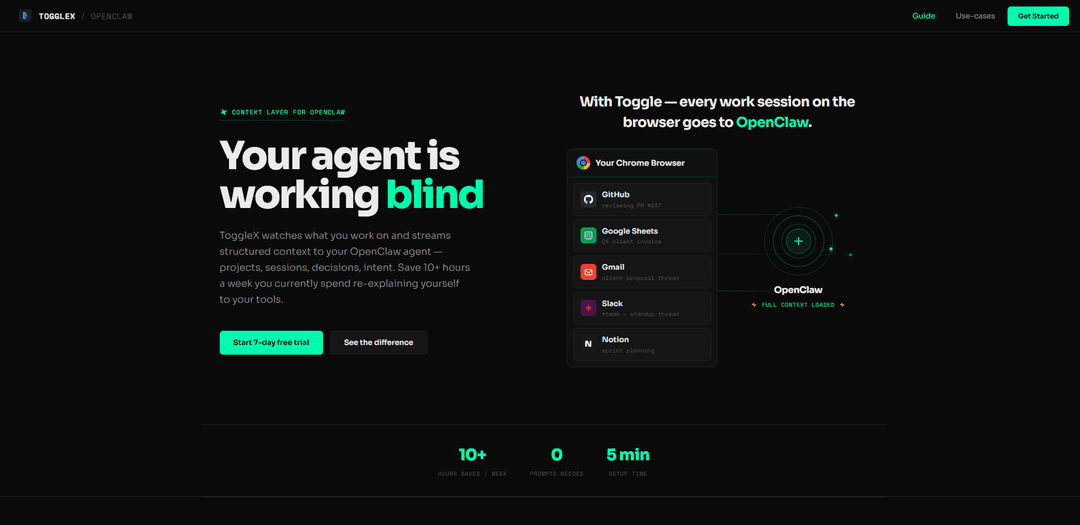
Toggle is a context layer for OpenClaw that streams real-time structured data about your work activities to your AI agent, enabling it to provide intelligent assistance without requiring manual prompting.
https://claw.toggle.pro/?ref=producthunt
Product Information
Updated:Mar 8, 2026
What is Toggle for OpenClaw
Toggle is a Chrome extension and OpenClaw skill that creates a context layer between your browser activities and your OpenClaw AI assistant. It captures and structures data about your work sessions, projects, and activities across various tools like GitHub, Google Sheets, Gmail, Slack, and Notion, then feeds this information directly to your OpenClaw agent. With a simple 5-minute setup process and 7-day free trial, Toggle enables your AI assistant to understand your work context and provide relevant assistance without needing constant explanation.
Key Features of Toggle for OpenClaw
Toggle for OpenClaw is a context layer integration that captures and streams real-time browser activity data to OpenClaw agents, providing structured context about projects, sessions, decisions, and user intent. It enables the AI assistant to understand user work patterns, automate repetitive tasks, and provide meaningful insights without requiring explicit prompts, potentially saving users 10+ hours per week.
Real-time Activity Tracking: Silently captures and structures user activity across browser tabs, apps, and tools into meaningful sessions and projects
Automated Context Streaming: Continuously feeds structured work context to OpenClaw agent without requiring manual input or prompts
Intelligent Automation Detection: Analyzes work patterns to identify repetitive workflows and suggests automated solutions
Focus and Productivity Monitoring: Tracks deep work sessions, focus scores, and provides real-time productivity insights and suggestions
Use Cases of Toggle for OpenClaw
Developer Workflow Optimization: Automatically tracks GitHub activities, PR reviews, and development sessions to streamline daily standups and progress reporting
Project Management: Monitors project progress across different tools like Notion, Figma, and Slack to provide comprehensive status updates and identify bottlenecks
Personal Productivity: Helps maintain focus by monitoring tab switching patterns and suggesting ways to reduce context switching and increase deep work time
Pros
Quick 5-minute setup process
Requires zero manual prompting after installation
Provides comprehensive work context across multiple platforms
Significant time savings potential (10+ hours/week)
Cons
Requires browser extension installation
Monthly subscription cost
Potential privacy concerns with activity tracking
How to Use Toggle for OpenClaw
Sign up for Toggle account: Create a free account on ToggleX (https://claw.toggle.pro). No credit card required - includes 7-day free trial.
Install Chrome extension: Add the ToggleX extension to Chrome browser. This will silently track your activity across tabs, apps and tools to structure your work into sessions and projects.
Connect to OpenClaw: Install the ToggleX skill in your OpenClaw configuration to enable the context feed between Toggle and your OpenClaw agent.
Allow context collection: Toggle will automatically start capturing your browser activity and work context, structuring it into meaningful data for your OpenClaw agent.
Access insights: Your OpenClaw agent will now receive real-time context about your work, enabling features like automated standup updates, focus tracking, and workflow automation suggestions.
Review automation suggestions: Ask your OpenClaw agent 'What repetitive stuff am I doing that you could automate?' to get AI-powered suggestions based on your work patterns.
Enable automations: Approve suggested automations to let your OpenClaw agent handle repetitive tasks automatically based on your work context.
Toggle for OpenClaw FAQs
Toggle is a context layer for OpenClaw that watches what you work on and streams structured context to your OpenClaw agent. It captures your activity across browser tabs, apps, and tools, then structures it into sessions and projects to give your agent real-time context about your work.
Toggle for OpenClaw Video
Popular Articles

Atoms: A Multi-Agent AI Platform That Transforms Ideas into Launch-Ready Products
May 22, 2026

Nano Banana SBTI: What It Is, How It Works, and How to Use It in 2026
Apr 15, 2026

Atoms Review — The AI Product Builder Redefining Digital Creation in 2026
Apr 10, 2026

Kilo Claw: How to Deploy and Use a True "Do‑It‑For‑You" AI Agent(2026 Update)
Apr 3, 2026
Latest AI Tools Similar to Toggle for OpenClaw

Inbox AI
Inbox AI is a privacy-focused MacOS productivity app that combines voice-driven AI automation with email management capabilities, allowing users to create custom workflows and commands while offering both cloud-based and on-device AI options.

Cart.ai
Cart.ai is an AI-powered service platform that provides comprehensive business automation solutions including coding, customer relations management, video editing, e-commerce setup, and custom AI development with 24/7 support.

Hiyllo Work
Hiyllo Work is an all-in-one team workspace platform that combines chat, project management, calendar, email, file storage and video meetings in a single integrated environment.

MailSense
MailSense is an AI-powered email assistant that filters, summarizes, and generates replies to emails through a Telegram bot interface to help users manage their inbox more efficiently.
Popular AI Tools Like Toggle for OpenClaw

Magentic-UI
Magentic-UI is an open-source, human-centered web agent prototype by Microsoft Research that enables collaborative planning and execution of complex web-based tasks through transparent interaction between humans and AI agents.

Microsoft Copilot Cowork
Microsoft Copilot Cowork is an AI-powered assistant that turns user intent into actionable plans and autonomously executes multi-step tasks across Microsoft 365 apps while keeping users in control through checkpoints and approvals.

Upsonic
Upsonic is a reliability-focused AI agent framework with dockerized server-client architecture that enables trusted agent workflows through advanced features like verification layers, triangular architecture, and Model Context Protocol (MCP) integration.

CampEd Hire
CampEd Hire is a powerful Chrome extension that streamlines recruitment by automatically collecting and organizing job applicant data from LinkedIn job posts, with features like automated data collection, CSV export, and batch resume downloads.