
Stakpak
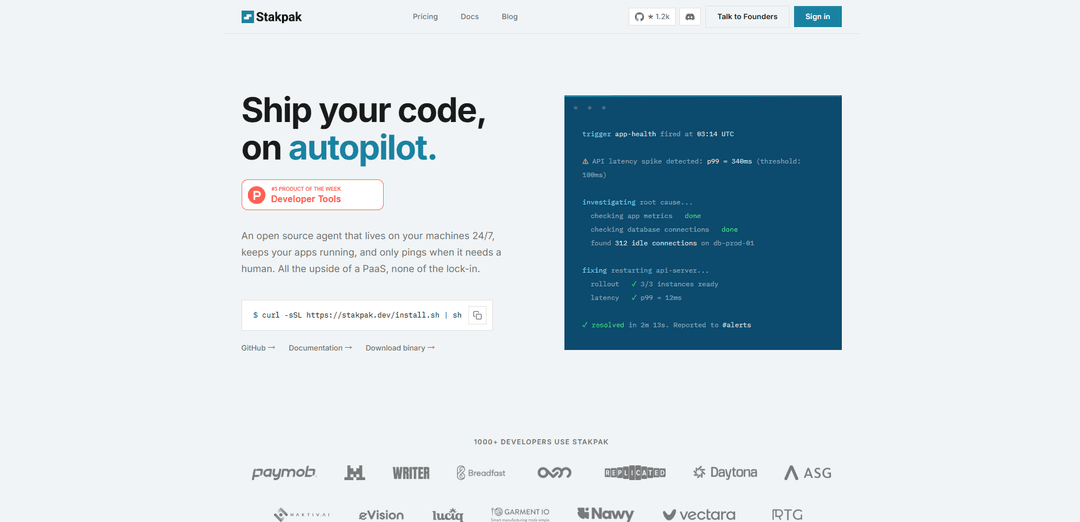
Stakpak is an open-source DevOps agent written in Rust that helps developers secure, deploy, and maintain production-ready infrastructure through AI-powered automation while ensuring complete security and privacy.
https://stakpak.dev/?ref=producthunt
Product Information
Updated:Apr 8, 2026
What is Stakpak
Stakpak is an AI-powered DevOps IDE designed to simplify infrastructure management and automation. It functions as a 24/7 autonomous agent that lives on your machines and helps manage your applications without vendor lock-in. Built with enterprise challenges in mind, Stakpak combines the convenience of a Platform-as-a-Service (PaaS) with the flexibility of open-source software, making DevOps and Infrastructure as Code (IaC) more accessible to developers.
Key Features of Stakpak
Stakpak is an open-source DevOps agent written in Rust that helps developers secure, deploy, and maintain production-ready infrastructure. It provides 24/7 autonomous monitoring, infrastructure as code generation, automated incident response, and secure secret management. The tool features a terminal-based interface, real-time operational insights, and integrates AI capabilities while maintaining strict security standards through mTLS encryption and dynamic secret redaction.
Autonomous Monitoring & Auto-healing: 24/7 background monitoring that automatically detects and resolves issues like latency spikes, idle connections, and failing health checks without human intervention
Secure Secret Management: Handles over 210 secret types with automatic detection and redaction, ensuring sensitive data never reaches LLM providers while maintaining operational functionality
Infrastructure as Code Generation: Provides 95% one-shot validity for infrastructure configurations, supporting Terraform, Kubernetes, GitHub actions, and more through CUE-based configuration management
Cost Optimization: Automatically identifies cost-saving opportunities like idle resources and orphaned volumes, generating savings reports and recommendations
Use Cases of Stakpak
Legacy Infrastructure Modernization: Helps teams modernize legacy infrastructure and manage technical debt through automated solutions and best practices
DevOps Automation: Streamlines routine DevOps tasks including deployment, monitoring, and incident response for development teams
Security Compliance: Ensures infrastructure meets security standards like ISO, GDPR, SOX & SOCII through continuous monitoring and automated fixes
Cloud Cost Management: Identifies and eliminates unnecessary cloud spending through automated resource optimization and cost analysis
Pros
Open-source with full transparency and customization options
Strong security features with mTLS encryption and local operation
High accuracy in infrastructure code generation
Simple installation and setup process
Cons
Requires CLI familiarity for optimal use
Limited third-party integrations as a newer tool
May require technical expertise to fully utilize all features
How to Use Stakpak
Install Stakpak: Run the installation command in your terminal: curl -sSL https://stakpak.dev/install.sh | sh
Initialize Stakpak: Run 'stakpak init' command. This will automatically discover your stack and generate an APPS.md file documenting your infrastructure
Start Autopilot Mode: Run 'stakpak up' to start the autonomous agent that runs 24/7 in the background monitoring your infrastructure
Monitor Activity: Use 'stakpak autopilot status' to check schedules, channels, and recent activity of the agent
Interactive Control: Use the Interactive TUI (Terminal User Interface) by running 'stakpak' command for full manual control when needed
Configure API Key: Export your API key after installation to start using the CLI features
Define Infrastructure Stack: Create stack definitions using CUE language to define workloads and dependencies in your infrastructure
Set Up GitHub Actions (Optional): Integrate Stakpak into your CI/CD pipeline using stakpak-action in your GitHub workflows for automated infrastructure analysis
Stakpak FAQs
Stakpak is an open source DevOps agent that runs 24/7 on machines to keep applications running. It's designed as an autonomous system that provides automated monitoring, healing, and maintenance of applications while requiring minimal human intervention.
Stakpak Video
Popular Articles

Vosko AI: Localize and Dub Videos for Global Audiences
Oct 15, 2026

Atoms: A Multi-Agent AI Platform That Transforms Ideas into Launch-Ready Products
Oct 13, 2026

Nano Banana SBTI: What It Is, How It Works, and How to Use It in 2026
Apr 15, 2026

Atoms Review — The AI Product Builder Redefining Digital Creation in 2026
Apr 10, 2026
Latest AI Tools Similar to Stakpak

Hapticlabs
Hapticlabs is a no-code toolkit that enables designers, developers and researchers to easily design, prototype and deploy immersive haptic interactions across devices without coding.

Deployo.ai
Deployo.ai is a comprehensive AI deployment platform that enables seamless model deployment, monitoring, and scaling with built-in ethical AI frameworks and cross-cloud compatibility.

CloudSoul
CloudSoul is an AI-powered SaaS platform that enables users to instantly deploy and manage cloud infrastructure through natural language conversations, making AWS resource management more accessible and efficient.

Devozy.ai
Devozy.ai is an AI-powered developer self-service platform that combines Agile project management, DevSecOps, multi-cloud infrastructure management, and IT service management into a unified solution for accelerating software delivery.
Popular AI Tools Like Stakpak

A2A Protocol
A2A (Agent2Agent) Protocol is an open interoperability protocol developed by Google that enables seamless communication and collaboration between AI agents across different frameworks and vendors, regardless of their underlying architecture.

VoltOps
VoltOps is a framework-agnostic LLM observability platform that provides real-time visual monitoring, debugging, and optimization tools for AI agents across any technology stack.

Chaterm
Chaterm is an open-source AI-native terminal and SRE copilot that enables engineers to manage complex infrastructure through natural language, automating deployment, troubleshooting, and operations without memorizing commands.

Open Browser Use
Open Browser Use is an open-source, agent-runtime-neutral browser automation layer that pairs a Chrome extension with a CLI/SDK/MCP to enable DOM-aware, CDP-powered tab control, navigation, and actions across different AI agent tools.