
SnapTodo
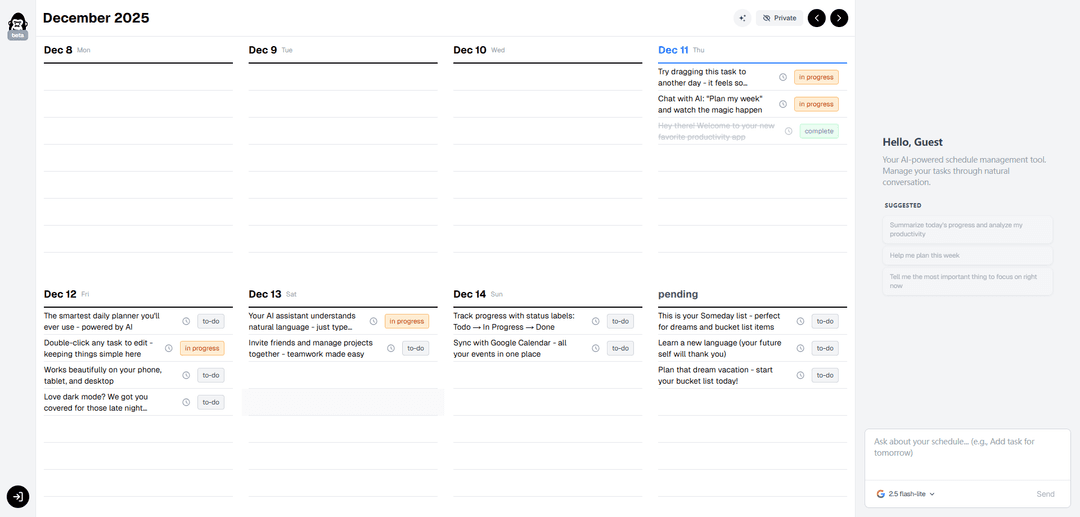
SnapTodo is an AI-powered todo app and daily planner that offers seamless task management across multiple devices with intuitive drag-and-drop functionality.
https://snaptodo.app/?ref=producthunt
Product Information
Updated:Dec 15, 2025
What is SnapTodo
SnapTodo is a modern, intelligent task management application designed to help users organize their daily activities and plan their weeks effectively. It combines the simplicity of a traditional todo list with the power of artificial intelligence, making it an advanced yet user-friendly productivity tool that works across phones, tablets, and desktop devices.
Key Features of SnapTodo
SnapTodo is an AI-powered todo app and daily planner that offers a smooth, intuitive interface for task management across multiple devices. It features drag-and-drop functionality, AI assistance for weekly planning, and supports both light and dark modes for comfortable viewing at any time of day.
AI-Powered Planning: Integrated AI assistant that helps users plan their week by providing smart suggestions and organizing tasks
Cross-Platform Compatibility: Seamless functionality across phone, tablet, and desktop devices for consistent task management
Intuitive Task Management: Smooth drag-and-drop interface and double-click editing for easy task organization and updates
Dark Mode Support: Built-in dark mode option for comfortable nighttime usage and reduced eye strain
Use Cases of SnapTodo
Personal Daily Planning: Individuals can organize their daily tasks and schedules with AI assistance
Weekly Work Management: Professionals can plan and adjust their work schedule across different days of the week
Late Night Planning Sessions: Users can comfortably plan their activities during evening hours using dark mode
Pros
Intuitive and smooth user interface
AI-powered planning assistance
Cross-platform compatibility
Cons
Limited information about offline functionality
Unclear pricing structure
How to Use SnapTodo
Install SnapTodo: Install the SnapTodo package through your LaTeX distribution system
Add command to document: Add \snaptodo command where you want to create a todo note in your LaTeX document
Set note position: The todo note will automatically snap to the closest margin (left or right) based on where you place the \snaptodo command on the page
Customize spacing: Use \snaptodoset{block sep=0pt} for global spacing changes or \snaptodo[<options>]{} for local changes
Compile document: Compile your LaTeX document twice to ensure proper placement of todo notes
Check results: Todo notes will appear in the margins without overlapping, with connecting lines that also won't overlap
SnapTodo FAQs
SnapTodo is an AI-powered todo app and daily planner that works across phone, tablet and desktop devices.
SnapTodo Video
Popular Articles

Vosko AI: Localize and Dub Videos for Global Audiences
Oct 15, 2026

Atoms: A Multi-Agent AI Platform That Transforms Ideas into Launch-Ready Products
Oct 13, 2026

Nano Banana SBTI: What It Is, How It Works, and How to Use It in 2026
Apr 15, 2026

Atoms Review — The AI Product Builder Redefining Digital Creation in 2026
Apr 10, 2026
Latest AI Tools Similar to SnapTodo

Inbox AI
Inbox AI is a privacy-focused MacOS productivity app that combines voice-driven AI automation with email management capabilities, allowing users to create custom workflows and commands while offering both cloud-based and on-device AI options.

Cart.ai
Cart.ai is an AI-powered service platform that provides comprehensive business automation solutions including coding, customer relations management, video editing, e-commerce setup, and custom AI development with 24/7 support.

Hiyllo Work
Hiyllo Work is an all-in-one team workspace platform that combines chat, project management, calendar, email, file storage and video meetings in a single integrated environment.

MailSense
MailSense is an AI-powered email assistant that filters, summarizes, and generates replies to emails through a Telegram bot interface to help users manage their inbox more efficiently.
Popular AI Tools Like SnapTodo

Magentic-UI
Magentic-UI is an open-source, human-centered web agent prototype by Microsoft Research that enables collaborative planning and execution of complex web-based tasks through transparent interaction between humans and AI agents.

Microsoft Copilot Cowork
Microsoft Copilot Cowork is an AI-powered assistant that turns user intent into actionable plans and autonomously executes multi-step tasks across Microsoft 365 apps while keeping users in control through checkpoints and approvals.

Upsonic
Upsonic is a reliability-focused AI agent framework with dockerized server-client architecture that enables trusted agent workflows through advanced features like verification layers, triangular architecture, and Model Context Protocol (MCP) integration.

CampEd Hire
CampEd Hire is a powerful Chrome extension that streamlines recruitment by automatically collecting and organizing job applicant data from LinkedIn job posts, with features like automated data collection, CSV export, and batch resume downloads.