SeedVideo
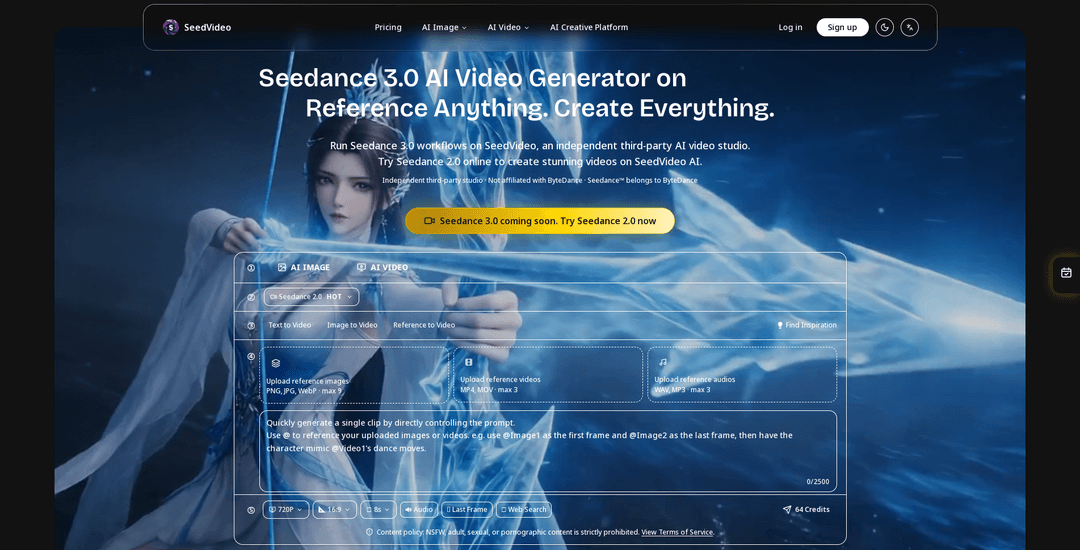
SeedVideo is an independent third-party AI video studio that runs ByteDance’s Seedance workflows with multi-modal references (text, images, video, audio), precise motion/camera control, built-in audio generation, and video extension/editing for cinematic, consistent outputs.
https://seedvideo.io/?utm_source=aipure
Product Information
Updated:May 6, 2026
What is SeedVideo
SeedVideo (seedvideo.io) is an independent, third-party creative workspace for generating and refining AI videos using Seedance models by ByteDance (SeedVideo is not affiliated with ByteDance). It’s positioned as an end-to-end studio where creators can produce cinematic videos from text or images, and optionally guide results with uploaded reference assets. The platform emphasizes controllability and consistency—helping maintain stable characters, faces, clothing, text, scenes, and styles across frames—while also providing supporting image tools (e.g., prompt-based photo edits, style transfer, background replacement, and upscaling) to prep assets for video workflows. SeedVideo also offers paid plans and one-time credit packs, with watermark-free exports on paid usage and credits that roll over on subscriptions or never expire on packs.
Key Features of SeedVideo
SeedVideo is an independent third-party AI video studio that lets creators run Seedance workflows with multi-modal inputs (text, images, video, and audio) to generate, extend, and edit cinematic videos with strong control over motion, camera language, character consistency, and audio. It supports reference-driven creation (including motion/camera replication from reference videos), built-in audio generation and beat sync, and iterative editing/extension tools, plus supporting image utilities (style transfer, portrait tools, background editing, upscaling) to prepare assets for consistent, production-ready outputs.
Multi-modal reference workflow: Upload and combine text, images, videos, and audio as creative references (with stated upload support up to 9 images, 3 videos, and 3 audio files) to guide generation with higher precision and flexibility.
Reference-anything control: Use natural language to specify what to borrow from uploaded references—motion, effects, camera movements, characters, scenes, or sound—enabling template-like reuse of proven creative patterns.
Precise motion & camera replication: Replicate complex choreography and professional camera moves (e.g., tracking shots, dolly-ins, pans, Hitchcock zoom-style effects) from reference videos without needing overly detailed prompts.
Consistency-focused generation: Designed to maintain consistent faces, clothing, scenes, text, and visual style across frames/clips to reduce character drift and style instability in iterative video creation.
Built-in audio generation & beat sync: Generate context-aware sound effects and background music, and sync visuals to uploaded audio/music beats for timing-sensitive content like dance, music, and short-form edits.
Video extension & editing toolkit: Extend clips seamlessly, merge scenes, and edit specific segments (e.g., replace characters or add elements) while preserving the rest of the video for efficient iteration.
Use Cases of SeedVideo
Advertising & marketing creatives: Turn product images and brand references into short video ads quickly; reuse reference templates and camera/motion styles to produce consistent campaign variants.
Social media content production: Generate scroll-stopping short-form videos by referencing trending styles/effects and iterating rapidly with extension and editing tools.
Music & dance videos: Upload choreography references and music/audio tracks to generate beat-synced visuals, with motion replication and timing aligned to the soundtrack.
Creative storytelling & pre-visualization: Prototype scenes and shot sequences with cinematic camera language, then extend/merge clips to refine narrative pacing before live production.
Education & training visuals: Create engaging explanatory clips and demonstrations using consistent characters/styles, with optional audio generation for background music and SFX.
Pros
Strong control via multi-modal references (text/image/video/audio) for more predictable motion, camera, and style outcomes
Built-in audio generation and beat sync support end-to-end audiovisual creation
Clip extension and targeted editing enable iterative workflows without starting over
Supporting image tools (style transfer, portrait/background edits, upscaling) help prepare consistent reference assets
Cons
SeedVideo is a third-party studio and explicitly not affiliated with ByteDance (the model owner), which may matter for compliance/procurement
Seedance 3.0 is described as “coming soon”/not broadly available, so users may rely on Seedance 2.0 availability in the meantime
Usage is credit-based/subscription-based, so output volume and higher-quality settings can be constrained by credit costs
How to Use SeedVideo
1) Open SeedVideo and start a new creation: Go to https://seedvideo.io/ and open the creation workspace (often via a “Create” flow). SeedVideo is an independent third-party studio that runs Seedance workflows.
2) Choose your workflow type (text-to-video, image-to-video, or mixed references): Decide whether you want to generate from text only, from a single image, or from multiple references (image + video + audio + text). SeedVideo supports multi-modal input so you can combine references for more control.
3) Upload reference assets (optional but recommended for control): Upload creative references to guide the generation. The platform supports uploading up to 9 images, 3 videos, and 3 audio files as references.
4) Tag your references in the prompt using @: In your text prompt, explicitly reference uploaded assets with tags like @image1, @video1, and @audio1. Example guidance from the source: “@image1 defines subject appearance. @video1 defines lens language and action rhythm. @audio1 defines music pacing and emotional arc.”
5) Write a natural-language scene prompt with clear intent: Describe the scene, characters, actions, style, and camera behavior in natural language. If you want to replicate motion/camera from a reference clip, say so directly (e.g., use @video1’s camera movement).
6) Set duration and format expectations in your prompt (and match generation length to the task): Specify the target length (SeedVideo supports short generations, commonly 4–15 seconds). If you are extending an existing clip, ask for the extension duration in the prompt and set the generation duration to the added segment length.
7) Generate the video: Run generation with your chosen model/workflow. SeedVideo emphasizes controllable motion/camera and consistent results when using references and clear prompts.
8) Iterate: refine, extend, or edit by re-uploading outputs as new references: If you need changes, upload the generated result back into the workspace and request targeted adjustments (e.g., modify an action, replace a character, or preserve the scene while changing a segment). SeedVideo supports extension and editing workflows.
9) Use audio options (optional): generate or sync sound: If desired, use built-in audio generation for context-aware sound effects/background music, or sync the video to an uploaded audio reference (e.g., beat timing for music/dance).
10) Export your final video: Download the final output. The source indicates watermark-free exports are available on paid usage/plans.
SeedVideo FAQs
SeedVideo is an independent third-party AI video studio that supports Seedance workflows with text, image, video, and audio inputs. It is not affiliated with ByteDance.
Popular Articles

Vosko AI: Localize and Dub Videos for Global Audiences
Oct 14, 2026

Atoms: A Multi-Agent AI Platform That Transforms Ideas into Launch-Ready Products
Oct 13, 2026

Nano Banana SBTI: What It Is, How It Works, and How to Use It in 2026
Apr 15, 2026

Atoms Review — The AI Product Builder Redefining Digital Creation in 2026
Apr 10, 2026
Latest AI Tools Similar to SeedVideo

Loud Fame
Loud Fame is an AI-powered video transformation tool that allows users to convert regular videos into anime-style animations and create AI-generated celebrity talking videos.

BizBoom.ai
BizBoom.ai is an AI-powered platform that automatically generates professional product videos from product links and images with 95% less cost.

EzVideos
EzVideos is an all-in-one video creation tool that helps users generate viral videos for social media platforms like Instagram, TikTok, and YouTube with automated editing features and built-in resources.

Illuminix
Illuminix is an AI-powered platform that empowers businesses with autonomous hyper-experts and specialized tools for automated business processes, data management, and video content creation.
Popular AI Tools Like SeedVideo

HunyuanVideo-I2V
HunyuanVideo-I2V is an open-source AI framework developed by Tencent that transforms static images into high-quality, dynamic videos with customizable motion effects and exceptional visual consistency.

Google Veo 2
Veo 2 is Google DeepMind's state-of-the-art AI video generation model that can create high-quality videos up to 4K resolution with realistic motion, extensive camera controls, and improved physics simulation from text prompts.

Vibing
Vibing is an AI-powered dating app that helps users share authentic moments through video stories and make genuine connections based on personality matching and interactive features.

Edits, an Instagram app
Edits is Instagram's free video creation app that provides creators with professional editing tools, AI features, and analytics capabilities to create high-quality videos directly from their phones.