Sea Imagine AI
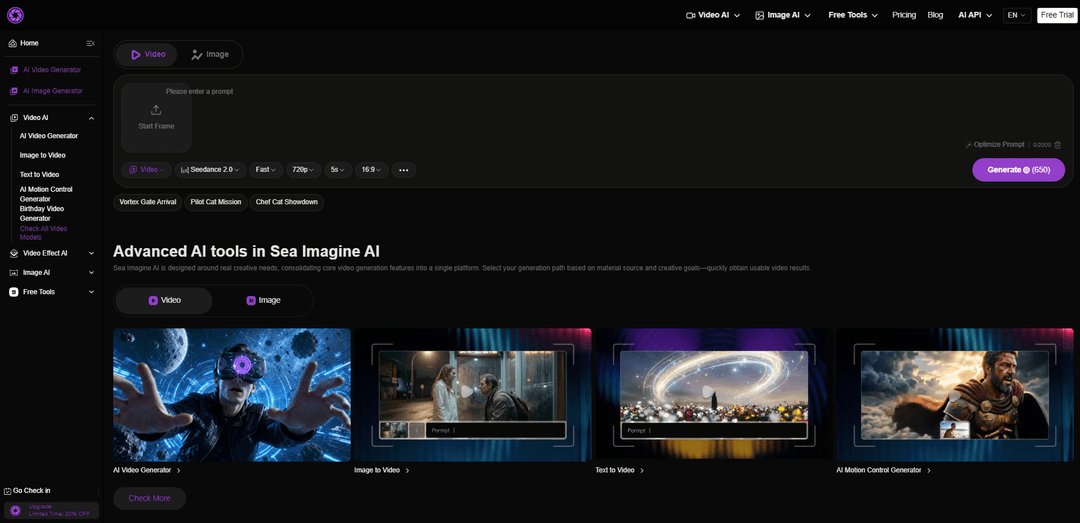
Sea Imagine AI is a browser-based, all-in-one AI creation platform that generates images and videos from text or images, offering multi-model support, a unified workflow, and reusable, editable outputs.
https://seaimagine.com/?utm_source=aipure
Product Information
Updated:Jul 3, 2026
What is Sea Imagine AI
Sea Imagine AI is an all-in-one creative platform for turning ideas, prompts, and images into stunning visual content. With powerful tools for text-to-video, image-to-video, text-to-image, image editing, motion control, video effects, and free AI utilities, it helps creators move from concept to polished assets in one streamlined workflow. Powered by advanced models such as Seedance 2.0 for dynamic AI video generation, Kling 3.0 Turbo for cinematic motion and expressive scenes, plus image models like GPT Image 2 and Seedream, Sea Imagine AI gives marketers, designers, storytellers, and everyday creators the speed, flexibility, and visual quality they need to create videos and images that stand out.
Key Features of Sea Imagine AI
Sea Imagine AI is an all-in-one, browser-based AI creation platform that unifies text-to-video, image-to-video, text-to-image, and image-to-image workflows in a single interface. It supports multiple underlying generation models so creators can choose the best engine for a given style or motion need, then iterate quickly using reusable outputs and history. The platform is designed for practical production—fast concept validation, social-ready clips, and editable base assets—paired with a credit-based system, free daily check-ins, and paid plans that add faster queues, watermark-free exports, private generation, and commercial licensing.
Text-to-Video generation: Creates short videos directly from written scene and action descriptions, useful for quickly validating concepts, story beats, and creative directions without starting from footage.
Image-to-Video animation: Turns a single image into a video by adding motion and camera transitions, making it suitable for presentations, product/lifestyle visuals, and extending still artwork into watchable clips.
Text-to-Image and Image-to-Image creation: Generates new images from prompts or transforms existing images with guided restyling/editing, enabling poster design, brand visuals, and iterative art direction.
Multi-model support in one hub: Offers multiple AI model options in one platform so users can compare outputs and select models based on scenario needs (e.g., cinematic motion, UGC-style ads, or stronger prompt control).
Unified workflow + creation history: Streamlines different generation paths into a consistent interface and keeps results accessible for review and iteration (history length varies by plan), reducing learning curve and speeding up refinement.
Reusable, editable outputs for downstream editing: Produces structured results intended to serve as foundational assets for further editing, voiceover, composition, and publishing workflows.
Use Cases of Sea Imagine AI
Marketing & UGC-style product ads: Generate quick product clips and social ad variations (text-to-video or image-to-video), then refine prompts and export watermark-free on paid plans for publishing.
E-commerce product visualization: Create product images, restyle backgrounds (image-to-image), or animate hero shots (image-to-video) for listings, promos, and seasonal campaigns.
Social media content creation: Turn simple ideas or a single photo into short, shareable videos and stylized images for TikTok/Reels/Shorts, with rapid iteration through the unified interface.
Creative concepting for designers and filmmakers: Use text-to-image for mood boards and key art, then text-to-video/image-to-video to prototype shots, motion ideas, and visual direction before full production.
Event and sports poster design: Create themed posters (e.g., football/World Cup-style key art) using text-to-image and image-to-image editing workflows, with practical checks to support safer publishing.
Personal media transformations: Restyle photos into cartoon/anime looks, restore old photos, or create fun personal clips by animating portraits and lifestyle images.
Pros
All-in-one platform: combines image and video generation paths (text/image to image/video) in a single workflow.
Model variety: multi-model support makes it easier to test and pick the best engine per task without switching tools.
Practical iteration: reusable outputs and history help users refine results efficiently for real publishing needs.
Flexible access: free credits (signup + daily check-in) plus modular plans with faster queues, watermark removal, privacy, and commercial license.
Cons
Credit-based limits: output volume depends on credits; heavy users may need subscriptions or top-ups.
Free tier constraints: slower processing, limited model access, and watermarks can restrict production use.
Output variability: results can drift based on prompt clarity, source image quality, aspect ratio, duration, and motion complexity, requiring iteration.
How to Use Sea Imagine AI
1) Open SeaImagine AI and choose your creation path: Go to https://seaimagine.com/ and decide what you’re starting from: Text (Text-to-Video / Text-to-Image) or an existing image (Image-to-Video / Image-to-Image). The platform is designed as connected paths—pick the one that matches your source material and goal.
2) Pick the right tool for the job (quick decision): Use Text-to-Video to prototype scenes from a written description, Image-to-Video to animate a still image with motion/camera transitions, Image-to-Image to restyle or edit an existing image using a prompt, and the main AI Image Generator when you want prompt freedom plus reference guidance.
3) Select a model (multi-model support): Choose a model based on the visual style and scenario you need. SeaImagine AI supports multiple model options, so you can switch models when the project calls for a different look—but avoid changing too many variables at once while you’re still dialing in results.
4) Set your basic output settings: Choose settings that match where the content will be used (e.g., aspect ratio for social vs. widescreen). Keep early tests simple and consistent so you can evaluate what each change does.
5) Write a simple first-draft prompt (start minimal): Describe the subject and the intended outcome in plain language. For video, include the key action/motion and camera behavior (e.g., slow push-in, gentle pan). For image edits, describe what should change while keeping what should stay.
6) (Optional) Add a reference image when you need guidance: If you want the output to follow an existing composition/subject, upload an image and use Image-to-Image or Image-to-Video. For mixed control (prompt freedom + reference guidance), use the main AI Image Generator workflow.
7) Generate your first result: Click Generate to create the image or video. Expect the first output to be a draft—SeaImagine’s workflow is built for fast iteration and reuse.
8) Review the output against your intent: Check whether the result matches your prompt: subject accuracy, composition, readability (if text is present), and for video, whether motion is coherent and watchable.
9) Iterate with controlled changes (most important workflow rule): Regenerate and adjust in small steps. Do not switch prompt, model, aspect ratio, and resolution all at once. Change one variable at a time (e.g., refine only the motion description, or only the style words) so improvements are predictable.
10) Decide whether to regenerate, revise, or switch tools/models: If the output is close, regenerate with minor prompt tweaks. If structure is off, revise the prompt for clarity. If the result consistently misses the target, try a different model or move to a more suitable path (e.g., from Text-to-Video to Image-to-Video using a stronger reference frame).
11) Reuse and edit outputs as building blocks: Treat generated images/videos as foundational assets. SeaImagine AI emphasizes reusable, editable results—download and continue editing externally (cuts, captions, voiceover, compositing) or iterate further inside the platform.
12) Manage credits and plan usage: Use the Free plan to start (includes new-user credits and daily check-in credits, with limited access and slower priority). Upgrade to paid tiers for faster queue, watermark-free results, private usage, longer history, and commercial license inclusion; or add one-time credits if you only need a short burst.
Sea Imagine AI FAQs
Sea Imagine AI is an all-in-one, unified platform for creating AI-generated videos and images. It supports common creation paths like text-to-video, image-to-video, text-to-image, and image-to-image, designed to streamline the workflow from input to usable output.
Popular Articles

Atoms: A Multi-Agent AI Platform That Transforms Ideas into Launch-Ready Products
May 22, 2026

Nano Banana SBTI: What It Is, How It Works, and How to Use It in 2026
Apr 15, 2026

Atoms Review — The AI Product Builder Redefining Digital Creation in 2026
Apr 10, 2026

Kilo Claw: How to Deploy and Use a True "Do‑It‑For‑You" AI Agent(2026 Update)
Apr 3, 2026
Latest AI Tools Similar to Sea Imagine AI

Loud Fame
Loud Fame is an AI-powered video transformation tool that allows users to convert regular videos into anime-style animations and create AI-generated celebrity talking videos.

BizBoom.ai
BizBoom.ai is an AI-powered platform that automatically generates professional product videos from product links and images with 95% less cost.

EzVideos
EzVideos is an all-in-one video creation tool that helps users generate viral videos for social media platforms like Instagram, TikTok, and YouTube with automated editing features and built-in resources.

Illuminix
Illuminix is an AI-powered platform that empowers businesses with autonomous hyper-experts and specialized tools for automated business processes, data management, and video content creation.
Popular AI Tools Like Sea Imagine AI

HunyuanVideo-I2V
HunyuanVideo-I2V is an open-source AI framework developed by Tencent that transforms static images into high-quality, dynamic videos with customizable motion effects and exceptional visual consistency.

Google Veo 2
Veo 2 is Google DeepMind's state-of-the-art AI video generation model that can create high-quality videos up to 4K resolution with realistic motion, extensive camera controls, and improved physics simulation from text prompts.

Vibing
Vibing is an AI-powered dating app that helps users share authentic moments through video stories and make genuine connections based on personality matching and interactive features.

Edits, an Instagram app
Edits is Instagram's free video creation app that provides creators with professional editing tools, AI features, and analytics capabilities to create high-quality videos directly from their phones.