
Routine
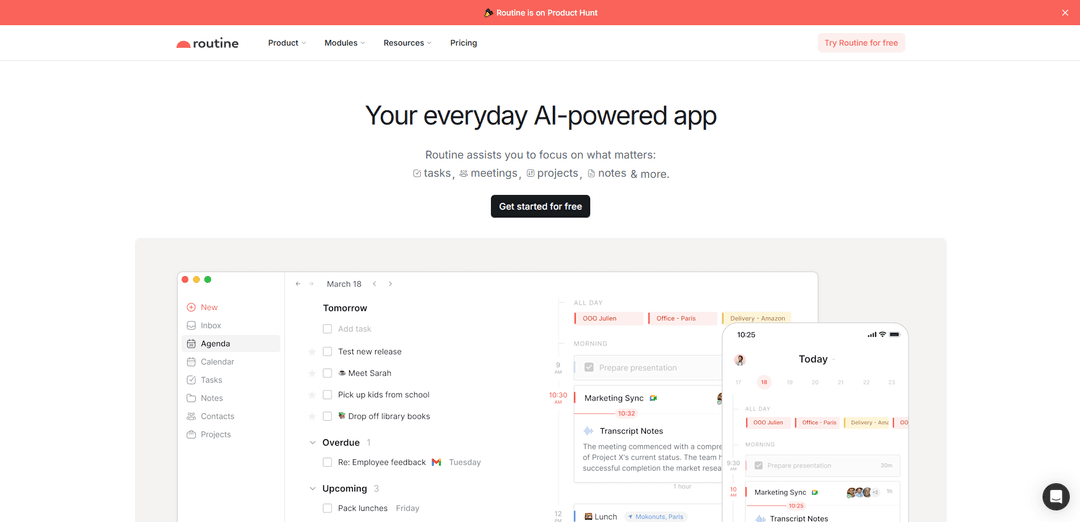
Routine is an AI-powered productivity app that centralizes tasks, meetings, notes, and projects in one unified workspace while leveraging automation and integrations to help professionals stay focused and get more done.
http://routine.co/?ref=producthunt
Product Information
Updated:Jan 8, 2026
Routine Monthly Traffic Trends
Routine received 83.5k visits last month, demonstrating a Slight Decline of -10.5%. Based on our analysis, this trend aligns with typical market dynamics in the AI tools sector.
View history trafficWhat is Routine
Founded in Paris in 2020, Routine is an all-in-one work platform designed to revolutionize personal productivity and team collaboration. The app combines essential work tools like calendars, tasks, notes, and contacts into a single interface, eliminating the need to constantly switch between multiple applications. As a Y Combinator-backed company, Routine has grown to serve over 100,000 ambitious professionals and teams worldwide by providing an integrated solution for managing both work and personal life.
Key Features of Routine
Routine is an AI-powered productivity app that combines calendar management, task organization, note-taking, and meeting management in one unified platform. It offers quick capture capabilities through keyboard shortcuts, AI-powered meeting summarization, time blocking features, and seamless integration with various calendars and productivity tools. The app helps users stay focused and organized by centralizing their work activities, automating routine tasks, and providing contextual organization of information.
AI Meeting Assistant: Automatically summarizes meetings and converts action items into tasks, working across all major platforms without requiring a meeting bot
Quick Capture & Universal Inbox: Captures thoughts, URLs, and tasks through a single desktop hotkey without context switching, while centralizing all tasks and notifications in one place
Calendar Integration & Time Blocking: Syncs with multiple calendars, enables time blocking for important tasks, and provides a comprehensive view of both work and personal schedules
Contextual Organization: Organizes information naturally through existing objects like pages, events, tasks, and projects rather than relying solely on tags and labels
Use Cases of Routine
Executive Management: Helps founders and executives maintain focus on priorities while centralizing team communication and project management
Freelance Work Management: Enables freelancers to manage client projects, track time, and handle billing while maintaining organized client communications and deliverables
Personal Productivity: Assists individuals in organizing their daily routines, managing tasks, and maintaining work-life balance through unified calendar and task management
Pros
Comprehensive integration of calendar, tasks, and notes in one platform
Powerful keyboard shortcuts and quick capture features for efficient workflow
AI-powered features for meeting summarization and task automation
Cons
Limited note-taking capabilities compared to dedicated note-taking apps
Some advanced features marked as 'coming soon' and not yet available
May have a learning curve due to the extensive feature set
How to Use Routine
Install and Set Up: Download Routine app on your preferred platform (macOS, Windows, iOS, Android, Web & Linux) and create an account
Connect Your Calendars: Connect and synchronize your professional and personal calendars (Google Calendar, Outlook, iCloud) to have a single unified view
Set Up Quick Capture: Use CTRL+SPACE keyboard shortcut to quickly capture thoughts, tasks, and URLs without switching context from your current work
Organize Tasks: Create tasks by either using the quick capture feature or directly in the app. Organize them using labels/tags and assign them to specific projects or contexts
Plan Your Week: Use the Week Planner view to schedule your tasks and events. Block time for important tasks using the time blocking feature
Set Up Meeting Management: Enable AI meeting notes feature to automatically summarize meetings and convert action items into tasks. Join meetings through quick shortcuts when reminded
Use Time Tracking: Utilize built-in timers to track time spent on tasks and have it recorded in your calendar automatically
Set Up Integrations: Connect your commonly used apps and services (Slack, Linear, Asana, etc.) to centralize all notifications and tasks in one place
Configure Menu Bar Widget: Set up the system tray/menu bar widget to quickly glance at your daily tasks, events, and timers without opening the full app
Create Custom Data Types: Define your own data types to represent entities you work with (customers, projects, etc.) if needed for better organization
Routine FAQs
Yes, Routine is free to use. They offer a free plan with many functionalities, and paid plans with additional features and priority support.
Routine Video
Popular Articles

Vosko AI: Localize and Dub Videos for Global Audiences
Oct 15, 2026

Atoms: A Multi-Agent AI Platform That Transforms Ideas into Launch-Ready Products
Oct 13, 2026

Nano Banana SBTI: What It Is, How It Works, and How to Use It in 2026
Apr 15, 2026

Atoms Review — The AI Product Builder Redefining Digital Creation in 2026
Apr 10, 2026
Analytics of Routine Website
Routine Traffic & Rankings
83.5K
Monthly Visits
#315307
Global Rank
#5911
Category Rank
Traffic Trends: Jul 2024-Jun 2025
Routine User Insights
00:01:20
Avg. Visit Duration
4.08
Pages Per Visit
39.99%
User Bounce Rate
Top Regions of Routine
US: 23.28%
GB: 7.35%
IN: 7.08%
FR: 6.98%
NG: 4.94%
Others: 50.37%
Latest AI Tools Similar to Routine

Inbox AI
Inbox AI is a privacy-focused MacOS productivity app that combines voice-driven AI automation with email management capabilities, allowing users to create custom workflows and commands while offering both cloud-based and on-device AI options.

Cart.ai
Cart.ai is an AI-powered service platform that provides comprehensive business automation solutions including coding, customer relations management, video editing, e-commerce setup, and custom AI development with 24/7 support.

Hiyllo Work
Hiyllo Work is an all-in-one team workspace platform that combines chat, project management, calendar, email, file storage and video meetings in a single integrated environment.

MailSense
MailSense is an AI-powered email assistant that filters, summarizes, and generates replies to emails through a Telegram bot interface to help users manage their inbox more efficiently.
Popular AI Tools Like Routine

Magentic-UI
Magentic-UI is an open-source, human-centered web agent prototype by Microsoft Research that enables collaborative planning and execution of complex web-based tasks through transparent interaction between humans and AI agents.

Microsoft Copilot Cowork
Microsoft Copilot Cowork is an AI-powered assistant that turns user intent into actionable plans and autonomously executes multi-step tasks across Microsoft 365 apps while keeping users in control through checkpoints and approvals.

Upsonic
Upsonic is a reliability-focused AI agent framework with dockerized server-client architecture that enables trusted agent workflows through advanced features like verification layers, triangular architecture, and Model Context Protocol (MCP) integration.

CampEd Hire
CampEd Hire is a powerful Chrome extension that streamlines recruitment by automatically collecting and organizing job applicant data from LinkedIn job posts, with features like automated data collection, CSV export, and batch resume downloads.