
PopTask
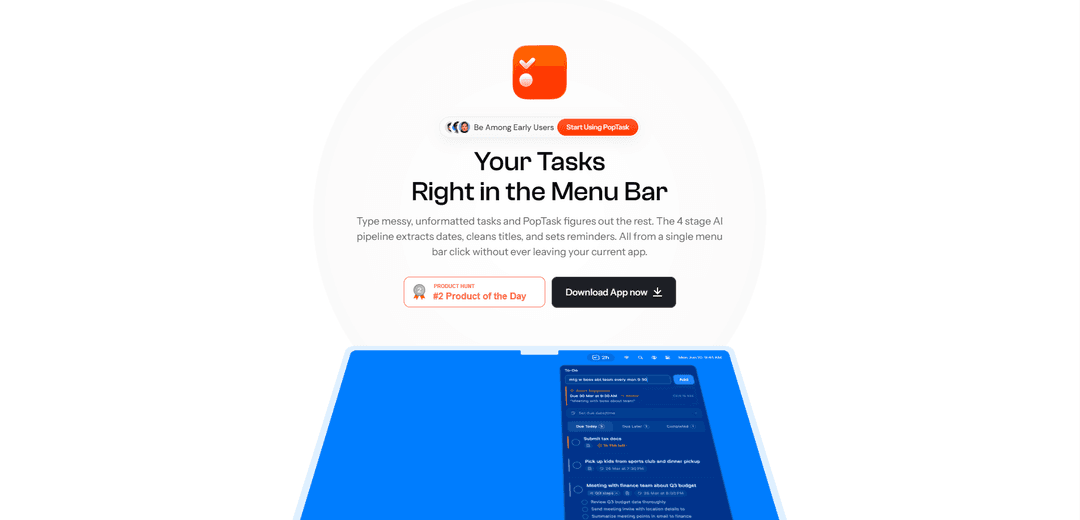
PopTask is an AI-powered task management app that lives in your macOS menu bar, combining intelligent task capture, smart countdown alerts, and focus mode to help you stay organized and productive.
https://poptask.bar/?ref=producthunt
Product Information
Updated:Apr 8, 2026
What is PopTask
PopTask is a modern task management solution designed specifically for macOS users who want quick and easy access to their tasks without switching between multiple apps. It serves as a smart digital assistant that sits right in your menu bar, leveraging AI technology to help users manage their daily tasks, deadlines, and recurring activities. The app focuses on providing a streamlined, distraction-free experience while maintaining powerful task management capabilities.
Key Features of PopTask
PopTask is an AI-driven task management application that lives in the macOS menu bar, offering intelligent task management with natural language input, smart deadline detection, and AI-powered task breakdown capabilities. It combines a streamlined interface with features like focus mode, offline functionality, and countdown alerts to help users stay organized and productive without switching between multiple apps.
AI-Powered Natural Language Input: Users can enter tasks in plain English, and the AI automatically detects dates, times, and deadlines without requiring specific formatting or dropdown selections
Smart Menu Bar Integration: Quick access to tasks directly from the macOS menu bar, eliminating the need to switch between applications
Intelligent Task Breakdown: AI assistance in breaking down large tasks into manageable steps, helping users tackle complex projects more effectively
Flexible Task Recurrence: Ability to set tasks to repeat daily, weekly, monthly, or on weekdays with automatic next occurrence creation upon completion
Use Cases of PopTask
Personal Task Management: Ideal for individuals managing daily tasks and reminders, such as calls, appointments, and deadlines
Professional Project Planning: Helps professionals break down and track complex work projects with intelligent task decomposition
ADHD Task Support: Specifically designed with features to help users with ADHD maintain focus and manage tasks effectively
Pros
Seamless integration with macOS menu bar for quick access
Natural language input reduces friction in task creation
AI-powered features for intelligent task management
Cons
Limited to macOS platform only
Requires internet connection for AI features
How to Use PopTask
Download and Install: Download PopTask from the Mac App Store and install it on your macOS device
Access from Menu Bar: Once installed, PopTask will appear in your Mac's menu bar at the top of the screen for quick access
Add Tasks Naturally: Click the menu bar icon and type your task in natural language (e.g., 'call dad in 20 min' or 'dentist Friday at 2pm'). The AI will automatically detect dates and times
Confirm Task Creation: When AI detects the date/time, tap the smart suggestion banner that appears to add the task instantly
Set Recurring Tasks: For repeating tasks, set them to recur daily, weekdays, weekly, or monthly through the task options
Use Snooze Feature: If needed, snooze tasks using preset options (15m, 1h, Tomorrow) or type natural language like 'after lunch'
Monitor Tasks: View countdown timers and urgency indicators in the menu bar to track what needs attention next
Complete Tasks: Click tasks to mark them as complete. For recurring tasks, the next occurrence will automatically be created
PopTask FAQs
PopTask is a smart task manager that lives in your macOS menu bar. It combines speed, intelligent task capture, and smart countdown alerts to help you stay organized and focused without opening additional windows or apps.
Popular Articles

Vosko AI: Localize and Dub Videos for Global Audiences
Oct 15, 2026

Atoms: A Multi-Agent AI Platform That Transforms Ideas into Launch-Ready Products
Oct 13, 2026

Nano Banana SBTI: What It Is, How It Works, and How to Use It in 2026
Apr 15, 2026

Atoms Review — The AI Product Builder Redefining Digital Creation in 2026
Apr 10, 2026
Latest AI Tools Similar to PopTask

Inbox AI
Inbox AI is a privacy-focused MacOS productivity app that combines voice-driven AI automation with email management capabilities, allowing users to create custom workflows and commands while offering both cloud-based and on-device AI options.

Cart.ai
Cart.ai is an AI-powered service platform that provides comprehensive business automation solutions including coding, customer relations management, video editing, e-commerce setup, and custom AI development with 24/7 support.

Hiyllo Work
Hiyllo Work is an all-in-one team workspace platform that combines chat, project management, calendar, email, file storage and video meetings in a single integrated environment.

MailSense
MailSense is an AI-powered email assistant that filters, summarizes, and generates replies to emails through a Telegram bot interface to help users manage their inbox more efficiently.
Popular AI Tools Like PopTask

Magentic-UI
Magentic-UI is an open-source, human-centered web agent prototype by Microsoft Research that enables collaborative planning and execution of complex web-based tasks through transparent interaction between humans and AI agents.

Microsoft Copilot Cowork
Microsoft Copilot Cowork is an AI-powered assistant that turns user intent into actionable plans and autonomously executes multi-step tasks across Microsoft 365 apps while keeping users in control through checkpoints and approvals.

Upsonic
Upsonic is a reliability-focused AI agent framework with dockerized server-client architecture that enables trusted agent workflows through advanced features like verification layers, triangular architecture, and Model Context Protocol (MCP) integration.

CampEd Hire
CampEd Hire is a powerful Chrome extension that streamlines recruitment by automatically collecting and organizing job applicant data from LinkedIn job posts, with features like automated data collection, CSV export, and batch resume downloads.