
Plow
Plow is a privacy-first AI agent for Mac that integrates OpenClaw with iMessage, allowing users to control their computer through simple text conversations from their iPhone without any technical setup.
https://plow.co/launch?ref=producthunt
Product Information
Updated:Apr 15, 2026
What is Plow
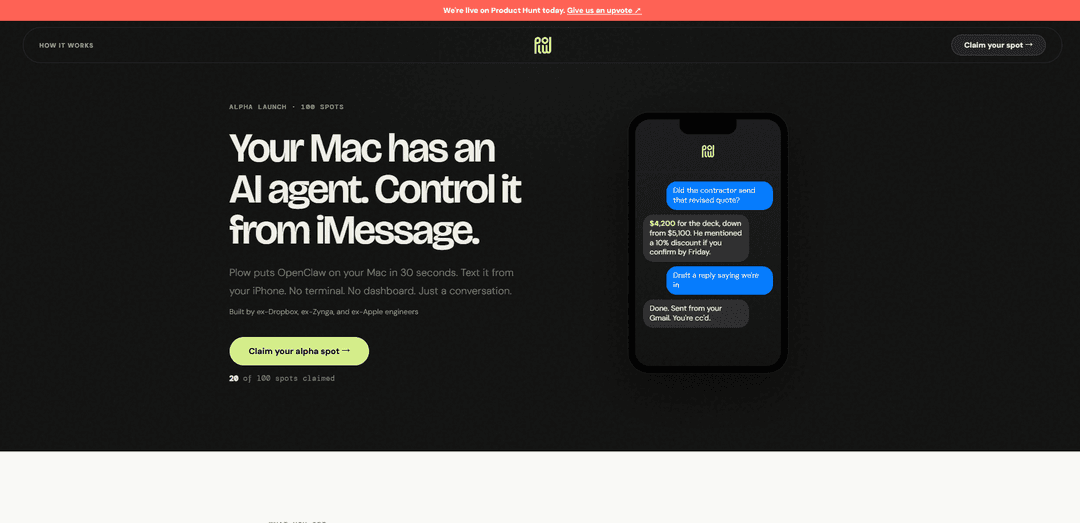
Plow is an innovative AI automation platform that brings the power of OpenClaw (a popular GitHub project with 228K stars) to Mac users through an incredibly simple 30-second installation process. Built by veteran engineers from Dropbox, Apple, and Zynga, Plow eliminates the traditional complexity of AI agents by offering a conversational interface directly through iMessage. Users can text their Mac from anywhere—whether at the grocery store or on the couch—and have their computer execute tasks without ever opening a terminal or dashboard. The platform is currently in alpha launch with only 100 founding user spots available, offering early adopters a chance to shape the product's development and gain permanent recognition on the founding wall.
Key Features of Plow
Plow is a Mac-based AI agent that integrates OpenClaw technology with iMessage, allowing users to control their Mac computer through simple text conversations from their iPhone. Built by ex-Dropbox, ex-Zynga, and ex-Apple engineers, it offers a 30-second installation process with no terminal or dashboard required. The system features a privacy-first architecture where every skill runs in its own sandbox, requiring plain-English approval for each action. Users can text a real iMessage number to have their Mac execute tasks remotely, making AI automation accessible without technical complexity.
iMessage-Based Control: Control your Mac through text messages from your iPhone using a real iMessage number, enabling remote task execution from anywhere without opening a terminal or dashboard.
Privacy-First Sandboxing: Every skill runs in its own isolated sandbox and cannot access files, messages, or calendar data without explicit permission, with every action requiring plain-English approval that can be audited later.
30-Second Installation: Simple drag-to-install setup that solves the packaging complexity of OpenClaw (228K GitHub stars), making enterprise-grade AI automation accessible without technical configuration.
Conversational AI Interface: Natural language interaction that allows users to request information, draft responses, and execute tasks through simple text conversations rather than complex commands.
Founding User Benefits: Alpha testers receive permanent recognition on the founding wall, direct Slack access to the team, early access to new features, and the ability to have their workflows become templates for future users.
Use Cases of Plow
Remote Business Communication Management: Check for important emails or messages from contractors and clients while away from your desk, review quotes and pricing information, and draft professional responses without accessing your computer directly.
On-the-Go Task Automation: Execute Mac-based tasks and workflows from your iPhone while at the grocery store, commuting, or traveling, enabling productivity without being physically present at your workstation.
Secure Document and File Operations: Access and manage files on your Mac remotely with sandboxed permissions, ensuring sensitive documents remain protected while still allowing controlled access when needed.
Personal Assistant for Daily Tasks: Query your Mac for information, check calendar appointments, retrieve data from applications, and manage routine computer tasks through simple text messages throughout the day.
Custom Workflow Development: Create and refine personalized automation workflows that can be shared as templates with other users, turning your specific use cases into reusable skills for the community.
Pros
Extremely simple installation process (30 seconds, drag-to-install) compared to complex OpenClaw setup
Strong privacy and security model with sandboxed execution and mandatory approval for all actions
Natural iMessage interface eliminates need for learning new apps or terminal commands
Built by experienced engineers from major tech companies (Dropbox, Apple, Zynga) ensuring quality and reliability
Cons
Limited to Mac users only, excluding Windows and Linux users from the platform
Requires both a Mac computer and iPhone to function, creating a dual-device dependency
Currently in alpha with only 100 spots available, indicating early-stage development and potential bugs
Each action requires approval which may slow down automation for users wanting fully autonomous operations
How to Use Plow
1: Install Plow on your Mac using the 30-second drag-to-install process. No terminal or complex setup required.
2: Connect Plow to iMessage. The system will provide you with a real iMessage number that connects to your Mac.
3: Text your Mac from your iPhone using the iMessage number. You can do this from anywhere - at the grocery store, on the couch, or on the go.
4: Send natural language commands or questions via iMessage. For example, ask 'Did the contractor send that revised quote?' or request 'Draft a reply saying we're in'.
5: Review and approve actions. Every action that Plow wants to take requires your plain-English approval for privacy and security.
6: Allow or deny permissions as needed. Each skill runs in its own sandbox and can only access files, messages, or calendar data if you explicitly grant permission.
7: Audit actions later if needed. The system keeps track of all actions for your review and security.
Plow FAQs
Plow is a Mac application that puts an AI agent (OpenClaw) on your Mac, which you can control from iMessage on your iPhone. It allows you to interact with your Mac through natural conversation without needing to use a terminal or dashboard.
Plow Video
Popular Articles

Atoms: A Multi-Agent AI Platform That Transforms Ideas into Launch-Ready Products
May 22, 2026

Nano Banana SBTI: What It Is, How It Works, and How to Use It in 2026
Apr 15, 2026

Atoms Review — The AI Product Builder Redefining Digital Creation in 2026
Apr 10, 2026

Kilo Claw: How to Deploy and Use a True "Do‑It‑For‑You" AI Agent(2026 Update)
Apr 3, 2026
Latest AI Tools Similar to Plow

Inbox AI
Inbox AI is a privacy-focused MacOS productivity app that combines voice-driven AI automation with email management capabilities, allowing users to create custom workflows and commands while offering both cloud-based and on-device AI options.

Cart.ai
Cart.ai is an AI-powered service platform that provides comprehensive business automation solutions including coding, customer relations management, video editing, e-commerce setup, and custom AI development with 24/7 support.

Hiyllo Work
Hiyllo Work is an all-in-one team workspace platform that combines chat, project management, calendar, email, file storage and video meetings in a single integrated environment.

MailSense
MailSense is an AI-powered email assistant that filters, summarizes, and generates replies to emails through a Telegram bot interface to help users manage their inbox more efficiently.
Popular AI Tools Like Plow

Magentic-UI
Magentic-UI is an open-source, human-centered web agent prototype by Microsoft Research that enables collaborative planning and execution of complex web-based tasks through transparent interaction between humans and AI agents.

Microsoft Copilot Cowork
Microsoft Copilot Cowork is an AI-powered assistant that turns user intent into actionable plans and autonomously executes multi-step tasks across Microsoft 365 apps while keeping users in control through checkpoints and approvals.

Upsonic
Upsonic is a reliability-focused AI agent framework with dockerized server-client architecture that enables trusted agent workflows through advanced features like verification layers, triangular architecture, and Model Context Protocol (MCP) integration.

CampEd Hire
CampEd Hire is a powerful Chrome extension that streamlines recruitment by automatically collecting and organizing job applicant data from LinkedIn job posts, with features like automated data collection, CSV export, and batch resume downloads.