PixFit
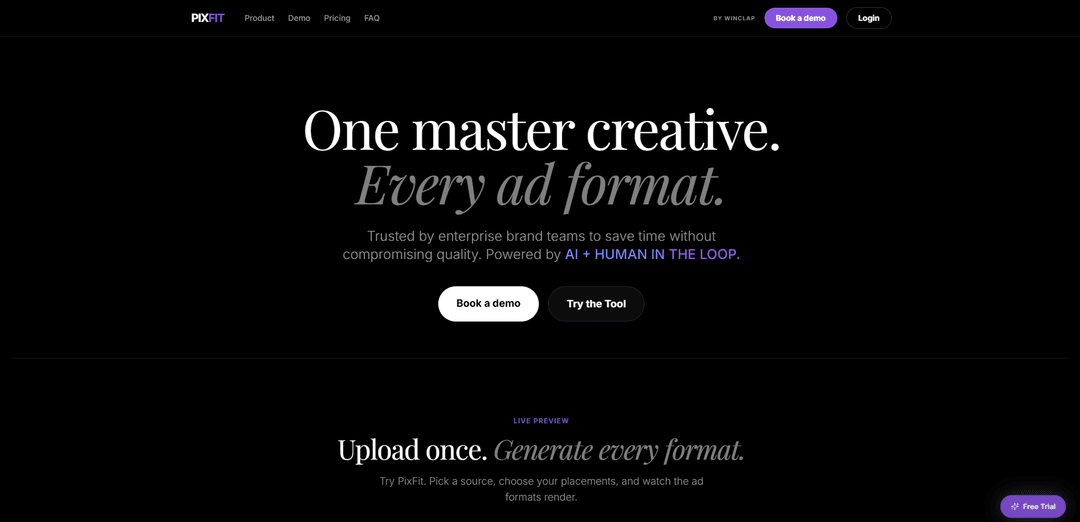
PixFit ist eine KI-Plattform zur kreativen Größenanpassung, die ein Master-Anzeigen-Asset in jedes benötigte Format umwandelt – unter Einhaltung von Markenregeln und plattformspezifischen Sicherheitszonen und liefert produktionsreife Ausgaben mit optionaler menschlicher Nachbearbeitung ("human-in-the-loop").
https://pixfit.ai/?ref=producthunt&utm_source=aipure
Produktinformationen
Aktualisiert:Jul 8, 2026
Was ist PixFit
PixFit ist ein Tool zur kreativen Anpassung, das für interne Marketing- und Brand-Teams entwickelt wurde, die schnell große Mengen an Multi-Plattform-Performance-Anzeigen versenden müssen. Anstatt dieselbe Kreation manuell für verschiedene Platzierungen anzupassen und neu zu erstellen, ermöglicht PixFit Teams, ein einziges Quell-Asset hochzuladen und in wenigen Minuten mehrere plattformspezifische Formate (z. B. Google, Meta, TikTok) zu generieren. Es ist für Produktions-Workflows konzipiert – mit Priorität auf Markentreue, Konsistenz und zuverlässige Lieferung –, sodass Teams Kampagnen skalieren können, ohne Personal aufstocken oder Kompromisse bei der Qualität eingehen zu müssen.
Hauptfunktionen von PixFit
PixFit ist eine KI-gestützte kreative Plattform zur Größenanpassung für Performance-Werbung, die ein einziges Master-Asset in produktionsreife Anzeigenformate für wichtige Plattformen (z. B. Google, Meta, TikTok) umwandelt. Sie konzentriert sich auf skalierbare, markengesteuerte Anpassungen durch die Durchsetzung von Regeln zur Markentreue (Farben, Typografie, Logo-Ausschlusszonen, Hierarchie) und plattformspezifischen Sicherheitszonen, damit Schlüsselelemente wie Logos, CTAs und rechtliche Texte nicht beschnitten werden. Die Ergebnisse können iterativ über eine KI-Autofix-Schleife (einschließlich gezieltem Inpainting und kommentarbasierter Regeneration) verfeinert werden, mit einem Human-in-the-Loop-Fallback, um die Lieferung zu gewährleisten, wenn die KI allein nicht ausreicht – wodurch sie sich für die Produktion großer Mengen und multiregionaler Kampagnen eignet.
Ein Upload → viele Anzeigenformate: Generieren Sie mehrere Plattformplatzierungen und Seitenverhältnisse aus einem einzigen Quell-Creative und rendern Sie Ausgaben mit Live-Vorschau für eine schnellere Anpassung.
Durchsetzung der Markentreue: Wendet Markenfarb-Tokens, Typografie-Regeln, Logo-Ausschlusszonen und visuelle Hierarchie an, damit jede in der Größe angepasste Ausgabe über alle Formate hinweg markenkonform bleibt.
Intelligente Größenanpassung mit Sicherheitszonen: Respektiert automatisch plattformspezifische Sicherheitszonen und Layout-Beschränkungen, um das Beschneiden oder die falsche Platzierung von Logos, CTAs und Rechtstexten zu verhindern.
KI-Autofix-Schleife + Inpainting: Unterstützt iterative Verbesserungen mit bis zu mehreren KI-Korrektur-Iterationen, einschließlich gezieltem Inpainting und kommentarbasierter Verfeinerungen, um die Ergebnisse zu optimieren.
Human-in-the-Loop-Fallback: Wenn KI-Iterationen nicht ausreichen, vervollständigt ein erfahrener interner Kreativer das Asset, damit die Produktion nicht ins Stocken gerät und die Ergebnisse geliefert werden.
Stapelverarbeitung & Versionshistorie: Erstellen Sie schnell über 30 Formate mit einem Klick und verfolgen Sie jede Generierung mit Versionierung, um einzelne Formate zu vergleichen, neu zu generieren oder zurückzusetzen.
Anwendungsfälle von PixFit
Interne Marketingteams skalieren Kampagnen: Zentralisieren Sie die kreative Anpassung für Multi-Channel-Starts, reduzieren Sie die manuelle Größenanpassungszeit und beschleunigen Sie die Bereitstellung von Tagen auf Minuten.
Globale/multiregionale Markteinführungen: Passen Sie ein Master-Creative an viele Verhältnisse an, während Sie die Markengovernance beibehalten und konsistente Layouts über Märkte und Platzierungen hinweg gewährleisten.
Performance-Werbung über Plattformen hinweg: Erstellen Sie schnell Google-, Meta- und TikTok-fähige Varianten, die den Formatanforderungen und Sicherheitszonen jeder Plattform entsprechen.
Optimierung des Workflows für kreative Operationen: Nutzen Sie die Stapelgenerierung, rollenbasierte Zusammenarbeit, Ordner/Arbeitsbereiche und die Versionshistorie, um Produktionspipelines mit hohem Volumen zu optimieren.
Schnelle Iteration ohne Engpässe bei Designern: Regenerieren Sie spezifische Ausgaben und verfeinern Sie diese über KI-Autofix/Inpainting und Kommentare, wodurch der wiederholte Einsatz von Designern für Routineänderungen minimiert wird.
Vorteile
Reduziert die Zeit, die für die Anpassung von Creatives an mehrere Anzeigengrößen und Platzierungen aufgewendet wird, erheblich.
Starke Markengovernance und automatische Sicherheitszonenbehandlung helfen, häufige Produktionsfehler zu vermeiden.
Human-in-the-Loop-Fallback gewährleistet die produktionsreife Lieferung, selbst wenn die KI Schwierigkeiten hat.
Stapelverarbeitung und Versionshistorie unterstützen volumenstarke, betrieblich effiziente Workflows.
Nachteile
Komplexe Layouts erfordern möglicherweise immer noch mehrere Regenerationen oder manuelle Eingriffe (wie vom Produkt bestätigt).
Die kreditbasierte Preisgestaltung bedeutet, dass die Kosten mit dem Ausgabevolumen steigen (1 Credit pro Ausgabe).
Einige erweiterte Steuerelemente und maßgeschneiderte Workflows sind höheren/benutzerdefinierten Plänen vorbehalten.
Wie verwendet man PixFit
1. PixFit öffnen und einen neuen Größenanpassungsauftrag starten: Gehen Sie zu https://pixfit.ai/ und starten Sie ein neues Projekt/einen neuen Auftrag, um mehrere Anzeigenformate aus einem Master-Creative zu generieren.
2. Wählen Sie Ihr Quell-Asset (Master-Creative) aus: In Schritt 1 (Quell-Asset auswählen) laden Sie das Master-Creative hoch oder wählen es aus, das Sie anpassen möchten (das einzelne Design, das Sie in viele Platzierungen anpassen werden).
3. Plattformen und Seitenverhältnisse auswählen: In Schritt 2 (Plattformen und Verhältnisse auswählen) wählen Sie die benötigten Anzeigenplattformen (z. B. Google, Meta, TikTok) und die erforderlichen Verhältnisse für jede Plattform aus (z. B. 1:1, 4:5, 9:16, 16:9).
4. Vorschau der Ausgaben während der Wiedergabe: Verwenden Sie die Live-Vorschau, um zu sehen, wie jedes ausgewählte Format gerendert wird, damit Sie Layoutprobleme (Zuschneiden, Hierarchie, CTA-Platzierung) schnell erkennen können, bevor die Lieferung erfolgt.
5. Den Stapel von Formaten generieren: Führen Sie die Generierung aus, um alle ausgewählten Formate in einem Stapel zu produzieren (PixFit ist darauf ausgelegt, schnell viele Formate aus einem einzigen Master auszugeben).
6. Markentreue und Sicherheitszonen überprüfen: Überprüfen Sie jede Ausgabe, um sicherzustellen, dass die Markenelemente konsistent bleiben (Farben, Typografie, Logo-Platzierung/-Ausschlusszonen, visuelle Hierarchie) und dass die plattformspezifischen Sicherheitszonen verhindern, dass Logos/CTAs/Rechtstexte beschnitten oder falsch platziert werden.
7. Die KI-Autofix-Schleife für Verbesserungen nutzen: Wenn eine Ausgabe nicht korrekt ist, lösen Sie die iterative Verfeinerung von PixFit aus (bis zu 5 KI-Korrektur-Iterationen), um die Ergebnisse neu zu generieren und zu verbessern, einschließlich gezieltem Inpainting und kommentarbasierter Verfeinerung.
8. Bei Bedarf an die "Human-in-the-Loop"-Lieferung eskalieren (planabhängig): Wenn KI-Iterationen nicht ausreichen, verwenden Sie den "Human Fallback"-Workflow (in Scale und höher enthalten), damit ein erfahrener interner Kreativer das Asset finalisiert und die Produktion nicht ins Stocken gerät.
9. Versionen vergleichen und bei Bedarf zurücksetzen: Verwenden Sie die Versionshistorie, um Generierungen zu vergleichen, einzelne Formate neu zu generieren oder zu einer früheren Version zurückzukehren, wenn eine neuere Iteration schlechter ist.
10. Organisieren und zusammenarbeiten (Team-Workflows): Laden Sie Teammitglieder mit rollenbasiertem Zugriff ein und organisieren Sie die Arbeit in Ordnern/Arbeitsbereichen, um Multi-Market- oder Großvolumen-Kampagnen zu verwalten.
11. Produktionsreife Assets exportieren/herunterladen: Sobald die Ausgaben Ihren Standards entsprechen, laden Sie die finalen, produktionsreifen Creatives für jede Plattform/jedes Verhältnis herunter/exportieren Sie sie.
12. Nutzung mit Credits verfolgen und einen Plan auswählen: Verstehen Sie, dass 1 Credit = 1 Ausgabe. Nutzen Sie die kostenlose Testversion (5 Größenanpassungen, keine Kreditkarte) zum Testen und wählen Sie dann einen Plan basierend auf dem Volumen (Core, Scale, Advanced oder Premier).
PixFit FAQs
PixFit ist ein KI-gestütztes Tool zur kreativen Größenanpassung für Performance-Anzeigen, das ein Master-Creative in mehrere Anzeigenformate für verschiedene Plattformen und Seitenverhältnisse umwandelt, mit KI- und "Human-in-the-Loop"-Lieferoptionen.
PixFit Video
Beliebte Artikel

Atoms: Eine Multi-Agenten-KI-Plattform, die Ideen in startbereite Produkte verwandelt
May 22, 2026

Nano Banana SBTI: Was es ist, wie es funktioniert und wie man es im Jahr 2026 einsetzt
Apr 15, 2026

Atoms Review – Der KI-Produkt-Builder, der die digitale Erstellung im Jahr 2026 neu definiert
Apr 10, 2026

Kilo Claw: Wie man einen echten "Do-It-For-You" KI-Agenten bereitstellt und verwendet (2026 Update)
Apr 3, 2026
Neueste KI-Tools ähnlich wie PixFit

Loud Fame
Loud Fame ist ein KI-gestütztes Video-Transformationswerkzeug, das es Nutzern ermöglicht, reguläre Videos in Anime-Stil-Animationen zu konvertieren und KI-generierte sprechende Videos von Prominenten zu erstellen.

BizBoom.ai
BizBoom.ai ist eine KI-gestützte Plattform, die automatisch professionelle Produktvideos aus Produktlinks und Bildern mit 95 % geringeren Kosten generiert.

EzVideos
EzVideos ist ein All-in-One-Tool zur Videoerstellung, das Nutzern hilft, virale Videos für soziale Medien wie Instagram, TikTok und YouTube mit automatisierten Bearbeitungsfunktionen und integrierten Ressourcen zu generieren.

Illuminix
Illuminix ist eine KI-gestützte Plattform, die Unternehmen mit autonomen Hyper-Experten und spezialisierten Werkzeugen für automatisierte Geschäftsprozesse, Datenmanagement und die Erstellung von Videoinhalten unterstützt.
Beliebte KI-Tools wie PixFit

HunyuanVideo-I2V
HunyuanVideo-I2V ist ein Open-Source-KI-Framework, das von Tencent entwickelt wurde und statische Bilder in hochwertige, dynamische Videos mit anpassbaren Bewegungseffekten und außergewöhnlicher visueller Konsistenz umwandelt.

Google Veo 2
Veo 2 ist das hochmoderne KI-Videoerzeugungsmodell von Google DeepMind, das hochwertige Videos mit bis zu 4K-Auflösung mit realistischen Bewegungen, umfangreicher Kamerasteuerung und verbesserter Physiksimulation aus Texteingaben erstellen kann.

Vibing
Vibing ist eine KI-gestützte Dating-App, die Benutzern hilft, authentische Momente durch Videogeschichten zu teilen und echte Verbindungen basierend auf Persönlichkeitsmatching und interaktiven Funktionen herzustellen.

Edits, an Instagram app
Edits ist Instagrams kostenlose Videoerstellungs-App, die Erstellern professionelle Bearbeitungswerkzeuge, KI-Funktionen und Analysefähigkeiten bietet, um hochwertige Videos direkt von ihren Handys zu erstellen.