OffShelf: Learn & Focus
OffShelf: Learn & Focus is an AI-powered focus timer and habit tracker that prioritizes your tasks automatically, logs timed sessions, and motivates you with points, streaks, levels, and progress stats.
https://apps.apple.com/us/app/offshelf-learn-focus/id6767906574?ref=producthunt
Product Information
Updated:Jun 8, 2026
What is OffShelf: Learn & Focus
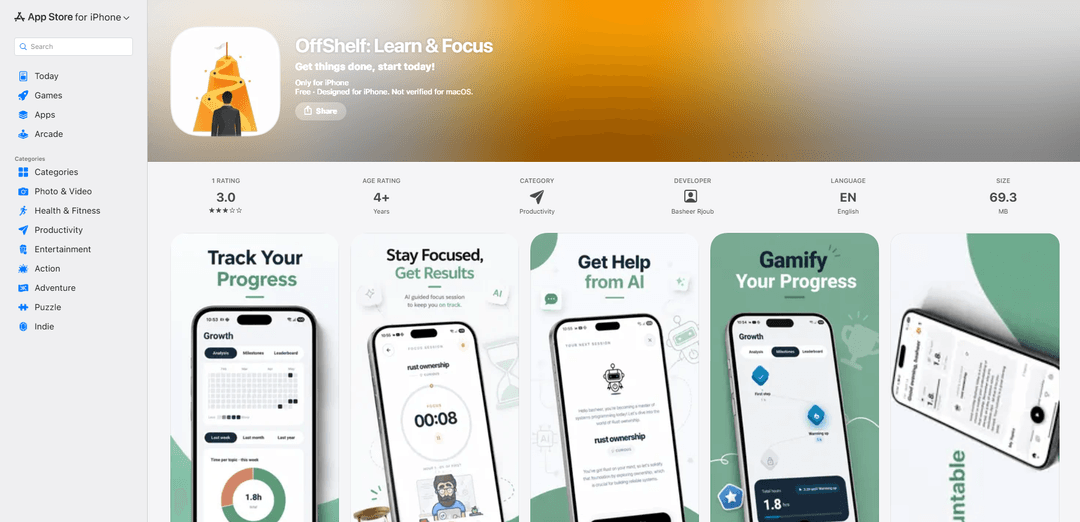
OffShelf: Learn & Focus is a productivity app for iPhone designed to help you finally finish the goals you keep postponing—like books, courses, languages, coding practice, or side projects. Instead of leaving you to manually decide what to do next, the app uses smart prioritization to surface the best next task, then helps you execute with a built-in focus timer and automatic session logging. It’s free to download, designed for iPhone (iOS 13+), and positions itself as a “start in one tap” solution for turning procrastinated plans into consistent progress.
Key Features of OffShelf: Learn & Focus
OffShelf: Learn & Focus is an AI-powered focus timer and habit/progress tracker designed to help you stop procrastinating and finish long-postponed goals. It scores tasks by factors like priority, recency, and how long they’ve been neglected, then suggests what to work on next so you don’t get stuck deciding. The app runs timed focus sessions, automatically logs minutes into a progress history, and adds gamified rewards (points, streaks, leveling) plus visual stats to show where you’re building momentum and what you’re neglecting.
AI task prioritization: Scores goals/tasks by priority, recency, and “time sitting,” then picks the next best focus session to reduce decision fatigue.
One-tap focus sessions with timer: Start a timed work session quickly for activities like reading, coding, studying, writing, or language learning.
Automatic progress logging: Tracks and records each session’s minutes to build a reliable progress history over time.
Gamification (points, streaks, leveling): Rewards consistency with points and streaks to make progress feel motivating and measurable.
Visual stats and insights: Shows what you’re investing time in, what you’re neglecting, and where momentum is increasing.
Use Cases of OffShelf: Learn & Focus
Self-study and online course completion: Helps learners consistently work through courses/tutorials by having AI select the next session and logging time spent.
Reading backlog management: Ideal for readers with unfinished books—run focused reading sessions, build streaks, and track which books get neglected.
Software engineering skill-building: Use timed sessions for coding practice (e.g., Python) and let prioritization guide which skill/project to tackle next.
Creative writing and content creation: Supports writers by turning “someday” drafts into scheduled focus sessions with visible progress and motivational rewards.
Hobby and side-project revival: For paused personal projects, the app surfaces neglected goals and encourages steady momentum through gamified tracking.
Pros
Reduces decision paralysis by automatically choosing the next task via AI prioritization.
Combines timer + progress history + gamification, which supports both focus and long-term consistency.
Visual stats make neglect and momentum clear, helping users rebalance attention across goals.
Cons
Accessibility features are not specified on the App Store listing (developer has not indicated supported features).
Very limited public rating signal so far (only 1 rating shown), making quality hard to judge from reviews alone.
AI-driven recommendations may not match every user’s preferences for manual planning or control.
How to Use OffShelf: Learn & Focus
1) Install OffShelf: On your iPhone, open the App Store, search for “OffShelf: Learn & Focus,” then download and install it (requires iOS 13.0 or later).
2) Open the app and prepare your goals list: Launch OffShelf and create the goals/tasks you’ve been putting off (e.g., a book to read, a Python course, a side project). Add multiple items so the app has options to prioritize.
3) Set or review each goal’s priority: For each goal/task, set or confirm its priority so OffShelf can score it properly. OffShelf’s prioritization considers priority, recency, and how long the task has been sitting.
4) Start a focus session in one tap: Tap Start to begin a timed focus session. OffShelf will use its AI prioritization to pick what you should work on right now, reducing decision fatigue.
5) Focus while the timer runs: Work on the selected goal during the timed session. OffShelf is designed for activities like reading, coding, studying, writing, and language learning.
6) End the session and confirm it saved: When you finish, stop/end the timer. OffShelf logs your minutes and builds your progress history automatically; recent updates mention improved reliability for session saving.
7) Earn points and build streaks: Review your earned points and streaks after sessions. OffShelf gamifies progress so each completed session contributes to momentum and “leveling up” your goals.
8) Review your progress stats: Open the stats/insights area to see visual progress: what you’re investing time in, what you’re neglecting, and where momentum is building.
9) Keep your list fresh so AI recommendations stay useful: Periodically add new goals, update priorities, and continue running sessions. The AI prioritization uses your habits plus task priority/recency/age to choose the next best focus item.
10) Send feedback or report bugs: If you encounter issues or have suggestions, go to Settings > Send Feedback (the developer notes they read every message).
OffShelf: Learn & Focus FAQs
OffShelf: Learn & Focus is an AI-powered focus timer and habit/progress tracker designed to help you start and finish goals you’ve been putting off. It scores tasks and can pick what you should work on next, then logs timed focus sessions and shows progress stats.
Popular Articles

Vosko AI: Localize and Dub Videos for Global Audiences
Oct 15, 2026

Atoms: A Multi-Agent AI Platform That Transforms Ideas into Launch-Ready Products
Oct 13, 2026

Nano Banana SBTI: What It Is, How It Works, and How to Use It in 2026
Apr 15, 2026

Atoms Review — The AI Product Builder Redefining Digital Creation in 2026
Apr 10, 2026
Latest AI Tools Similar to OffShelf: Learn & Focus

Inbox AI
Inbox AI is a privacy-focused MacOS productivity app that combines voice-driven AI automation with email management capabilities, allowing users to create custom workflows and commands while offering both cloud-based and on-device AI options.

Cart.ai
Cart.ai is an AI-powered service platform that provides comprehensive business automation solutions including coding, customer relations management, video editing, e-commerce setup, and custom AI development with 24/7 support.

Hiyllo Work
Hiyllo Work is an all-in-one team workspace platform that combines chat, project management, calendar, email, file storage and video meetings in a single integrated environment.

MailSense
MailSense is an AI-powered email assistant that filters, summarizes, and generates replies to emails through a Telegram bot interface to help users manage their inbox more efficiently.
Popular AI Tools Like OffShelf: Learn & Focus

Magentic-UI
Magentic-UI is an open-source, human-centered web agent prototype by Microsoft Research that enables collaborative planning and execution of complex web-based tasks through transparent interaction between humans and AI agents.

Microsoft Copilot Cowork
Microsoft Copilot Cowork is an AI-powered assistant that turns user intent into actionable plans and autonomously executes multi-step tasks across Microsoft 365 apps while keeping users in control through checkpoints and approvals.

Upsonic
Upsonic is a reliability-focused AI agent framework with dockerized server-client architecture that enables trusted agent workflows through advanced features like verification layers, triangular architecture, and Model Context Protocol (MCP) integration.

CampEd Hire
CampEd Hire is a powerful Chrome extension that streamlines recruitment by automatically collecting and organizing job applicant data from LinkedIn job posts, with features like automated data collection, CSV export, and batch resume downloads.